- 01The billing emails alone did not show what was left
- 02The clue: the confirmation email from the purchase
- 03How the Paidy pay-later plan for Apple works
- 04Timing of billing and debits
- 05How to count remaining payments and the payoff month
- 06Counting it out for my case
- 07The gap between “charges for month X” and “debited in month X”
- 08List your installment plans to see the household exit
- 09How to look at overlapping installment plans
- 10Can you switch to a lump sum partway through?
- 11Common pitfalls
- 12Things to check before counting
- 13FAQ
- 14Official references
- 15Summary
Good morning, this is まさきん.
This March, I bought a MacBook Air in 24 installments with Paidy, a Japanese buy-now-pay-later service. The monthly debits keep going, but I could not tell how many payments were left. This post is about working backward from the purchase email to find the remaining number of payments and the month I will be paid off.
*This information is current as of publication. Please check the official sites for the latest details.
- The monthly billing emails did not show “which payment number this is” or “how much is left”
- The “Notice of confirmed usage” email sent at purchase lists the number of payments and the monthly amount
- From three things (purchase month, number of payments, and the month of the first debit) you can count the remaining payments and the payoff month
- “Charges for month X” and “debited in month X” are one month apart, so write both in your table
- Listing your installment plans shows when your household’s fixed spending will get lighter
The billing emails alone did not show what was left
Paidy sends a billing email every month. It shows this month’s billed amount and the debit date. But it does not say which payment number it is.
The remaining balance is not shown either. So I knew roughly the same amount would go out every month. But when it would end stayed out of view.
The payments are only a few thousand yen a month, so it is not straining our budget. What I wanted to know, though, was the household’s “exit”: when this installment plan ends, and when our fixed monthly spending gets lighter. Without knowing that, it is hard to plan the next step.
The clue: the confirmation email from the purchase
That is when I remembered the email I received at the time of purchase. The subject was “Notice of confirmed usage” (ご利用確定のお知らせ).
This email listed the number of payments and the monthly amount. Unlike the monthly billing emails, it described the whole installment plan. I figured that counting from here would give me both the remaining payments and the payoff month.
Paidy’s help pages also explain the role of this confirmation email. Right after paying through Apple, the app apparently shows the full amount as an unconfirmed amount. Once the merchant confirms the purchase, the monthly installment amounts are displayed. So it advises waiting until the confirmation email arrives.
In other words, the installment terms are settled at the point of the confirmation email. If you are using something as the starting point for counting backward, I think this email is the most reliable.
How the Paidy pay-later plan for Apple works
What I used is the “Paidy pay-later plan exclusively for Apple” (ペイディあと払いプランApple専用). Here is what I could confirm on the official pages as of September 2026.
It is a way to buy Apple products in installments on Apple’s website or at Apple Stores. The installment fee is stated as 0%. However, the 0% only applies when you pay by direct debit from a bank account (口座振替) or bank transfer. Convenience store payment is not included, so be careful here.
The number of payments is fixed per product. Apple’s installment page listed the following.
| Product | Number of payments |
|---|---|
| iPhone | 36 |
| Mac / Vision Pro | 24 |
| iPad | 12 |
| Watch / AirPods / accessories, etc. | 3 |
My MacBook Air was 24 payments, as in this table. According to Paidy’s help, you can switch to a lump-sum payment. On the other hand, you apparently cannot change to a different number of payments. So you can count on the assumption that the number set at purchase continues to the end.
The credit limit is apparently set separately from regular Paidy. You apply through the Paidy app, and there is a screening process.
Timing of billing and debits
To count backward, you need to pin down the billing and debit dates. Here is the flow I could confirm in Paidy’s help.
| Timing | What happens |
|---|---|
| 1st–5th of the month after the usage is confirmed | The billed amount arrives by email or SMS |
| From the 16th of each month | The direct debit date and amount arrive by email |
| 27th of the following month | Automatic direct debit (next business day if it is a holiday) |
For convenience store payment or bank transfer, the deadline is also the 27th.
The key point is that billing comes “in the month after the usage is confirmed.” Usage confirmed in March is billed in April and debited on April 27. This one-month gap matters later when counting.
According to Apple’s guidance, billing happens when the product can be picked up or shipped. If you order at the end of a month and it ships the next month, the confirmation month may shift one month later. It is reassuring to check your own confirmation date against the email’s date.
How to count remaining payments and the payoff month
Now for the main part. Here is how I counted, as a set of steps.
- Find the “Notice of confirmed usage” email and note the confirmation date, number of payments, and monthly amount
- Treat the month after the confirmation date as the “month of the first debit”
- Count from the first month to find which payment number the debit in the month you care about is
- Subtract that number from the total number of payments to get the remaining payments
- Add “number of payments − 1” months to the first debit month to get the final debit month
- Treat the month before the final debit month as the “last charges for month X”, and write both in the table
Step 5 is where mistakes happen most. For 24 payments, you add 23 months to the first month. If you add 24 months, you end up one month off.
I think checking the number of payments in the email is key. If you count based on memory, like “I’m pretty sure it was 24,” the whole premise might be off.
Counting it out for my case
Here is the result of actually counting. I have left out the amount column here.
| Payment number | Charges for | Debit month |
|---|---|---|
| 1st | March 2026 | April 2026 |
| 6th | August 2026 | September 2026 |
| 12th | February 2027 | March 2027 |
| 18th | August 2027 | September 2027 |
| 24th (final) | February 2028 | March 2028 |
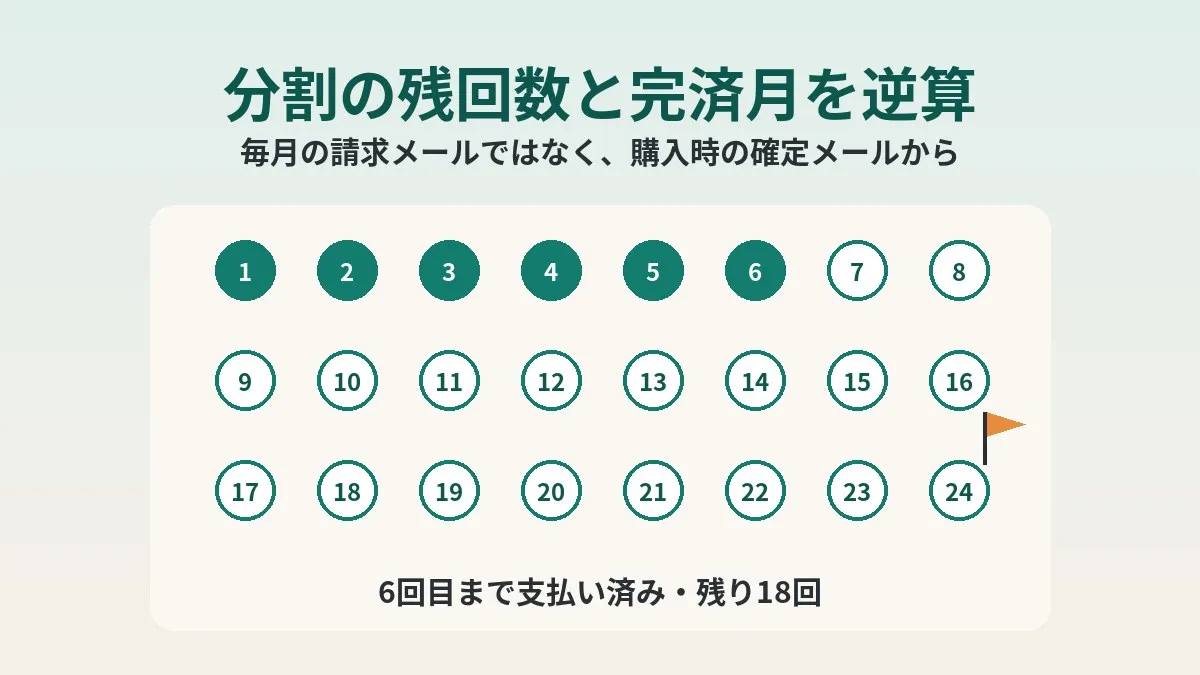
The September 2026 debit was the 6th payment. That means 18 payments remain. It will be paid off with the charges for February 2028, and the last debit will be in March 2028.
Once I put it into numbers, it was further off than I thought. Personally, I had felt it was about one more year. This kind of gap in perception may be something you only notice by counting.
However, I have not yet cross-checked it on the app screen. Paidy’s official page says you can check your payment schedule in the app at any time. It would be reassuring to check once whether the backward calculation matches what the app shows.
The gap between “charges for month X” and “debited in month X”
What confused me most while counting was the relationship between “charges for” and “debited in.”
Paidy bills in the month after usage is confirmed and debits on the 27th of that month. So depending on whether your household budget treats it as “March spending” or “April spending,” it shifts by one month. When someone asks for the payoff month, the answer changes depending on which one you use.
- For the payoff month, decide whether you mean the month the charges are for or the debit month, and write that
- The money actually leaves your household account in the debit month
- The order month and confirmation month can differ, so use the confirmation email date as your starting point
In my case, the goal was to know the household’s exit. So the table focuses mainly on the debit month. The way I see it, the amount leaving our account every month gets lighter starting in April 2028.
List your installment plans to see the household exit
Once you know the remaining payments, I think the next step is to put them in a list. You can remember a single installment plan, but once there are two or three, you cannot track them in your head.
Here are the columns for the table I am planning to make.
| Column | What to write |
|---|---|
| Item | What the installment is for, such as the MacBook Air |
| Payee | Paidy, a card company, a mobile carrier, etc. |
| Number of payments | Total number confirmed from the confirmation email or contract |
| Monthly amount | Write the actual amount, even if it is only a few thousand yen |
| First debit month | Set by the payee’s rules, such as the month after confirmation |
| Final debit month | Add “number of payments − 1” months to the first month |
| Source | Which email or screen you confirmed it with |
I feel the “Source” column is the important one. When you look back later, you can tell where each number was confirmed. In my case, it just says the confirmation email. Once I cross-check with the app, I plan to add that there.
It might be good to keep this table next to your fixed-cost review table. I have summarized the overall process for reviewing fixed costs in getting started with reviewing fixed costs.
How to look at overlapping installment plans
When installment plans overlap, there is no longer just one exit. Picture your monthly spending stepping down like stairs each time one ends.
When reviewing them, I think sorting by the final debit month is easiest to understand. For example, with a hypothetical lineup, it looks like this.
| Item (hypothetical) | Final debit month | Change after it ends |
|---|---|---|
| Smartphone handset | Earlier month | Monthly spending drops one step |
| Laptop | Middle month | Drops another step |
| Home appliance | Later month | All installments are finished |
Lined up like this, “how long the current level continues” becomes clear. Deciding whether to take on a new installment plan might also be easier after looking at this table.
Phone handset payments can be viewed the same way. If handset installments are mixed into your phone bill, my post on checking and settling remaining handset payments might also help.
While reviewing handset installments, review the monthly phone and data cost itself too. That might make things a bit lighter beyond the exit.
Clicking this opens the Rakuten login page. Once you log in, you’ll see the campaign details.
Can you switch to a lump sum partway through?
Once you know how many payments remain, some people may think, “Should I just pay it all off?” Paidy’s help covers this too.
Installments on the pay-later plan for Apple can reportedly be changed to a lump-sum payment. The procedure is to contact customer support through the inquiry form. After that, the process moves forward so you can make the change yourself in the app.
However, it is clearly stated that a payment switched to a lump sum cannot be changed back to installments. Deadlines and detailed steps seem to be given in support’s reply.
Since these are 0% fee installments, whether there is any reason to rush into a lump sum may depend on the person. For now, I am keeping the installments and just making the exit visible.
Common pitfalls
Here are the points where backward counting tends to go off.
- Looking only at the monthly billing emails and thinking you know what is left
- Counting from the order date and ending up off from the confirmation month
- Calculating the final month of a 24-payment plan by adding 24 months to the first month
- Making a table that mixes “charges for month X” and “debit month”
- Using convenience store payment and falling outside the 0% fee condition
- Having multiple installment plans but only looking at one at a time
The ones I almost fell for were the third and fourth. I found that writing it out on paper and counting makes mistakes surprisingly less likely.
Things to check before counting
- You still have the Notice of confirmed usage email
- Noted the confirmation date, number of payments, and monthly amount from the email
- Payment method is set to direct debit or bank transfer
- Decided whether your table focuses on the charges month or the debit month
- Listed any other installment plans in progress
- Planned to cross-check the result against the payment schedule in the app
FAQ
Q. Can I see the remaining number of payments in the monthly billing emails?
The emails I receive showed neither the payment number nor the remaining balance. To know what is left, I think counting from the confirmation email at purchase is the surest way. The official page says the payment schedule can be checked in the app.
Q. When is the first debit?
Paidy’s help says it is debited by direct debit on the 27th of the month after the usage is confirmed. For usage confirmed in March, April 27 would be the first. If the 27th is a bank holiday, it moves to the next business day.
Q. What if I cannot find the confirmation email?
The “Usage details” section of the Paidy app reportedly has an “Apple exclusive” section. It seems you can check the total amount there. If you cannot find the email, looking at the app first seems like a good idea.
Q. Why is the monthly amount not the same every time?
Paidy’s help explains how remainders are handled when the purchase amount is divided by the number of payments. Any amount that does not divide evenly is added 1 yen at a time, starting from the final payment and working back. So some later payments may be just 1 yen higher.
Q. Can I change the number of payments partway through?
According to the help, you can change to a lump-sum payment. On the other hand, you apparently cannot change to a different number of payments.
Q. If I switch to a lump sum, can I change it back?
It is clearly stated that you cannot. Switching to a lump sum is done by contacting customer support. If you are unsure, I think it is best to first count the remaining payments and the exit, then decide.
Q. Is the fee 0% even with convenience store payment?
The 0% only applies to direct debit or bank transfer. Convenience store payment apparently incurs a payment fee each time. It is reassuring to check your payment method in the app.
Official references
- Paidy pay-later plan exclusively for Apple (Paidy official, in Japanese)
- 0% interest installment payments (Apple Japan official, in Japanese)
- How to use the Paidy pay-later plan for Apple (Paidy customer support, in Japanese)
- When is the debit date? (Paidy customer support, in Japanese)
- By when do I need to pay? (Paidy customer support, in Japanese)
- I bought in installments but the full amount is shown (Paidy customer support, in Japanese)
- How is the monthly payment amount calculated? (Paidy customer support, in Japanese)
- I want to change the number of installments (Paidy customer support, in Japanese)
- I want to change installments to a lump-sum payment (Paidy customer support, in Japanese)
Summary
With installment payments, if you only look at the monthly amount, it is easy to forget what is left. Even though I looked at the billing email every month, I did not know where the exit was.
Counting from the confirmation email at purchase, the remaining payments and payoff month are surprisingly easy to work out. In my case, 18 payments remain, and the last debit is in March 2028. Next, I plan to cross-check in the app and add the source to my list.
Consolidating where your bills are paid also makes a list like this easier to build. I wrote about that approach in my post on consolidating to a single main card.
If you have installment plans, why not find the confirmation email and count once?
Once the household exit comes into view, review your phone costs beyond it too. That might make your monthly spending one step lighter.
Clicking this opens the Rakuten login page. Once you log in, you’ll see the campaign details.
This article contains affiliate advertising. If you sign up for a product or service through a link on this site, we may receive compensation from the partner company. The site operator is also an employee of Rakuten Group and may receive compensation through an employee referral program. The content and opinions here are based on the operator’s own experience and research regardless of any advertising relationship, but please read with the above in mind. See the Disclaimer & Affiliate Disclosure for details. Disclaimer & Affiliate Disclosure
This article includes machine-translated content. Please check the official Rakuten Mobile multilingual page for exact terms.
If you have concerns about Rakuten Mobile coverage or signal quality, you can consult through the official signal improvement request form .