- 01The Convenience Store Spending I Cap Each Month
- 02What I Noticed in the October Mid-Month Tally
- 03Why Card Statements Arrive Late
- 04Instant Notifications and Accounting Software Statements Are Different Things
- 05How Each Payment Method Shows Up
- 06Where to Check PASMO and Rakuten Pay History
- 07September’s Result and the Gap from My Projection
- 08Why I Set the Judgment Day to Around the 4th or 5th of the Next Month
- 09How to Choose When to Judge
- 10Steps Up to the Judgment
- 11Common Mistakes and Pitfalls
- 12Who This Suits and Who It Does Not
- 13Frequently Asked Questions
- 14Official Sources I Referred To
- 15Summary
Good morning, this is まさきん.
In our household, we set a monthly cap on convenience store spending. When I did a mid-month tally in mid-October, I noticed something. In the middle of the month, you cannot say for sure that you “stayed within the cap.” This time I want to record why, and how I decided on the day to make the call.
*This information is current as of publication. Please check the official websites for the latest terms.
- Card statements arrive a few days late, so you cannot make a final call on the cap within the month
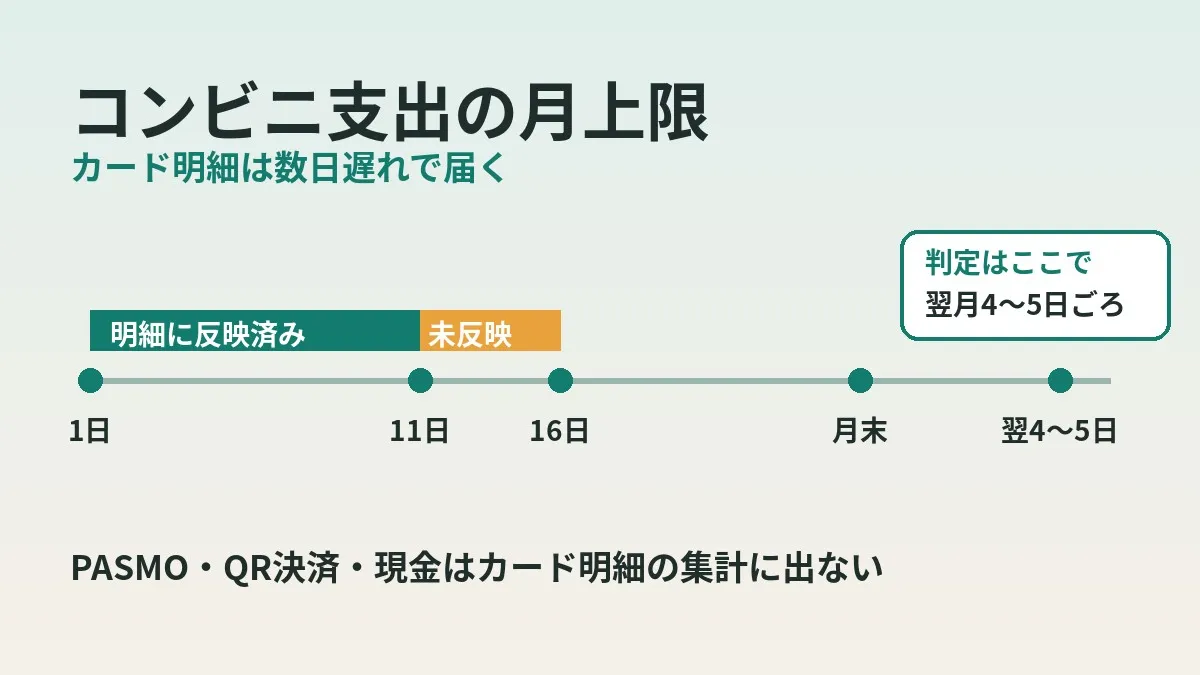
- In our case, as of the 16th, only charges through the 11th had come in
- Convenience store purchases with PASMO, Rakuten Pay or cash do not show up in a tally based on card statements
- I pushed the judgment day to around the 4th or 5th of the next month, when statements are in, and set the task to “waiting”
- Deciding the judgment day in advance means you do not ride an emotional roller coaster mid-month
I wrote separately about how to get ahead of your unconfirmed card spending using instant notification emails. That is in the steps to know your Rakuten Card spending before the statement is finalized.
The focus of this post is elsewhere. It is about “when and how to finalize” a monthly cap. And about how each payment method shows up differently.
The Convenience Store Spending I Cap Each Month
The scope is three chains: 7-Eleven, Lawson and FamilyMart. I set one monthly cap on spending at these three. Since the amount differs from household to household, I will only talk in ratios in this post.
For tallying, I use the accounting software freee. It imports card statements, and I filter them by merchant. I do almost no manual entry.
Convenience stores are places where each purchase is small, so the number of visits tends to climb. It adds up before you notice, so I feel a cap is very meaningful here.
What I Noticed in the October Mid-Month Tally
On October 16, I tried a mid-month tally. But the statement only included charges through the 11th. Purchases from the 12th to the 16th had not arrived yet.
In other words, there was a gap of about 5 days. Saying “this month is going well so far” in that state is only half-backed by evidence.
That is when I realized the same thing happens at month-end. At the end of the month, the last few days are not yet on the statement. So you cannot make a final call within the month that you “stayed within the cap.”
Honestly, when I started tallying, I had not thought this far. When a number appears, you tend to assume that is everything.
Why Card Statements Arrive Late
I checked the official explanation of why there is a delay. A Rakuten Card explainer article describes the following flow.
- Charges appear on your statement after the store sends payment information to the card company
- The timing of sending varies by store, and some stores send it several days later
- Depending on when sales data arrives, the charge may be billed several months later
So a statement entry is not created the moment you pay by card. It only becomes a statement entry once the store’s sales data arrives.
There is also a date discrepancy. According to the card usage notification service guide, the “date and time of use” in notifications is when the transaction was processed. It may differ from when you actually made the purchase.
The accounting software side adds to this. freee’s help pages advise bookkeeping on the assumption that card statements will be reflected late. Apparently it can take around two months from the date of use until the data is retrieved.
Honestly, the wording treated “delays are normal” more than I expected. It seems better to think of the delay not as an error but as part of how the system works.
Instant Notifications and Accounting Software Statements Are Different Things
Rakuten Card also has notifications that arrive right after you use the card. According to the card usage notification service guide, app notifications arrive immediately after use. At that point, however, the merchant is not shown.
Notifications of confirmed statement entries arrive as early as 2 days after use. That is the stage where you learn the merchant.
To judge a convenience store cap, you need the merchant. If you cannot tell which chain you used, you cannot count it toward the cap. So instant notifications without a merchant are hard to use as a basis for judgment.
| Type of information | When it arrives (per official guidance) | Merchant | Usable for judging the cap? |
|---|---|---|---|
| Real-time app notification | Immediately after use | Not shown | Only as a rough reference |
| Confirmed statement notification | As early as 2 days after use | Shown | Yes |
| Statements imported into accounting software | After syncing (expect delays) | Shown | Yes (our tally source) |
| Scheduled billing amount | The 12th of every month | Shown | Usable for cross-checking |
I covered the method of adding up instant notification emails in detail in the post I mentioned at the start. Here I have simply decided that “the judgment is made using confirmed statements.”
How Each Payment Method Shows Up
The other gap is payment methods. Our tally is built on card statements in the accounting software. Convenience store purchases paid by anything other than a card never show up in the tally to begin with.
| Payment method | Shows up in our tally (card statements)? | Where to check it yourself |
|---|---|---|
| Credit card | Yes (a few days late) | Rakuten e-NAVI, Rakuten Card app |
| Transit IC card (PASMO) | No | PASMO balance history (ticket machines, app) |
| QR code payment (Rakuten Pay) | No | Rakuten Pay app |
| Cash | No | Receipts, what is in your wallet |
Laid out in a table, everything other than the card is “outside the tally.” Even though I thought I was judging the cap, I was really only judging card payments.
This is an area where settings differ by household. Rakuten Pay says you can choose the payment source from a card, a bank account or your Rakuten Pay balance. How it shows up on statements may change depending on that setting. In our tally it does not show up, so I treat it as outside.
Where to Check PASMO and Rakuten Pay History
Even the spending outside the tally has a history you can view. Here is what I could confirm from official sources.
With a PASMO card, you can display and print the balance history at station ticket machines. It covers up to the 20 most recent uses. Apparently some rail operators can show up to the latest 100 entries within 26 weeks.
For Mobile PASMO and PASMO on Apple Pay, you can check in the app or on the member menu site. The member menu site is said to show up to 100 entries within 26 weeks of use. Note that same-day usage is not displayed.
For Rakuten Pay, you check your usage history in the app. Rakuten’s official help explains where to check the transaction history for your Rakuten Pay balance.
All of these are separate from card statements. If you check them all at once once a month, it is probably not that much hassle.
September’s Result and the Gap from My Projection
The judgment for September came out slightly over the cap. However, the overage was smaller than the projection I made when I created the task mid-month.
That projection was a full-month extrapolation from mid-month figures. Forecasting month-end from mid-month numbers may be prone to swings.
What I learned from this is not to draw conclusions from mid-month numbers. I look at progress as a “pace guide” and do the judgment on a different day. Separating them that way seems to reduce second-guessing.
Why I Set the Judgment Day to Around the 4th or 5th of the Next Month
So I decided to push the month-end judgment to around the 4th or 5th of the following month. The task I manage is also not closed at month-end but set to “waiting.”
The reason I chose the 4th or 5th was the October mid-month tally. As of the 16th, statements went through the 11th, meaning a delay of about 5 days. By that logic, month-end purchases should also be in the statement after a similar wait.
I also checked this against the official information. Confirmed statement notifications come as early as 2 days later. Some stores send data several days later. Considering that range, I decided to wait about 5 days.
Of course, there is no guarantee that every entry will be in by then. As freee’s help says, some statement entries may be delayed even longer. So I position the 4th or 5th as a “practical judgment day.”
Clicking this opens the Rakuten login page. Once you log in, you’ll see the campaign details.
With variable costs like convenience store spending, there is a part where you just have to wait for the judgment. Fixed costs like your phone bill, on the other hand, keep paying off once you review them. I think checking fixed costs alongside managing caps makes it easier to get the whole household budget in order.
How to Choose When to Judge
I think there are three main candidates for the judgment day. Here are the characteristics of each.
| Judgment day | Speed | How complete the statements are | Best use |
|---|---|---|---|
| The last day of the month | Fastest | The last few days are likely missing | Checking pace only |
| Around the 4th or 5th of the next month | Moderate | Most entries are in (some late ones remain) | Our monthly judgment |
| Around the 12th of the next month or later | Slow | Can cross-check with the scheduled billing amount | Verification a few times a year |
According to the Rakuten Card app guide, the scheduled billing amount is displayed on the 12th of every month. If you wait until then, the numbers become more reliable. But the judgment slips to the middle of the month. I felt that was a bit late to apply to how you spend the next month.
So our household chose the middle option, the 4th or 5th. It is a compromise between speed and accuracy.
Steps Up to the Judgment
Here is the actual flow, written as steps.
- During the month, look only at the “pace” in the card statements
- At month-end, do not close the task; set it to “waiting”
- Around the 4th or 5th of the next month, sync and check the card statements in the accounting software
- Use the dates of use to confirm that the last few days of the previous month are included
- Pick up PASMO, Rakuten Pay and cash convenience store purchases from their respective histories
- Combine the card portion with the portion outside the tally and calculate the ratio against the cap
- Record the judgment and close the task
Step 4 is unglamorous, but I think it is important. If there is not a single entry dated at month-end, it may not have arrived yet. In that case, it seems better to wait a little longer before judging.
In my nightly card usage check, I look at sync delays in terms of days. I also wrote about handling sync delays in my post on a system for reviewing card spending with AI every night. The idea is the same: I build the judgment on the assumption that delays happen.
Common Mistakes and Pitfalls
- Looking at mid-month numbers and deciding “this month is fine”
- Judging on the last day of the month and recording it with the final few days missing
- Forgetting that non-card payments are outside the tally
- Adding up instant notifications and counting entries toward the cap even when the merchant is unknown
- Not setting a judgment day and tallying whenever you feel like it
I almost made the first one myself in the October mid-month tally. When numbers are on the screen, it feels like they are final.
The payment method gap is also easy to overlook. Convenience stores are places where PASMO and QR code payments are handy. Feeling reassured by looking only at your card may be a little risky.
Who This Suits and Who It Does Not
This approach of “pushing the judgment day into the next month” seems to suit people like the following.
- You import card statements into accounting software or a budgeting app to tally them
- You set caps on small, frequent spending such as at convenience stores
- You do not want to be thrown around by mid-month numbers
On the other hand, I think it is a poor fit if you mainly use cash or PASMO. Card statements are not your foundation, so waiting for a judgment day means less.
Some people will feel that a monthly cycle is too slow to notice things. I wrote about checking eating out and convenience store spending on a weekly basis in my post reviewing a weekly eating-out budget over two weeks. It is probably best to use whichever fits your goal.
- Have you listed every payment method you use at convenience stores?
- Have you checked which of them show up in your accounting software statements?
- Have you decided where to view the history of payments outside the tally?
- Have you set a specific judgment day, such as “around day X of the next month”?
- Have you set up a routine of not closing the task at month-end and leaving it “waiting”?
Frequently Asked Questions
Q. How many days does it take for charges to appear on the card statement?
According to Rakuten Card, confirmed statement notifications arrive as early as 2 days after use. However, it depends on when the store sends its sales data. In our case in October, there was a delay of about 5 days.
Q. Is it wrong to judge at month-end?
It is not wrong. But there is a high chance the last few days are missing. I think it is more reliable to only check your pace at month-end and push the judgment into the next month.
Q. Why did you set the judgment day to around the 4th or 5th of the next month?
Because the delay I saw in the mid-month tally was about 5 days. By that logic, month-end purchases should come in after a similar wait. I chose it as a compromise between speed and accuracy.
Q. Are there statement entries that still have not arrived after the 4th or 5th?
It can happen. freee’s help says it can take around two months from the date of use until the data is retrieved. If it looks like some entries are missing, it seems better to wait a bit longer.
Q. How should I keep track of convenience store purchases made with PASMO?
You can check PASMO in the balance history at ticket machines or in the app. It does not show up on card statements, so you need to pick it up separately. For Mobile PASMO, history within 26 weeks is said to be covered.
Q. Does Rakuten Pay usage show up on card statements?
Rakuten Pay lets you choose the payment source from a card, a bank account or your Rakuten Pay balance. How it shows up may depend on that setting. It does not show up in our accounting software statements, so I check it in the app’s history.
Q. Can’t I judge with instant notifications alone?
The app’s instant notifications do not show the merchant. Since you cannot tell which convenience store you used, it is hard to count it toward the cap. I think it is best to use them only as a rough reference.
Official Sources I Referred To
- When credit card payment information is reflected in statements and available credit (Rakuten Card Minna no Manekatsu)
- Card usage notification service (Rakuten Card)
- How to check statements and billing details in the app (Rakuten Card)
- How to read your statement (Rakuten Card)
- Linking (syncing) Rakuten Card (freee Help Center)
- Notes on using the linking (sync) feature (freee Help Center)
- Checking balance history (PASMO)
- Checking balance history and usage details for PASMO on Apple Pay (PASMO)
- Rakuten Pay app beginner’s guide (Rakuten Pay)
Summary
There were two reasons a convenience store cap cannot be judged mid-month. Card statements arrive a few days late. And payments other than cards sit outside the tally.
Our household pushed the judgment day to around the 4th or 5th of the next month and set the task to “waiting.” The numbers are not perfect, but it seems calmer than rushing to conclusions from mid-month figures.
I think the right judgment day depends on how your household’s statements come in. Take a look at how many days late your own statements arrive. A good day may become clear.
Alongside tricks for variable costs like cap management, it is reassuring to take a look at your fixed phone bill too.
Clicking this opens the Rakuten login page. Once you log in, you’ll see the campaign details.
This article contains affiliate advertising. If you sign up for a product or service through a link on this site, we may receive compensation from the partner company. The site operator is also an employee of Rakuten Group and may receive compensation through an employee referral program. The content and opinions here are based on the operator’s own experience and research regardless of any advertising relationship, but please read with the above in mind. See the Disclaimer & Affiliate Disclosure for details. Disclaimer & Affiliate Disclosure
This article includes machine-translated content. Please check the official Rakuten Mobile multilingual page for exact terms.
If you have concerns about Rakuten Mobile coverage or signal quality, you can consult through the official signal improvement request form .