- 01The Symptom
- 02The Cause Was a Scope Added Later
- 03Separating Symptoms From Causes
- 04Scopes and Data Types for Sleep Data
- 05How OAuth Behaves When You Add a Scope
- 06Steps for Redoing Consent
- 07What I Left to AI and What I Did Myself
- 08Verifying With a Dry Run
- 09The Roughly One Week I Couldn’t Recover
- 10Health Data Scopes Are Handled Strictly
- 11Common Mistakes and Pitfalls
- 12What to Check Before You Start
- 13Frequently Asked Questions
- 14Official Sources I Referred To
- 15Wrap-Up
Good morning, this is まさきん.
I switched my phone from an iPhone to Android. Taking the opportunity, I have been consolidating the path my health data travels into a single route. But sleep alone kept showing “no source recorded” in my notification every morning. The cause turned out to be an OAuth scope and the need to redo consent, so I am leaving a record here alongside the official information.
Note: The information here is current as of publication. Please check the official sites for the latest terms.
- Sleep in the Google Health API is read with a separate scope from steps:
sleep.readonly - Adding a scope later doesn’t add permissions to the token you already hold. You need to redo consent
- Adding
include_granted_scopes=trueto the authorization URL carries over the scopes you granted before - You can verify the fix first with a dry run that doesn’t write to production
- In my case, the roughly one week before I added the permission was not backfilled
The Symptom
My health data currently flows along this route. From the activity tracker to Google’s health app (Google Health). From there, through the API, to my own records (my health log). Just this one path.
Steps and the like were already coming in. But the sleep field alone would not fill. The notification I get every morning showed “no source recorded” where sleep should be.
The Cause Was a Scope Added Later
The cause was simple. I had added the permission for sleep after the fact.
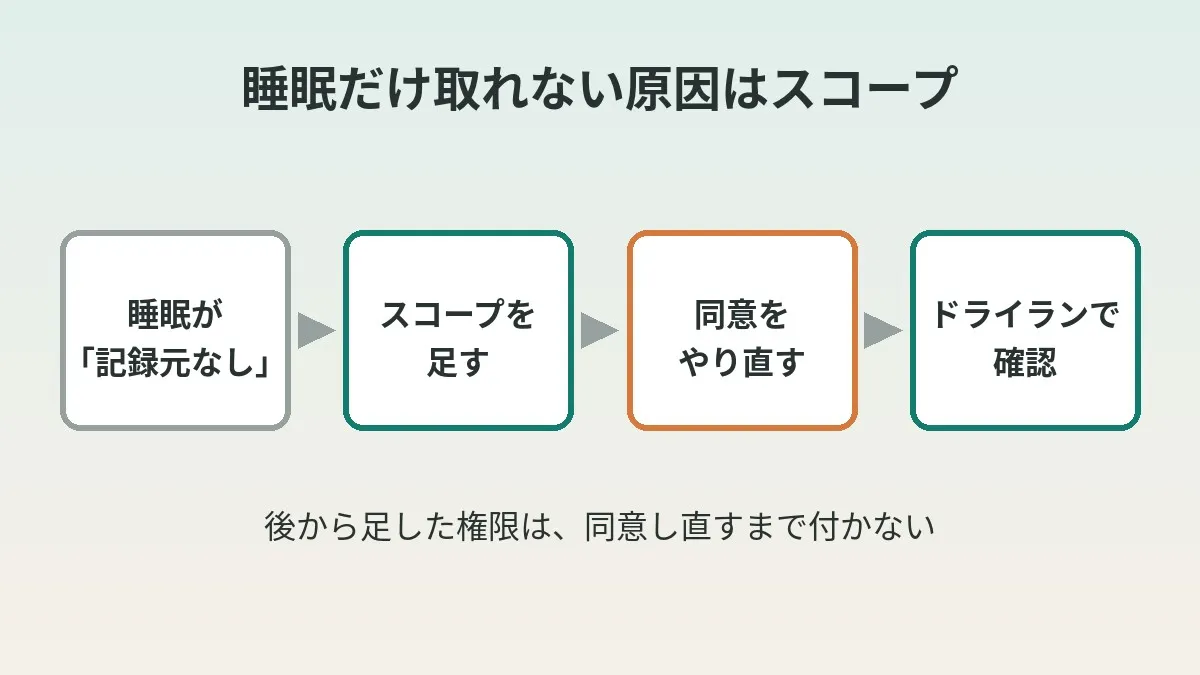
When I first gave consent, what I requested were scopes for steps and so on. After that, I added the sleep scope on the code side. But I hadn’t redone the consent.
The official Google Health API documentation says this. An issued access token contains only the scopes granted by the user who consented. In other words, just adding it in code changes nothing.
The Name “Google Health API”
The Google Health API is officially described as “the next generation of the Fitbit Web API.” It is a system for handling data from Fitbit, Pixel Watch, and other devices on top of Google’s OAuth 2.0.
A shutdown schedule has been published for the legacy Fitbit Web API. Support ends on September 30, 2026. The API itself is turned off on October 30, 2026. To keep getting data, migration to the Google Health API is what is advised.
The same notice also carries a caveat, though. Its gist is that new projects are not being accepted at this time. If you are just starting out, it may be reassuring to look at the latest official guidance first.
Separating Symptoms From Causes
Here is a table of the possible causes when “only sleep won’t come through.”
| Symptom | Possible cause | Where to check |
|---|---|---|
| Only sleep comes back empty | Consent was not given for the sleep scope | The scopes contained in the token |
| Every item suddenly stops coming through | Token expiry (401) | Publishing status and expiry conditions |
| Consent succeeded but calls fail | The account isn’t linked to Google Health | Settings in the Google Health app |
| Only certain days are empty | No record for that day exists on Google’s side | What the Google Health app shows |
In my case, it was the top row. Steps were coming through, which means the token itself was alive.
I covered the case where everything stops in a separate article.
Why Google refresh tokens expire in 7 days: the “Testing” status, and how to publish to production
If the publishing status is the cause, I think that one is closer.
Scopes and Data Types for Sleep Data
Google Health API scopes all begin with the same string: https://www.googleapis.com/auth/googlehealth. After it comes a name for each grouping of data.
From the official scope list and data type pages, I pulled out the ones relevant here.
| Scope (suffix) | Official description | Examples of readable data |
|---|---|---|
.activity_and_fitness.readonly | See activity and fitness data | Activity data such as steps |
.sleep.readonly | See sleep data | Sleep sessions and sleep stages |
.health_metrics_and_measurements.readonly | See health metrics and measurement data | Heart rate variability and breathing rate during sleep, and so on |
The data type for sleep is sleep, and the unit of record is a session. Within a single sleep, stage intervals are lined up. There are four kinds of stage: LIGHT / DEEP / REM / AWAKE.
What I put into my health log is sleep duration, deep sleep, and REM sleep. All of these were data readable within .sleep.readonly.
Heart rate variability and blood oxygen during sleep are a different matter, however. These fall under the health metrics scope. Lumping everything under the word “sleep” could lead you to mix this up.
Google advises requesting only the scopes you need. Write scopes are set only when you send data. For read-only uses, readonly looks sufficient.
How OAuth Behaves When You Add a Scope
Refreshing the refresh token you hold doesn’t add permissions. What a refresh gives you is an access token for the range already granted.
There is one way to use a new scope. Send the authorization request again with that scope included. The user grants it on the consent screen. Only then is the new permission attached.
Incremental Authorization and include_granted_scopes
The practice of adding scopes later has an official name: incremental authorization. The idea is to ask for additional scopes at the point they become necessary.
The parameter used here is include_granted_scopes. When you set its value to true and consent goes through, the new access token also includes the earlier scopes. Google recommends it as a best practice.
The official documentation also describes the rules for a combined authorization. With that refresh token, you can get access tokens covering all the scopes. On the other hand, if you revoke it, all the included scopes are removed at once.
So even when adding only sleep, you don’t lose the permission for steps.
Handling the Refresh Token
A tool that runs automatically needs a refresh token. Setting access_type to offline in the authorization URL is how you specify that.
There is one more important note in the official documentation. A refresh token is returned only the first time you exchange an authorization code. On second and later consents, it may not come back.
When you want to be sure of receiving a new one, add prompt=consent. It specifies showing the consent screen every time. In situations where you are redoing consent, adding it may spare you some confusion.
Steps for Redoing Consent
Here is the general flow, numbered. It follows the official OAuth 2.0 procedure for web servers.
- Confirm you have the intended project open in the Google Cloud console
- Add
.sleep.readonlyto the scope list on the tool side - Build the authorization URL. List the required scopes in
scope - Add
access_type=offlineandinclude_granted_scopes=trueto the same URL - If you are re-obtaining the refresh token, add
prompt=consentas well - The account owner opens that URL in a browser, reads the consent screen, and grants access
- Exchange the returned authorization code for tokens
- Confirm the sleep scope is in the
scopeof the response - Save the new refresh token and stop using the old one
Step 8 is unglamorous but important. On the consent screen, the user can choose whether to grant each scope.
What I Left to AI and What I Did Myself
This time I had an AI (Claude) do the groundwork on my Mac. Things like preparing the authorization URL with the added scope. What I did was open the consent screen and press allow.
| Task | Who | Why |
|---|---|---|
| Preparing the authorization URL with the added scope | AI (Claude) | It is string assembly and easy to get wrong |
| Opening the consent screen and pressing allow | Me | It is the owner’s own expression of intent |
| Looking at the next morning’s notification | Me | In the end I want to confirm with my own eyes |
Consent is the act by which the data’s owner indicates “you may have this.” So I keep just the pressing of allow as something I do myself.
I wrote about how the morning notification works in a separate article.
How I have AI build a one-page “daily briefing” while I get ready in the morning
Changing phones means reviewing these integrations one by one. How about reviewing your monthly phone bill at the same time?
Clicking this opens the Rakuten login page. Once you log in, you’ll see the campaign details.
Verifying With a Dry Run
After redoing consent, I didn’t send it straight to production. First, a dry run. That is, a run that only tries the fetch without writing to the production records.
In the dry run, I confirmed that sleep data came back. Then I ran the production process. Three values went into that day’s row in my health log. Sleep duration, deep sleep, and REM sleep. Having seen that much, I called it done.
With a dry run, nothing gets dirtied even if it fails. It heads off the accident of overwriting existing rows with empty values.
The order of checks is a read-only trial run first and the real write second. If you settle on never reversing that order, you can stay calm even right after redoing consent.
The Roughly One Week I Couldn’t Recover
There is just one thing that didn’t come back. The roughly one week of sleep before I added the permission.
For this period, there were no records on Google’s side either. So redoing consent doesn’t fill it in. I am leaving those rows in my health log empty.
I didn’t put estimated values into the empty rows. That is because, looking back later, they would be indistinguishable from real records. Leaving it as “what isn’t there isn’t there” feels more honest for a log, I think.
Even when the permission goes through, nothing comes back if the original records don’t exist. When isolating the problem, I think looking at what the app shows first is fastest.
If you plan to add a scope, it also seems worth noting the date you added it. When you later see an empty stretch, you can recall the reason right away.
Health Data Scopes Are Handled Strictly
Health data is sensitive information. Google treats it strictly on its side as well.
The official documentation says most Google Health API scopes are “restricted.” Apps released to the general public have to pass a review. The review has two stages: OAuth app verification and a third-party security assessment.
Apps that haven’t passed review are limited to 100 users. For a tool you use only yourself, reaching this cap seems all but impossible. However, an unverified app warning may appear before consent.
Common Mistakes and Pitfalls
| Mistake | What happens | How to prevent it |
|---|---|---|
| Adding the scope in code and stopping there | The token’s permissions don’t change | Redo consent after adding it |
| The refresh token isn’t returned | You keep using the old token | Add prompt=consent and obtain it again |
| Testing straight in production | Records get overwritten with empty values | Run a dry run first |
| Filling an empty period with guesses | They can’t be told apart from real records | Leave it empty |
Having built things so that the notification says “no source recorded” was something that helped.
What to Check Before You Start
- Whether the API you use is the Google Health API or the legacy Fitbit Web API
- Whether the project open in the console is the intended one
- Which scope contains the data you want to add
- Which scopes your current token contains
- Whether the publishing status is Testing or In production
- Whether you added include_granted_scopes and access_type to the authorization URL
- Whether the account owner can set aside time to open the consent screen
- Whether you have a way to do a dry run that does not write to production
If the publishing status is still “Testing,” refresh tokens expire in 7 days. Even if you add a scope and redo consent, this time limit applies separately. Checking the publishing status first may save you from doing the work twice.
Frequently Asked Questions
Q. If I add a scope, do I always need to redo consent?
Yes, you do. That is because a token contains only the scopes the user has granted. Just adding it to code or settings doesn’t increase the permissions.
Q. If I refresh the refresh token, will the new scope be attached too?
No. What a refresh gives you is an access token for the range already granted. A new scope is attached only once it is granted on the consent screen.
Q. Which scope reads sleep data?
In the Google Health API, it is .sleep.readonly. You can read sleep sessions and the stages within them. Heart rate variability during sleep and the like separately require the health metrics scope.
Q. Can I get deep sleep and REM sleep?
In the official data type, there are four kinds of stage: LIGHT / DEEP / REM / AWAKE. Support differs by device, so checking the official table of supported devices as well is the sure way.
Q. Can I go back and get sleep from days before I consented?
I think it depends on whether the original records exist on Google’s side. In my case, about a week of records didn’t exist on Google’s side either. So that period remains empty.
Q. Is it okay to leave even the consent step to an AI?
I don’t. That is because I regard consent as the expression of intent by the data’s owner. I ask the AI only for the groundwork, such as preparing the authorization URL.
Q. Can I keep using the Fitbit Web API as is?
Officially, it is announced to be turned off on October 30, 2026. If you want to keep getting data, you need to migrate to the Google Health API. Please check the official guidance for the status of new project acceptance.
Official Sources I Referred To
- Google Health API (Google for Developers)
- Google Health API scopes (Google for Developers)
- Sleep and recovery data types (Google for Developers)
- App verification (Google Health API)
- Troubleshooting (Google Health API)
- Using OAuth 2.0 for Web Server Applications (Google for Developers)
- Using OAuth 2.0 to Access Google APIs (Google for Developers)
Wrap-Up
The reason only sleep showed “no source recorded” was a scope I added later. Once you add one, redo consent. Once you understand it, that is all there is to it.
I left the groundwork to AI and pressed allow myself. I verified with a dry run before sending it to production. The final check of whether it is fixed is tomorrow morning’s notification. That is still ahead of me.
If you have just changed phones, take one look through the permissions of the apps you have connected.
If you are also thinking about switching carriers, there is my article summarizing the MNP number-porting steps as well.
Clicking this opens the Rakuten login page. Once you log in, you’ll see the campaign details.
This article contains affiliate advertising. If you sign up for a product or service through a link on this site, we may receive compensation from the partner company. The site operator is also an employee of Rakuten Group and may receive compensation through an employee referral program. The content and opinions here are based on the operator’s own experience and research regardless of any advertising relationship, but please read with the above in mind. See the Disclaimer & Affiliate Disclosure for details. Disclaimer & Affiliate Disclosure
This article includes machine-translated content. Please check the official Rakuten Mobile multilingual page for exact terms.
If you have concerns about Rakuten Mobile coverage or signal quality, you can consult through the official signal improvement request form .