- 01I was asked for “a year of electricity” before the quote
- 02Why “a full year” is needed
- 03Why “when you use it” matters
- 04Checking the fiscal 2026 feed-in price
- 05Think about storage batteries from your “night usage”
- 06The steps I took
- 07Where I got stuck
- 08How to read 30-minute data
- 09What I put in the one-page table
- 10What to look at in the installer’s estimate
- 11Common pitfalls
- 12Things to check before you start
- 13FAQ
- 14Official references
- 15Summary
Good morning, this is まさきん.
I am currently considering putting solar panels on our house. Partway through, I was asked, “Please tell us your electricity bills and usage for the past year.” To answer, I went back through our electricity in actual numbers, so here are the steps and what I noticed.
*This information is current as of publication. Please check the official sites for the latest details.
- Before getting a solar quote, get your own grip on a year of usage and “when you use it”
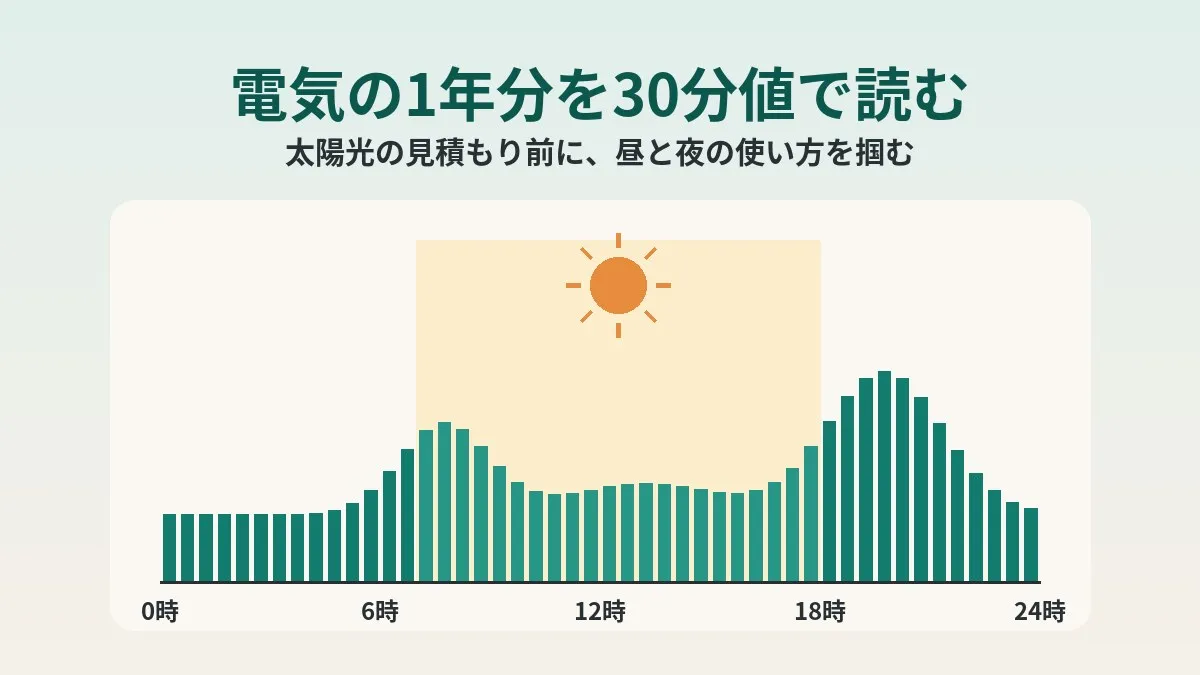
- There are two angles: the seasonal peaks by month, and the day/night split seen in 30-minute interval data
- The more electricity you use during the day, the more of your generated power you can typically use yourself
- For fiscal 2026, the residential feed-in price differs between the first 4 years and year 5 onward
- Having your own numbers tells you where to look in the installer’s estimate
I was asked for “a year of electricity” before the quote
I was contacted by both the coordinator organizing the solar installation and the installer. They wanted to know our electricity bills and usage for the past year in order to estimate the benefit.
At first, I thought lining up 12 months of bill amounts would be enough. But on reflection, “how we use it” seemed more important. Solar only generates during the day. So whether a household uses power during the day should change how much it helps.
Our electricity provider is Octopus Energy. Using the billing emails and the online account page, I put everything into one table and replied. I had AI help with the work. I am still waiting for the estimate results.
Why “a full year” is needed
Electricity usage swings a lot by season. Summer has a peak from air conditioning, and winter from heating. Spring and autumn tend to be the valleys.
Solar generation also changes by season. It is higher when days are long and lower in winter. To see how the usage peaks overlap with the generation peaks, you need a full year.
Using only one month or the last three months might distort the yearly picture. For example, an estimate based only on winter numbers gets pulled toward the season when generation is low and usage is high.
| Season | Usage trend (general) | Generation trend (general) |
|---|---|---|
| Spring/Autumn | Little heating or cooling, tends to be a valley | Generates well in good weather |
| Summer | Air conditioning tends to create a peak | Long days, generation is higher |
| Winter | Heating and lighting tend to create a peak | Short days, generation is lower |
In our case, annual usage was well above the average household. We are a family of six with four kids, so I think being on the high side is natural.
Why “when you use it” matters
Electricity generated by residential solar is used inside the home first. Whatever you cannot use becomes electricity sold to the power company.
This is where the price difference between buying and selling electricity comes in. Whatever you use yourself is electricity you do not have to buy. Whatever you sell is bought back at a set price.
Generally, it seems the price of buying electricity is often higher than the selling price. In that case, using generated power yourself tends to be better than selling it.
In other words, the more electricity a home uses during the day, the more solar tends to pay off. Conversely, a home that is empty during the day and uses power mostly at night will sell a larger share. What I used to look at this “day/night split” was the 30-minute interval data.
Checking the fiscal 2026 feed-in price
The price for selling electricity is set by Japan’s national FIT (feed-in tariff) scheme. I checked the residential (under 10kW) price on the Agency for Natural Resources and Energy’s page.
| Category | Purchase price (per kWh) | Period |
|---|---|---|
| FY2026, years 1–4 | 24 yen | First 4 years |
| FY2026, years 5–10 | 8.3 yen | Remaining 6 years |
| (Reference) FY2025 April–September | 15 yen | 10 years |
For fiscal 2026, the first 4 years are 24 yen per kWh. From year 5 to year 10, it drops to 8.3 yen. The pricing is reportedly front-loaded so the initial investment can be recovered sooner. The same pricing has apparently already been applied since the second half of fiscal 2025.
Personally, the 8.3 yen from year 5 onward caught my attention. On many rate plans, the price of buying electricity is quite a bit higher than that, I think. So the longer the time frame, the more “the share you use yourself” may matter.
For after the period ends, the Agency for Natural Resources and Energy also outlines options: using the power at home combined with a storage battery or an electric vehicle, or selling it under an individual contract with a power company.
Think about storage batteries from your “night usage”
I suspect many quotes come with a proposal bundled with a storage battery. A storage battery is equipment that stores surplus daytime electricity so you can use it at night.
So night usage is a clue to how much a battery would help. A home that uses a lot at night has somewhere to use the stored power. On the other hand, a home with little daytime surplus might not have enough power to store.
Here too, the 30-minute data helps. You can only see daytime surplus and night usage by looking at time slots. We have not decided on a storage battery yet either.
The steps I took
Here is the actual flow I followed.
- Gather 12 months of billing emails going back
- Pick out each month’s usage (kWh) and bill amount from the email text
- Add up the 12 months to get annual usage and annual electricity cost
- Look at usage every 30 minutes on the online account page to get a sense of the time-of-day pattern
- Put the annual numbers and the time-of-day pattern into one table and reply
I had AI help with steps 2 and 3. Picking numbers out of email text and turning them into a table felt much easier.
Lining up the monthly numbers makes the seasonal peaks obvious at a glance. It is also a bit fun to work out the average price per kWh. You just divide the bill amount by usage.
Where I got stuck
The work did not go as smoothly as I expected. I got stuck in two places.
The first was the invoice PDFs. The PDFs were email attachments, and the AI could not extract their contents. So I used the numbers written in the body of the billing emails. The body included both usage and amount, so that was enough this time.
The second was the online account data. I could not fetch the 30-minute usage automatically. In the end, I opened the account page myself and looked through it by hand. Rather than copying it down, I browsed it to get a sense of the time-of-day pattern.
Once you look at your electricity bill in this much detail, other fixed costs start to bother you too. It seems worth lining up your monthly phone and internet costs in numbers the same way.
Clicking this opens the Rakuten login page. Once you log in, you’ll see the campaign details.
How to read 30-minute data
A smart meter measures usage every 30 minutes. Kansai Transmission and Distribution’s page explains it that way too. Another feature is automatic remote meter reading through its communication function.
According to Octopus Energy’s FAQ, you can check it from the electricity usage section of the online account page. It says you can see usage and estimated charges by hour, day, and month.
I think 30-minute data is useful even without totaling all of it. Here are some things to look for, for example:
- How much daytime usage differs between weekdays and weekends
- How tall the peaks are in the morning and from evening into night
- Whether there is always-on usage that does not drop even in the middle of the night
- How the shape changes on a typical summer day versus a winter day
Just picking a few days per season and looking through them may be enough to see the pattern.
Octopus Energy’s FAQ also has guidance for when the display shows 0. Data can take time to arrive, and it says to wait a while and reopen the page. The bill amount apparently reflects accurate data.
What I put in the one-page table
The table I sent back used the following items. I will not share the actual numbers here, but the framework should be reusable as is.
| Item | What to write | Source |
|---|---|---|
| Power company and plan | Company name and plan name | Billing email |
| Monthly usage | 12 months of kWh | Billing email text |
| Monthly bill amount | 12 months of amounts | Billing email text |
| Annual usage | Total of 12 months | Sum of the above |
| Annual electricity cost | Total of 12 months | Sum of the above |
| Seasonal peaks | High and low months | Monthly lineup |
| Time-of-day pattern | Whether day or night is higher | 30-minute data on the account page |
| Lifestyle pattern | Times when people are usually home, etc. | My own notes |
The last one, lifestyle pattern, is not a number. But I think it is useful information for whoever does the estimate. Daytime usage changes depending on whether there are work-from-home days, for example.
What to look at in the installer’s estimate
With your own numbers, you know what to look at when the estimate arrives. I have not received the results yet, so these are the points I plan to check.
- Whether the annual usage assumed in the estimate matches my own numbers
- Whether the self-consumption rate seems consistent with the daytime usage seen in the 30-minute data
- Whether the selling price reflects the price from year 5 onward
- Which numbers change, and by how much, with and without a storage battery
The self-consumption rate in particular could move the estimate a lot. If you have looked at your own day/night split, you can judge whether that number is too optimistic.
Common pitfalls
Here are points that seem easy to trip over, based on the official information and my own work.
- Deciding based only on the last few months and missing the seasonal peaks
- Looking only at bill amounts without checking usage (kWh)
- Calculating all 10 years using the first-4-year selling price
- Deciding whether you need a storage battery without looking at day vs. night usage
- Giving up after trying to collect by hand all the data that cannot be fetched automatically
I think looking at just enough to see the pattern is more sustainable than collecting everything.
Households that charge an EV at home will see that added to their usage. Depending on when you charge, the day/night split may change too. I have written about my approach to EV charging in my post about driving a Tesla without home charging.
Things to check before you start
- You can go back through 12 months of billing emails or statements
- You can see monthly usage (kWh)
- You can log in to your power company account page
- Your home electricity meter is a smart meter
- You have roughly written down when people are home on weekdays and weekends
If you do not have a smart meter, you may not be able to see 30-minute data. Octopus Energy’s FAQ says the meter is, in principle, replaced free of charge when you switch. The replacement is done by the general transmission and distribution operator. However, depending on the installation, there may be additional costs.
FAQ
Q. Is it enough to share just the bill amounts?
With bill amounts only, changes in unit price and changes in usage get mixed together. I think sharing monthly usage (kWh) as well tends to make the estimate more accurate. It is often listed in the body of the billing email, so take a look.
Q. Where can I see 30-minute data?
It seems it is often available on your power company’s online account page or app. For Octopus Energy, you can reportedly check it by hour from the electricity usage section of the account page. Please check each company’s guidance for what range and period you can view.
Q. Do I need to collect a full year of 30-minute data?
I do not think it is required. Looking at a few typical days per season is enough to see the day/night pattern. I also looked by hand, so I stopped at getting a sense of the pattern.
Q. What is the feed-in price for fiscal 2026?
According to the Agency for Natural Resources and Energy’s page, residential (under 10kW) is 24 yen per kWh for the first 4 years. From year 5 to year 10, it is 8.3 yen. The price changes depending on when you are certified, so please check the latest information.
Q. Is solar a bad fit for homes where nobody is in during the day?
I would not go that far. It just means a larger share gets sold, so the estimate looks different. Combinations like storage batteries or running appliances on timers may change things too.
Q. What if I cannot get the numbers from the invoice PDF?
In my case, usage and amount were in the body of the billing email. Even if the PDF will not open, the email text or account page may be enough. Checking just one email first to see what is where is the quickest approach, I think.
Q. How can I tell if I have a smart meter?
It seems you can often tell from the meter’s appearance, or from guidance by your power company or the transmission and distribution operator. If you are not sure, asking your power company is the surest way.
Official references
- Purchase prices and periods, FIT/FIP scheme (Agency for Natural Resources and Energy, “Nattoku! Renewable Energy”, in Japanese)
- The end of the FIT purchase period for residential solar is approaching: what next? (Agency for Natural Resources and Energy, “Enekore”, in Japanese)
- FAQ (Octopus Energy Japan, in Japanese)
- Smart meters (Kansai Transmission and Distribution, in Japanese)
Summary
Before getting a solar quote, I went back through a full year of our electricity. I looked at two things: the seasonal peaks by month, and the day/night split seen in 30-minute data.
With the numbers in hand, I know what to look at when the installer’s estimate arrives. I plan to decide whether to install after seeing the results. I have also summarized how to review fixed costs overall in getting started with reviewing fixed costs.
If you are thinking about solar, just opening one billing email might be a good place to start.
Clicking this opens the Rakuten login page. Once you log in, you’ll see the campaign details.
This article contains affiliate advertising. If you sign up for a product or service through a link on this site, we may receive compensation from the partner company. The site operator is also an employee of Rakuten Group and may receive compensation through an employee referral program. The content and opinions here are based on the operator’s own experience and research regardless of any advertising relationship, but please read with the above in mind. See the Disclaimer & Affiliate Disclosure for details. Disclaimer & Affiliate Disclosure
This article includes machine-translated content. Please check the official Rakuten Mobile multilingual page for exact terms.
If you have concerns about Rakuten Mobile coverage or signal quality, you can consult through the official signal improvement request form .