- 01Why I decided to measure the cost per page now
- 02What the catalog’s “about 2.0 yen per page” actually measures
- 03How to read ink levels as numbers
- 04The measured result: about 13–33 yen per page
- 05The culprit was cleaning, not ink
- 06Break-even against a mono laser
- 07Why I still did not buy one right away
- 08Who this is for, and who it is not
- 09Common mistakes and pitfalls
- 10Frequently asked questions
- 11Official sources referenced
- 12Summary
Good morning. This is まさきん.
At our house we print about 7 pages of kids’ drill sheets every night. When I measured the ink cost as “yen per page,” the number came out very different from the catalog figure. In this post I want to write down how I measured it, and where the break-even sits if we switched to a mono laser printer.
Note: This information is current as of publication. Please check the official sites for the latest conditions.
- Measured black ink cost on our inkjet came out to about 13–33 yen per page, 6–16 times the catalog figure of about 2.0 yen
- The prime suspect was not the ink used for printing, but head cleaning triggered by waking the printer 7 times every night
- The break-even for a mono laser is a short 2–6 months. Still, I chose to fix how we run things first and watch what happens
- Read ink levels as numbers, not as a picture. With a cumulative page count and a remaining %, you can work out the cost per page
Why I decided to measure the cost per page now
What started this was the black ink running out ahead of everything else. The three color cartridges were still at 91%, but black was at 12%. I had replaced all four cartridges with new ones at the start of September. Two and a half weeks felt far too fast.
Almost everything we print is drill sheets for the kids. An AI generates them every evening, and they print automatically late at night. At 7 pages a day, that is around 2,500 pages a year. For a household, I think that is on the high side.
With that much printing, ink is closer in nature to a fixed cost. I wanted to see it in numbers rather than by feel. So I decided to put the catalog figure and the measured figure side by side.
What the catalog’s “about 2.0 yen per page” actually measures
The all-in-one we use is a Brother MFC-J7300CDW. The official page lists the running cost as about 2.0 yen (tax included) per page for A4 mono documents. It takes the high-yield LC412XL series cartridges.
That 2.0 yen is measured with a standard print pattern defined by ISO/IEC 24734. It is simply the cartridge price divided by the rated page yield. The high-yield black LC412XLBK sells for 5,698 yen (tax included) on the official store and is rated at about 3,000 pages. Do the division and you do indeed get just under 2 yen.
But this calculation does not include the ink discarded during cleaning. It assumes continuous, high-volume printing, so the conditions do not match how a household uses the printer. That is what comes back to bite later.
How to read ink levels as numbers
To get a cost per page, you need two numbers: the cumulative page count and the remaining % of the cartridge. The printer holds both internally.
You can see the ink level on the printer’s LCD or in the manufacturer’s phone app. But on most models the display is just a gauge, with no actual number. So I read it from my Mac over the network instead.
Printers publish management information on the network. The cumulative page count is a standard field and I could read it straight away. The ink level, on the other hand, only returned “unknown” from the standard field. I had to dig for the manufacturer’s proprietary fields before I finally got the % for black, yellow, cyan, and magenta.
This part takes a little effort. That said, once you have it set up it is handy. If you note the replacement date and the page count at that time, from then on it is just one division.
| Number to read | Where to read it from | Our value (as of 9/26) |
|---|---|---|
| Cumulative page count | Printer’s standard management info | 1,808 pages |
| Black ink remaining | Manufacturer’s proprietary management info | 12% |
| Three color inks remaining | Same as above | 91% each |
| Print jobs since replacement | Print log on the computer | about 150–160 jobs |
The measured result: about 13–33 yen per page
The formula is simple.
- Work out the ”% used” since replacement (100% → 12%, so 88%)
- Work out the “pages added” over the same period (about 150–200 pages from the print log)
- Cartridge price × (% used ÷ 100) ÷ pages added
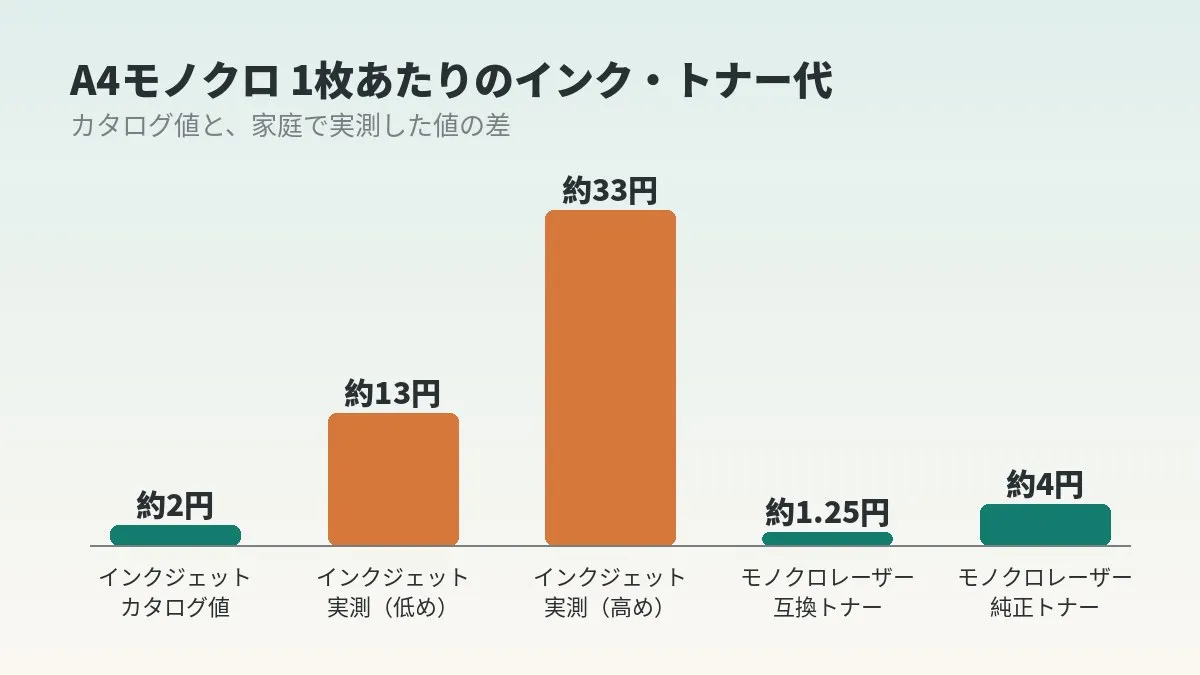
I used two prices for black: about 2,900 yen as a prorated share of the 4-color pack, or 5,698 yen as a single cartridge. That gives a range of about 13 yen to about 33 yen per page.
Compared with the catalog’s roughly 2.0 yen, that is 6–16 times higher. Honestly, my first reaction was to doubt the math. But no matter how many times I rechecked, the numbers did not change. We had used 88% of a cartridge rated for 3,000 pages in under 200 pages.
The culprit was cleaning, not ink
This is where I stopped to think. If it drops that much in 200 pages, ink must be disappearing somewhere other than printing.
Inkjets have automatic head cleaning. It typically runs when the printer wakes from sleep or when it is powered on, and each time it discards a little ink.
When I looked at our late-night printing, the 7 drill sheets were being sent as separate jobs at 5-minute intervals. From 2:30 to 3:00, we were waking the printer 7 times every night. Five minutes is enough for it to drop back into sleep before the next job arrives, so a cleaning cycle very likely ran on every wake-up. I even had a record of seeing a “Cleaning” message on the display in late September.
Up to 126 cleaning cycles over 18 days. At that rate, I suspect more ink went to cleaning than to printing. It is a hypothesis, but everything lines up.
- When ink at home seems to vanish for no reason, suspect the number of wake-ups before the number of pages
- Sending many small jobs spaced out over time may be a bad fit for an inkjet
- People who build automated printing setups are the most likely to fall into this trap
Break-even against a mono laser
With a measured inkjet figure in hand, I compared it with a laser. The candidate is Brother’s mono laser HL-L2460DW. It supports duplex printing and Wi-Fi, and I see it selling for around 13,000 yen.
The extra-high-yield TN32JXXL toner is officially rated at about 5,000 pages. With genuine toner that works out to roughly 4 yen per page. With compatible toner, it is said to be about 1.25 yen.
| Type | Per page | Hardware cost | Annual cost at 2,500 pages/year |
|---|---|---|---|
| Inkjet (catalog figure) | about 2.0 yen | already owned | about 5,000 yen |
| Inkjet (this measurement) | about 13–33 yen | already owned | about 33,000–83,000 yen |
| Mono laser (genuine toner) | about 4.0 yen | about 13,000 yen | about 10,000 yen |
| Mono laser (compatible toner) | about 1.25 yen | about 13,000 yen | about 3,100 yen |
At the measured figures, the laser’s hardware cost is recovered in 2–6 months. At the catalog figures, it would take 6–7 years instead. So the decision boils down to whether the inkjet’s real cost per page exceeds 3 yen.
Incidentally, on August 6, 2026 Brother announced price revisions for some consumables. They take effect October 1, and the increase is said to be around 5–10%. If you are comparing genuine ink and toner, it may be worth keeping that in mind.
Why I still did not buy one right away
On the numbers alone, the laser wins hands down. But I have not bought one yet. The reason is that the cause seems to be my own setup, not a limitation of inkjets.
So I fixed the setup first. I reworked the process so all 7 jobs are handled in a single wake-up, consolidating the late-night printing into one job. Even counting the morning reprint job, the printer now wakes at most twice a night. This went live on the night of September 26.
I will judge the result in a few days. At the old pace, black was dropping about 5% per night, so it should be empty in 2–3 nights. If black is still at 8–10% or more, the cleaning hypothesis is essentially confirmed, and I can skip buying a laser. If it is empty, the fix did not work, and I will revisit buying a single cartridge and switching to a laser.
I chose this order because I wanted to avoid a common mistake in fixed-cost reviews. Buying a new machine feels like a satisfying solution. But what if the root cause is still there? The same waste might just show up in a different form on the laser.
It is the same with phone bills. Before replacing the handset, look at the numbers to see whether your current plan fits how you actually use it. That is how we brought down our telecom costs.
Clicking this opens the Rakuten login page. Once you log in, you’ll see the campaign details.
Who this is for, and who it is not
Switching to a mono laser probably makes sense for households like these:
- Mono printing, such as kids’ study sheets, exceeds 100 pages a month
- You have an unattended printing setup that runs late at night or early in the morning
- Printing has become a daily thing rather than an occasional one
On the other hand, it is probably not a fit in cases like these:
- You print a few dozen pages a month, mostly color such as photos or New Year’s cards
- You are short on space and cannot fit a second printer
- You want an inkjet all-in-one to handle scanning and copying as well
Since most of our printing is mono, switching is a solid candidate for us. But I think stopping the waste on the printer we already have comes first.
Common mistakes and pitfalls
Judging ink levels by the gauge alone. Gauges often have only about 4 steps, so you cannot tell when the level dropped. Setting up a way to read the number once makes decisions faster.
Talking about cost per page based on page count alone. If the ink is dropping fast despite a low page count, it may be worth suspecting the number of wake-ups. Cleaning never shows up in the page count.
Calculating the break-even using only compatible toner prices. Compatible toner is cheap, but quality and warranty treatment differ from genuine. Checking first whether it pays off even at genuine prices leaves less room for regret.
Panic-buying in bulk before a price increase. Fixing your setup to reduce consumption matters more than a 5–10% difference. Before stockpiling, measure how fast you are using ink now.
- Have you noted the cumulative page count and remaining % together with the replacement date?
- Can you confirm the number of print jobs since replacement from the computer or printer log?
- Are you sending many small print jobs separately late at night or early in the morning?
- Would the hardware cost be recovered within a year even at genuine toner prices?
- Have you decided where a second printer would go, and where scanning and copying will happen?
Frequently asked questions
Q. Can you really read the remaining % from the printer?
It depends on the model. Many network printers publish management information, and the cumulative page count is usually readable from a standard field. Ink levels are sometimes in manufacturer-specific fields; in our case, the standard field only returned “unknown.” On some models you can see it by logging into the printer’s web admin page.
Q. Is the catalog’s 2.0 yen per page a lie?
No. It is the cartridge cost alone, measured while printing a standard pattern continuously. The conditions simply differ from home use, where you print small batches at intervals.
Q. How much ink does head cleaning use?
I could not find a figure published by the manufacturer, so I cannot say for certain. But in our case, nearly 90% of a 3,000-page cartridge disappeared in under 200 pages. I think it is very likely that cleaning used more than printing did.
Q. Will consolidating printing into one job really stop the drain?
That is what I am about to find out. At the old pace, black would be empty within a few days, so if it is still there, the cleaning hypothesis is supported. I will add the result when it is in.
Q. If you switch to a laser, will you get rid of the inkjet?
No, I plan to keep it. The all-in-one is more convenient for scanning, copying, and color printing. I am thinking of offloading only high-volume mono printing to the laser.
Q. Is compatible toner safe to use?
It is cheaper, but quality and warranty treatment differ from genuine. I think that is up to each person. It is reassuring to calculate the break-even at genuine prices as well.
Q. Should I stock up on genuine ink before the price increase?
The increase is said to be around 5–10%. On a cartridge costing a few thousand yen, that is a few hundred yen. Fixing how fast you use ink has a bigger effect, so I think it is fine to measure your current consumption first.
Official sources referenced
- MFC-J7300CDW product page (Brother)
- LC412XLBK high-yield black (Brother Direct Club)
- HL-L2460DW product page (Brother)
- Price revision for some consumables (Brother, August 6, 2026)
Summary
When you measure ink as “yen per page,” the gap from the catalog becomes obvious. In our case, the cause of the gap was the setup, not the machine. Since the break-even for switching to a laser is short, I am keeping it as an option I can take at any time.
The drill system behind our home printing is described in automating hiragana drills for preschoolers and batch scanning and sorting drill sheets. For how to review fixed costs as a whole, see getting started with a fixed-cost review.
Ink is not the only expense that quietly balloons without you noticing. For us, telecom costs were another. While you are reading the numbers on your printer, why not take another look at your phone bill too?
Clicking this opens the Rakuten login page. Once you log in, you’ll see the campaign details.
This article contains affiliate advertising. If you sign up for a product or service through a link on this site, we may receive compensation from the partner company. The site operator is also an employee of Rakuten Group and may receive compensation through an employee referral program. The content and opinions here are based on the operator’s own experience and research regardless of any advertising relationship, but please read with the above in mind. See the Disclaimer & Affiliate Disclosure for details. Disclaimer & Affiliate Disclosure
This article includes machine-translated content. Please check the official Rakuten Mobile multilingual page for exact terms.
If you have concerns about Rakuten Mobile coverage or signal quality, you can consult through the official signal improvement request form .