- 01How much of your Rakuten Card spending can you know before it is finalized
- 02When do you find out the Rakuten Card withdrawal amount
- 03Why I wanted to check without logging in to the member site
- 04The difference between the preliminary and confirmed notification emails
- 05Some purchases do not trigger a notification email
- 06Build the base from the synced data in a household budgeting app
- 07Fill the most recent two days with the preliminary emails
- 08Steps for working out your spending before it is finalized
- 09The month’s landing figure and next month’s expected withdrawal are different numbers
- 10Checking the answer after the bill is finalized
- 11You can also check with the Rakuten Card app and the automated voice line
- 12How to set up the notification emails
- 13Common mistakes and pitfalls
- 14Who this suits and who it does not
- 15What to check before you start
- 16How this divides the work with the nightly check
- 17Frequently asked questions
- 18Official sources I referred to
- 19Summary
Good morning, this is まさきん.
At the end of every month, I start wondering where this month’s card spending landed. I also want an early read on what will be withdrawn on the 27th of the following month. This time I worked out my spending before the statement was finalized, without logging in to Rakuten e-NAVI. Here is the procedure for the record.
Note: This information is current as of the time of publication. Please check the official sites for the latest conditions.
- Officially, the Rakuten Card billing amount is displayed around the 12th of each month
- Even before that, you can produce an estimate from the Card Usage Notification Emails and the card data synced to a household budgeting app
- The preliminary version is sent at the time of authorization, and the regular version is sent when the usage data arrives
- Purchases on Rakuten Ichiba, Rakuten Pay, and Rakuten Travel close on the 25th of each month
- An estimate is only an estimate. Confirm the final amount on the member site after it is finalized
How much of your Rakuten Card spending can you know before it is finalized
To give the conclusion first, I could get the broad picture even at month end. I used only two sources. One is the card usage notification emails that arrive in Gmail, and the other is the card transactions synced to my accounting software.
What I wanted was to pin down two numbers at the end of the month. One is where September landed, in other words the spending for the current month. The other is the expected withdrawal on October 27.
Neither number becomes official until the bill is finalized. Still, having an estimate at month end makes it easier to act. You can start planning early for the money you need to move into the account.
When do you find out the Rakuten Card withdrawal amount
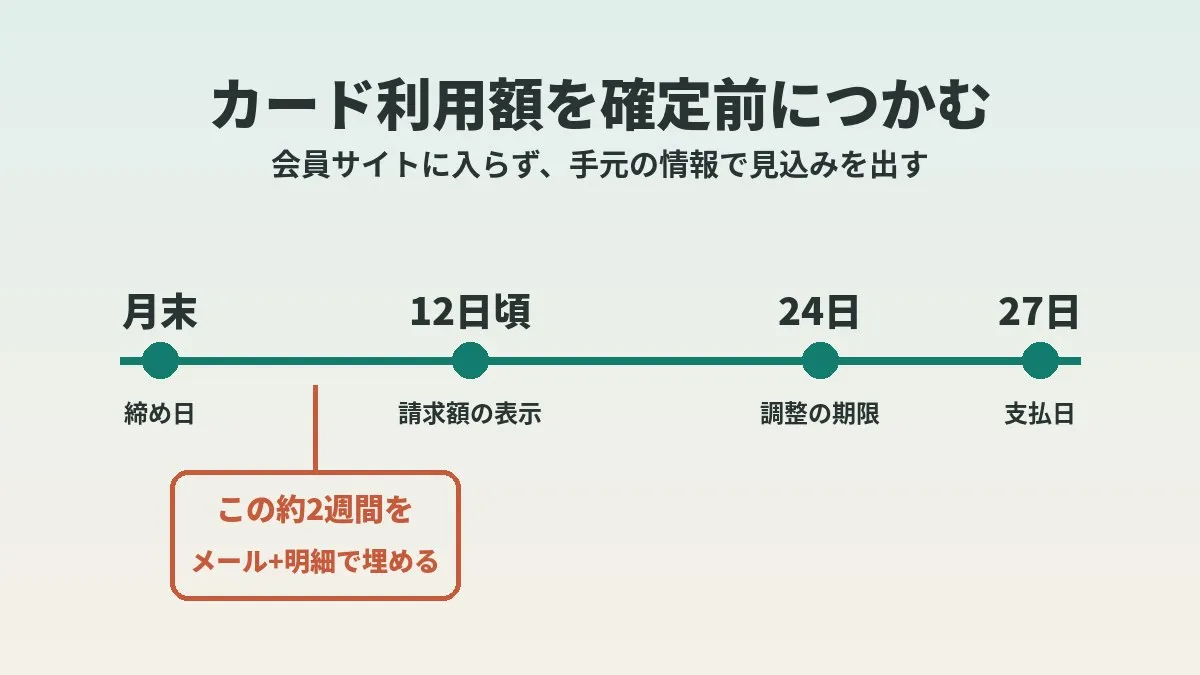
First, let me lay out the official schedule. The Rakuten Card FAQ says that purchases close at the end of each month. The payment date is the 27th of the following month. If the financial institution is closed that day, it moves to the next business day.
The timing of when the billing amount becomes visible was also stated officially. The billing amount for the month appears under “Statement” in Rakuten e-NAVI and the Rakuten Card app around the 12th of each month. If you are registered for the web statement service, an email about the scheduled billing amount is also said to arrive on or after the 12th.
| Item | Official guidance |
|---|---|
| Closing date (regular purchases) | End of each month |
| Closing date (Rakuten Ichiba, Rakuten Pay, Rakuten Travel) | 25th of each month |
| When the billing amount is displayed | Around the 12th of each month |
| Email about the scheduled billing amount | On or after the 12th of each month (when registered for the web statement service) |
| Payment date | 27th of the following month (next business day if closed) |
In other words, from month end until around the 12th, there are no official numbers. How to fill that roughly two-week gap is what this article is about.
Rakuten Ichiba purchases close on the 25th
This was an easy point to miss. Purchases on Rakuten Ichiba, Rakuten Pay, and Rakuten Travel are said to close on the 25th of each month. Anything spent from the 26th through month end is billed on the 27th two months later.
So “spending for the month” and “the withdrawal next month” will not be exactly the same. In a month where you shopped on Rakuten Ichiba close to month end, the gap is especially likely to show up.
Why I wanted to check without logging in to the member site
I leave the household finance checks to an AI assistant. I figured I would have it produce the month-end landing figure as part of the same flow.
The member site, however, requires a login. Because it is a screen where you enter a password, the AI could not open it. This is a mechanism to protect card information. I think the fact that no one but the cardholder can get in easily is actually reassuring.
So instead of trying to get around the login, I looked for other material. I tested how far I could get using only the information that had already reached me.
The difference between the preliminary and confirmed notification emails
The first source is the Card Usage Notification Email. Reading the Rakuten Card terms of service, there are two kinds of email.
| Type | When it is sent | What it contains |
|---|---|---|
| Card Usage Notification Email, preliminary version | When Rakuten Card approves the authorization request from the merchant | Date of use, amount, card user, and so on |
| Card Usage Notification Email (called the confirmed version in this article) | When Rakuten Card receives the usage data from the merchant | Date of use, merchant, amount, card user, and so on |
I think there are two big differences. One is how fast it arrives, and the other is whether the merchant is shown.
The preliminary version is sent at the time of authorization. In exchange for being fast, it is said not to show the merchant. The regular version, on the other hand, is sent after the usage data reaches Rakuten Card. This one does show the merchant. The guide page explains that confirmed transactions are notified in as little as two days.
Also, the preliminary version is positioned as an option. The guide page states that you cannot use the preliminary version on its own.
The email is not a bill
The cautionary notes are worth reading too. The guide page includes statements to the following effect.
- The content of the notification does not finalize the purchase or the billing
- It is not a statement or an invoice
- The “date and time of use” is when processing took place and may differ from the actual date and time of use
- You may receive multiple notifications because of amount corrections and the like
- You may receive a notification even for a purchase that was cancelled right away
In other words, the number you get by adding up the emails is not the billing amount itself. It seems best to treat it strictly as material for producing an estimate.
Some purchases do not trigger a notification email
It is also worth noting that emails alone will not capture everything. The guide page and the terms list purchases for which no email is sent.
| Cases said not to be sent or to be delayed | Notes |
|---|---|
| Small purchases | The guide page says under 500 yen, the terms say 500 yen or less |
| Recurring charges such as utilities | Many fixed costs probably fall here |
| Purchases overseas | Stated on the guide page |
| Rakuten ETC Card charges | Stated on the guide page |
| Cash advances | Stated in the terms |
| Purchases whose validity cannot be confirmed at authorization | Such as going over the available credit |
So fixed costs and small purchases cannot be tracked by email. It is safest to assume that the total from emails alone comes out on the low side. What fills this hole is the transaction data from the household budgeting app, covered next.
Build the base from the synced data in a household budgeting app
The second source is the card sync in a household budgeting app or accounting software. From here on I am writing in general terms. Sync specifications differ from app to app, so please check the official guidance for the one you use.
Many household budgeting apps import card transactions automatically. Unlike the emails, small purchases and fixed costs also show up in the list. So I think this is the better place to build the base of the total.
There is a time lag before things appear, though. Even the Rakuten Card guidance says it normally takes 2 to 4 business days for a charge to show up in the statement. The import into the app comes after that.
In my case, at month end the accounting software had caught up to purchases from two days earlier. Put the other way, the most recent two days were not yet visible.
I also wrote about how to handle this lag in my setup for having AI check card spending every night. I treat a delay of up to two days as within the normal range. This time it stayed within that range too.
Fill the most recent two days with the preliminary emails
What fills the remaining two days is the preliminary email. Because it arrives at the time of authorization, it reaches you sooner than the statement does.
I searched Gmail for preliminary emails that arrived in the two days up to month end. The result was zero. So I concluded that there was no card use in those two days.
Let me be a little careful here. Zero preliminary emails does not let you say for certain that usage was zero. Small purchases and recurring payments are not covered by the emails in the first place. Taking it to mean that there were no large purchases may be the more accurate reading.
Fixed costs such as phone and internet bills are exactly the kind of spending that is hard to track by email. Because they are almost the same every month, I feel that reviewing the level itself works better than tracking it.
Clicking this opens the Rakuten login page. Once you log in, you’ll see the campaign details.
Steps for working out your spending before it is finalized
Here is the flow as a set of steps. What I actually did was steps 1 through 5. Steps 6 and after are checks I added after reading the official guidance.
- Open the current month’s transactions for the card in your household budgeting app
- Check up to which date the transactions have been reflected
- Add up what has been reflected to form the base of the current month’s spending
- Search your email for preliminary notices that arrived during the period not yet reflected
- If there are preliminary notices, add those amounts on top of the base
- Compare the confirmed emails with the transactions to make sure you are not counting anything twice
- Remove purchases from the 26th onward on Rakuten Ichiba and similar services from next month’s expected withdrawal
- Record the resulting numbers with a note that they are estimates
I think the key is to divide up the roles. The base is the household budgeting app, and the most recent gap is filled by the preliminary emails. The confirmed emails are used for cross-checking the merchant.
How to look at it so you do not count twice
The same purchase appears in three places: the preliminary email, the confirmed email, and the statement. Add all of them and the total naturally balloons.
I decided not to add emails for any period already reflected in the transactions. I only add emails for the period the transactions have not yet caught up with. Drawing the line by period makes duplicates unlikely, I think.
The month’s landing figure and next month’s expected withdrawal are different numbers
Let me say a bit more about step 7. There were two numbers I wanted this time, and what goes into them was slightly different.
| Number you want | Purchases it covers | Main use |
|---|---|---|
| The month’s landing figure (spending for the month) | All purchases from the 1st through month end | Reviewing the household budget |
| Expected withdrawal on the 27th of the following month | Regular purchases through month end, Rakuten Ichiba and similar through the 25th | Preparing the account balance |
For reviewing the household budget, it is natural to line things up by the month you spent in. For preparing the account, on the other hand, what you need is the billing unit. Mix the two and you will probably end up puzzled that the numbers do not match.
On top of that, the arrival of usage data can be delayed. The official guidance says the billing month may end up being two months later or beyond. Utilities, gas stations, and online purchases were given as examples.
The payment method also has an effect. If you use installment payments or revolving payments, the month’s spending and the withdrawal amount will not match. Please think of what this procedure produces as a rough picture that assumes single-payment purchases.
Checking the answer after the bill is finalized
I also decided what to do after producing the estimate.
For the final withdrawal amount, I will open the member site myself and check after the bill is finalized in mid-October. I left this as the part where a person logs in and looks. I split what I leave to AI from what I do myself.
One more thing I decided is how to handle the night of the last day of the month. For anything spent that night, a preliminary email may arrive afterward. If one does, I add it to the estimate.
According to an official explainer article, what is displayed from the 12th onward is a provisional finalized amount. It said the payment amount can be adjusted until the 24th of that month at the latest. So taking one more look just before the 27th may give you peace of mind.
You can also check with the Rakuten Card app and the automated voice line
The member site is not the only way to check after finalization. Officially, the following methods are offered.
- “Statement” in Rakuten e-NAVI
- “Statement” in the Rakuten Card app
- The email about the scheduled billing amount that arrives on or after the 12th (when registered for the web statement service)
- The dedicated automated voice line (from the 11th of each month until the payment date)
The guide page for the Rakuten Card app says the scheduled billing amount is displayed on the 12th of each month. You can apparently also see the amount adjusted for cancellations and the breakdown of the bill. If you are checking on a smartphone, the app is probably the easy way.
If you want to know right after a purchase, there are also app notifications. The guide page explained that a notification arrives immediately after use. The setting is said to be on the “Notifications” screen under “App Settings” in the app menu.
How to set up the notification emails
Email delivery is set up from Rakuten e-NAVI, according to the guidance. Once set, emails are sent to your registered email address.
Only the initial setup requires a login. Once it is done, the emails arrive automatically. It is thanks to this groundwork that the month-end check no longer needs a login.
How family cards are handled was also on the guide page. Emails are sent for family card purchases too, but app notifications do not cover them. If you want to keep track of family spending as well, email seems like the better fit.
Common mistakes and pitfalls
Here are the points where I felt I could stumble while researching.
- Adding up the preliminary emails, the confirmed emails, and the statement all together and counting twice
- Assuming the email total is the billing amount as is
- Forgetting that small purchases and fixed costs do not show up in the emails
- Estimating the withdrawal without considering the 25th closing date for Rakuten Ichiba and similar services
- Leaving the preliminary notice for a cancelled purchase in the estimate
- Producing the estimate and never checking it against the finalized amount
I think the one that is especially easy to miss is the fourth, the difference in closing dates. The month’s landing figure and the expected withdrawal tend to look like the same number. Reading the official guidance makes it clear they need to be considered separately.
Who this suits and who it does not
Whether this approach fits depends on how you manage your household finances, I think.
It seems suited to people like these.
- People who want to know the broad shape of next month’s withdrawal before the month is out
- People who have already linked their card to a household budgeting app
- People who leave finance checks to AI or family and do not want to hand over a password
On the other hand, it may not suit people like these.
- People who want an amount accurate to the single yen
- People who use installment or revolving payments a lot, so that spending and billing differ widely
- People who use several cards for different purposes, with transactions scattered across them
When your cards are scattered, the effort of cross-checking grows with each card. I find that running everything through a single main card makes this procedure considerably easier.
What to check before you start
- I set up delivery of the Card Usage Notification Email in Rakuten e-NAVI
- I confirmed that the setting also delivers the preliminary version
- I checked how many days back my household budgeting app has synced card transactions
- I understand that Rakuten Ichiba, Rakuten Pay, and Rakuten Travel purchases close on the 25th
- I picked a day to check the answer on the member site or the app after the bill is finalized
How this divides the work with the nightly check
In an earlier article, I introduced a setup where AI looks at card spending every night. That one is for noticing large expenses on the day.
This procedure is the once-a-month closing. If the daily check is a “point,” the month-end landing figure is a check of the whole “surface.” The material is the same synced data, but what you want to see is different.
At work, too, daily numbers and the monthly close are handled separately. I feel the same thinking works for household finances. Notice anomalies daily, and bring the whole picture together monthly.
Keeping track of spending also helps on the points side. Some perks have a monthly cap, such as how the days ending in 5 and 0 work. If you can see your spending partway through the month, it may be easier to decide which day to buy on.
Frequently asked questions
Q. When do you find out the Rakuten Card withdrawal amount?
Officially, the billing amount for the month is displayed around the 12th of each month. You can check it under “Statement” in Rakuten e-NAVI and the Rakuten Card app. If you are registered for the web statement service, an email is also said to arrive on or after the 12th.
Q. Is there a way to know my spending before it is finalized?
For the official amount, you need to wait for finalization. An estimate, though, is possible, I think. The method is to use the synced data in a household budgeting app as the base and supplement the most recent days with the preliminary emails.
Q. How do the preliminary and confirmed versions differ?
Under the terms, the preliminary version is sent when the purchase is authorized. The regular notification email is sent when the usage data arrives from the merchant. The merchant is shown in the regular version and is said not to be shown in the preliminary version.
Q. Can I receive only the preliminary version?
The guide page states that you cannot use the preliminary version alone. The preliminary version is positioned as an option on the Card Usage Notification Email. It seems best to assume you will receive both.
Q. Are there purchases that do not trigger a notification email?
Yes. The guide page lists purchases under 500 yen and recurring charges such as utilities. Overseas purchases and Rakuten ETC Card charges are also said to be excluded. If you total up from emails alone, the figure may come out low.
Q. Is what I spend at month end withdrawn on the 27th of the following month?
Regular purchases close at month end, so the payment is basically on the 27th of the following month. Rakuten Ichiba, Rakuten Pay, and Rakuten Travel, however, are said to close on the 25th. There are also cases where the usage data arrives late and the charge is billed two months later or beyond.
Q. Is the amount shown around the 12th withdrawn exactly as is?
The official explainer article says that what is displayed from the 12th onward is a provisional finalized amount. The payment amount can apparently be adjusted until the 24th of that month at the latest. I think it is reassuring to look once more before the payment date.
Q. Can I have AI look at the member site for me?
In my environment, the AI could not open screens that require a password. It is a mechanism for safety, so I think it is better not to force a way through. Substituting information you already have on hand, such as emails and synced transactions, seems like the realistic approach.
Official sources I referred to
- Card Usage Notification Email (Rakuten Card)
- Terms of service for the Card Usage Notification Email service (Rakuten Card)
- Monthly closing date and payment date for card use (Rakuten Card FAQ)
- How to check this month’s payment amount (Rakuten Card FAQ)
- How to check card statements and billing amounts online (Rakuten Card FAQ)
- How to check your statement and billing breakdown in the app (Rakuten Card)
- How to check your Rakuten Card payment amount (Minna no Mane-katsu)
Summary
The billing amount is officially displayed around the 12th of each month. For the period before that, I was able to produce an estimate from the synced data in a household budgeting app and the notification emails. The base is built from the transactions, and the most recent gap is filled with the preliminary emails.
The email is not a bill, though. There are also differences in closing dates and purchases that trigger no email. So checking the answer after finalization is essential. I think of the procedure as one that includes that step.
Having the numbers in view at month end may make preparing for the next month a little easier. While you are looking over your card bill, why not take a look at the fixed costs that land on it every month?
Clicking this opens the Rakuten login page. Once you log in, you’ll see the campaign details.
This article contains affiliate advertising. If you sign up for a product or service through a link on this site, we may receive compensation from the partner company. The site operator is also an employee of Rakuten Group and may receive compensation through an employee referral program. The content and opinions here are based on the operator’s own experience and research regardless of any advertising relationship, but please read with the above in mind. See the Disclaimer & Affiliate Disclosure for details. Disclaimer & Affiliate Disclosure
This article includes machine-translated content. Please check the official Rakuten Mobile multilingual page for exact terms.
If you have concerns about Rakuten Mobile coverage or signal quality, you can consult through the official signal improvement request form .