- 01Picking up where I left off
- 02Re-measuring after fixing my workflow
- 03The real cost is about 4.7 yen per page
- 04How I read the ink levels and page counts
- 05Why I reversed my decision to wait
- 06Checking the HL-L2460DW specs
- 07Cost per page with genuine toner
- 08Compatible toner is about 1.6 yen per page
- 09Why genuine ink but compatible toner
- 10Lining up the cost per page
- 11Next steps
- 12Common mistakes and pitfalls
- 13Frequently asked questions
- 14Official sources I referred to
- 15Summary
Good morning, this is まさきん.
How much does the cost per page really change when you move from an inkjet to a laser printer? Last time I wrote “fix how I use the printer first” and held off on buying anything. I have since re-measured, so here is how I ended up deciding to switch.
Note: this reflects the information available at the time of publication. Please check the official sites for the latest conditions.
- After fixing how I run the inkjet and measuring again, the real cost of black came out at about 4.7 yen per page
- That is above the 3 yen per page threshold I had set for myself, so I decided to move only the daily drill printing to a monochrome laser
- With compatible toner the laser should come to about 1.6 yen per page. With genuine toner the official figure is about 3.5 yen per page
- The inkjet stays, on genuine ink. Color and A3 printing remain its job
- I have not ordered the laser printer yet. This article is a note from the “decided” stage
Picking up where I left off
The previous article was the one where I measured my inkjet’s actual cost per page. The real cost of black ink came out at roughly 13 to 33 yen per page, a long way from the catalog figure of about 2.0 yen.
The prime suspect was my own habit of waking the printer up over and over late at night. So before buying a machine, I consolidated the print jobs into a single run. I wrote that I would decide on a laser based on one question: does the real cost per page exceed 3 yen?
This article is the answer to that question. I will leave the measuring method and the cause discussion to the previous post. Here I only cover the re-measured numbers and the decision that followed.
Re-measuring after fixing my workflow
The new measurement covered about 8 days. During that time the lifetime page count went up by 73 pages. The black ink level went from 11% to 5%. Each color went from 91% to 87%.
| Item | Start of measurement | About 8 days later | Difference |
|---|---|---|---|
| Lifetime page count | (baseline) | +73 pages | 73 pages |
| Black ink remaining | 11% | 5% | down 6 points |
| Each color ink remaining | 91% | 87% | down 4 points |
Previously black was dropping about 5% in a single night. Now it is 6 points over 8 days, so the drain has calmed down a lot. I was honestly glad to see that.
Whether it went all the way back to the catalog figure is another story, though.
The real cost is about 4.7 yen per page
The formula is the same as last time. Multiply the cartridge price by the share that was used up, then divide by the number of pages added.
- Work out the share used (11% → 5%, so 6%)
- Work out the pages added over the same period (73 pages)
- Black ink price × 6% ÷ 73 pages
The black cartridge is the high-capacity LC412XLBK. Using the same single-unit price as last time, 5,698 yen, it comes to about 4.7 yen per page.
Compared with the earlier 13 to 33 yen, that is a big drop. Compared with the catalog figure of about 2.0 yen, it is still a little more than double. It is also above my own 3 yen threshold.
For reference, the price on the official online store was 6,270 yen (tax included) as of October. The same calculation at today’s price gives about 5.2 yen. If I think in terms of the ink I will be buying from now on, that figure may be closer to reality.
The cause of the sudden drain is still not confirmed
I want to be upfront here. I still have not pinned down what caused the earlier sudden drain.
It is a fact that the drain settled after I fixed my workflow. That is consistent with the cleaning-cycle theory. But this was not an experiment comparing like-for-like conditions. I do not think I can call it confirmed.
Even so, the decision was not hard. Whatever the cause, the number after the fix was above the threshold. Fixing the workflow alone did not bring the cost back to the catalog figure. That is what I learned this time.
How I read the ink levels and page counts
During the re-measurement I also stumbled a little over how to read the numbers.
At first I went to the multifunction printer’s web admin screen. It required a login, though, and neither the ink levels nor the page count could be read as is. So I tried other routes.
Two worked: SNMP and ipptool. SNMP is a mechanism for reading the status of network devices. ipptool is a command that queries a printer over the standard printing protocol. Both returned the remaining ink and the lifetime page count without logging in.
Which routes work will probably vary by model and settings. The route is not the important part. What matters is being able to read the numbers twice with the same method and take the difference. If you note down the numbers on day one, the rest is subtraction and division.
Why I reversed my decision to wait
Last time I set the dividing line at “does the real cost exceed 3 yen per page?” This time’s roughly 4.7 yen is clearly over that line.
One more thing: the nature of the number has changed. The earlier 13 to 33 yen included the cost of my own poor workflow. There was room to bring it down by fixing things. The 4.7 yen this time is the number after the fix. From here I feel it is hard to push it lower through usage alone.
The official inkjet page had a note that backs this up. It says running costs vary with how often you print and how often cleaning runs. It also says the printer periodically ejects and consumes ink while it is powered on. In a household that prints a little every day, falling short of the catalog figure may simply be normal.
So I reversed my decision to wait. I will move only the daily drill printing to a monochrome laser.
Checking the HL-L2460DW specs
The destination is the Brother HL-L2460DW, the same candidate as last time. I have not ordered it yet. I am at the stage of explaining it to my family and then ordering. So I cannot write any hands-on impressions. I will just list the specs I confirmed on the official pages.
| Item | Official description |
|---|---|
| Print speed (A4, single-sided) | About 34 pages per minute |
| Duplex printing | Automatic duplex supported (about 16 pages per minute at A4) |
| Connectivity | USB, wired LAN, wireless LAN |
| Paper feed | Standard tray 250 sheets + manual feed 1 sheet |
| Maximum paper size | A4 |
| Bundled toner | Starter toner (about 700 pages) |
| Replacement toner | TN32JXL (about 3,000 pages), TN32JXXL (about 5,000 pages) |
| Drum unit | DR32J (about 15,000 pages) |
| Dimensions | Width 356 × depth 360 × height 183 mm |
| Price | Open price |
Three points stood out as things to watch. First, wired LAN and wireless LAN cannot be used at the same time. You pick one or the other.
Second, the bundled toner is a starter cartridge good for about 700 pages. Its capacity differs from the replacement cartridges. At our pace, the first replacement will probably come fairly soon.
Third, the maximum paper size is A4. It cannot print A3. This became one of the reasons to keep the multifunction printer.
- Wired LAN and wireless LAN are mutually exclusive. Decide which one to use up front
- The bundled toner is good for about 700 pages. It is not the same as the high-capacity replacements
- Maximum paper size is A4. No A3 and no color
Cost per page with genuine toner
Let me look at the genuine-toner cost first. If I decide purely on how cheap compatible toner is, the assumptions tend to fall apart later.
The running cost on the official page is about 3.5 yen (tax included) per page for monochrome A4 single-sided. That is the figure when using the super-high-capacity TN32JXXL. A note says it comes to about 4.3 yen per page once the drum is included.
I also checked against the official online store prices. The TN32JXXL is 17,160 yen (tax included) for about 5,000 pages. Dividing gives about 3.4 yen. The high-capacity TN32JXL is 11,330 yen for about 3,000 pages, so about 3.8 yen. The DR32J drum is 11,550 yen for about 15,000 pages. That adds roughly 0.8 yen per page on top.
In other words, running on genuine supplies only costs about 4.3 yen per page. That is only slightly below the 4.7 yen I measured on the inkjet. If I stayed on genuine toner, there might not be much point in switching.
Note that the page yield for laser toner is a published value based on the JIS X 6931 standard. Like ink, it is the number you get when printing a fixed test document. Drill sheets have a lot of white space so the result should be close, but I will not know until I actually use it.
Compatible toner is about 1.6 yen per page
That brings us to compatible toner. I looked up high-capacity compatible cartridges equivalent to the TN32JXXL at several retailers.
In my previous estimate I had assumed about 1.25 yen per page. I could not find anything at that level, though. In the range I checked, the going rate is around 1.6 yen per page.
That is about 30% higher than I expected. My estimate was a bit optimistic. Even so, it is less than half the genuine cost and about a third of what I measured on the inkjet.
Compatible prices move with the retailer and the season. So please treat 1.6 yen as “a rough guide as of when I checked.” Right before buying, I plan to divide the price by the stated page yield once more.
Why genuine ink but compatible toner
I split the consumables policy by machine.
The inkjet is genuine ink only. That is less a choice than the only option. My model throws an error if you put compatible ink in it. So there was nothing to deliberate.
For the laser, I decided compatible toner is fine. The reason is what it will be used for. What I print is drill sheets for my kids, not documents to be submitted anywhere. I figured slight differences in density would not bother us.
That said, I am choosing this with the risks in mind. Brother recommends using genuine supplies. It states clearly that failures caused by non-genuine consumables are repaired for a fee even within the warranty period. There was also a proviso that it is not asserting every non-genuine product causes problems.
- A failure caused by compatible toner can become a paid repair even within the warranty period
- Compatible products vary in quality and price from retailer to retailer. The stated page yield is not necessarily the same as the genuine standard-based value
- If the warranty matters most to you, first check whether you break even at the genuine rate of about 3.5 yen per page
In our case, the relatively low price of the printer itself also nudged the decision along. Would I make the same call on an expensive multifunction machine? Probably not.
Lining up the cost per page
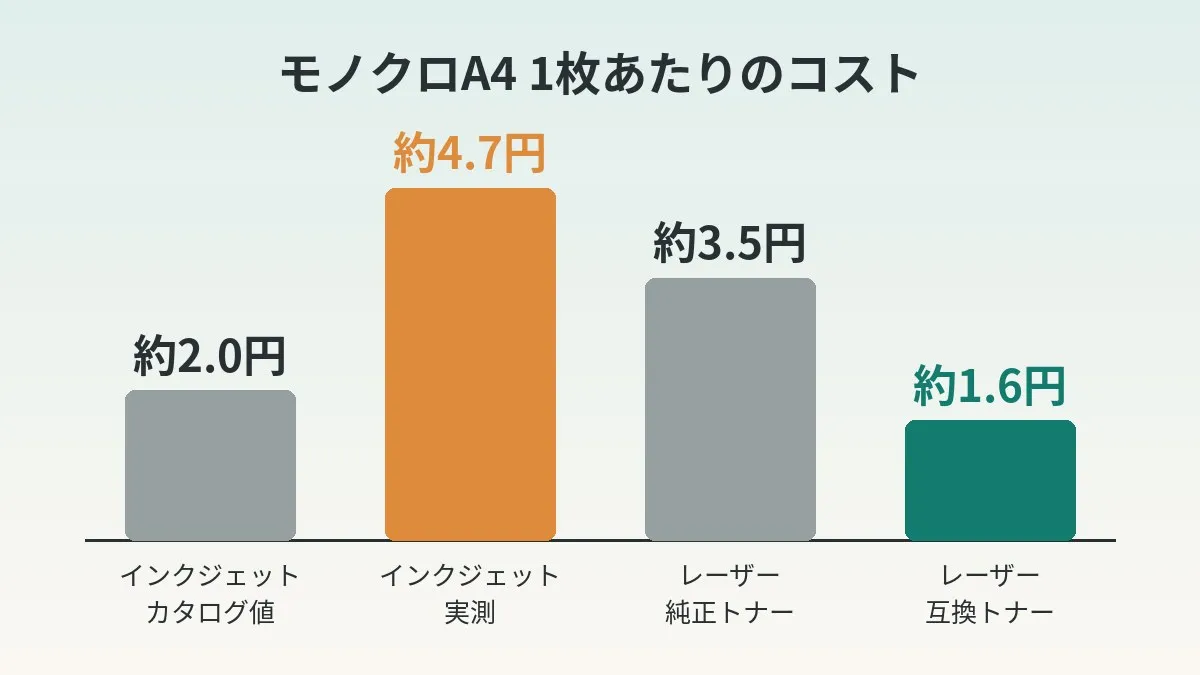
Here are all the numbers so far in one table.
| Method | Per page | Source of the number |
|---|---|---|
| Inkjet (catalog figure) | About 2.0 yen | Official running cost |
| Inkjet (measured before fixing workflow) | About 13 to 33 yen | Previous article |
| Inkjet (measured after fixing workflow) | About 4.7 yen | This re-measurement |
| Laser + genuine toner | About 3.5 yen | Official figure (about 4.3 yen including drum) |
| Laser + compatible toner | About 1.6 yen | Going rate I found |
The gap between the measured inkjet cost and compatible toner is about 3.1 yen per page.
The printer is sold at an open price. When I checked last time, the street price was around 13,000 yen. Dividing by this gap, the printer pays for itself at roughly 4,200 pages. As I wrote last time, we print about 2,500 pages a year, so it should take less than two years.
This is a comparison of toner cost alone, though. The drum needs replacing at about 15,000 pages. A genuine drum is about 0.8 yen per page. Even adding that, the total is around 2.4 yen, still under the 3 yen threshold.
Compared on genuine toner, the gap is only about 1 yen. Payback would take more than 10,000 pages. The benefit of switching leans heavily on the assumption of using compatible toner. That is a point I want to stay aware of myself.
The idea of comparing by unit cost works just the same for telecom bills. Instead of the monthly total, look at how much you are paying relative to how you actually use it. Mobile phone bills are worth checking once from that angle too.
Clicking this opens the Rakuten login page. Once you log in, you’ll see the campaign details.
How the two machines split the work
After the switch, the two machines will be divided by purpose.
| Machine | Printing it handles | Consumables |
|---|---|---|
| Monochrome laser (HL-L2460DW) | Daily drills | Compatible toner |
| Inkjet multifunction printer | Color and A3, scanning and copying | Genuine ink |
I am not getting rid of the multifunction printer. The laser cannot print color or A3. Scanning and copying also stay with the multifunction machine.
Once the inkjet gets less use, a different worry appears. If it sits idle for long stretches, the ink consumed just to keep the nozzles in good condition may become relatively more noticeable. I plan to measure that again with the same method after the switch.
Next steps
Since this is before ordering, these are plans.
- Show my family the numbers and explain why we are splitting across two machines
- Decide where it goes (356 mm wide × 360 mm deep, plus working space in front)
- Order the printer. No rush on compatible toner; start with the bundled starter toner
- Decide whether to connect by wired LAN or wireless LAN
- Switch only the drill print destination to the laser
- Record the lifetime page count and recalculate the cost per page at every toner change
The reason I am not stocking up on compatible toner from the start is that I want to see the printer run without problems on the genuine bundled cartridge first. It also makes it easier to isolate any initial defects.
The drill system behind all this printing is described in my article on auto-generating hiragana drills. Since only the print destination changes, I expect to leave the generation side untouched.
Common mistakes and pitfalls
Buying based on the numbers from before you fixed your workflow. If I had calculated with the earlier 13 to 33 yen, payback would have looked like a few months. Re-measuring after the fix gave 4.7 yen. The decision may not change, but the payback outlook changes a lot.
Assuming the lowest compatible toner price. I estimated at 1.25 yen and the going rate was 1.6 yen. I think it is worth confirming first whether the price you used in your estimate can still be had.
Forgetting to include the drum. On models where the toner and drum are separate, the drum replacement cost shows up later. The official running cost also lists a separate figure that includes the drum.
Assuming the bundled toner has the same capacity as a replacement. On this model the bundled cartridge is good for about 700 pages. That is a different thing from the 5,000-page replacement, so the first swap comes early.
Getting rid of the inkjet and regretting it. A monochrome laser cannot print color or A3. If you need those even a few times a year, it is safer to plan the space on the assumption that you keep the inkjet.
- Have you re-measured the inkjet cost per page using numbers from after fixing your workflow?
- Have you set your switching threshold (for example 3 yen per page) in advance?
- Are you still comfortable with the cost per page on genuine toner including the drum?
- Have you redone the division with the going price of compatible toner right before buying?
- Do you understand that a failure caused by compatible supplies can be a paid repair even within the warranty period?
- Have you decided where color, A3, scanning and copying will go?
- Have you decided where the second machine goes and how it connects (wired or wireless)?
Frequently asked questions
Q. I fixed my workflow, so why does the cost not drop to the catalog figure?
I do not know the exact cause. According to the official note, cost varies with how often you print and how often cleaning runs. Ink is apparently also used up by periodic ejection while the power is on. I think printing a little every day is simply a less favorable pattern than the continuous-printing conditions.
Q. What conditions are the catalog page yields based on?
For the inkjet, it is the value from printing the ISO/IEC 24712 document patterns using the ISO/IEC 24711 method. Only ink cost goes into the calculation. For laser toner, it was a published value based on JIS X 6931. Both assume printing a fixed document continuously.
Q. How did you decide on the 3 yen per page threshold?
It is a guide I set from the break-even calculation last time. At the catalog figure of about 2.0 yen there is no point in switching. If the measured cost goes over 3 yen, the laser tends to come out ahead. I set it as a line at about that level.
Q. Are you not going to use compatible ink?
No. My multifunction printer throws an error when compatible ink is installed. So the inkjet side is genuine only.
Q. What happens to the warranty with compatible toner?
Brother’s official page says failures caused by non-genuine consumables are repaired for a fee. The same applies within the warranty period. If you use compatible products, I think the deciding factor should be whether you can accept that risk.
Q. Is there any point in switching if I use genuine toner?
Looking at cost per page alone, maybe not much. Genuine comes to about 4.3 yen including the drum, which is nearly level with the 4.7 yen I measured. Not having to worry about ink disappearing into cleaning cycles is a separate kind of value, though. For a household with long gaps between print jobs, it could be reasonable to weigh that more heavily.
Q. Can you not see the ink levels on the web admin screen?
On our multifunction printer, neither ink levels nor page counts were shown without logging in. SNMP and ipptool let me read them without a login. It probably differs by model and settings, so try it on your own machine first.
Q. How does the laser printer feel to use?
I have not ordered it yet, so I do not know. Once it arrives and I have numbers, I plan to measure the cost per page the same way.
Official sources I referred to
- HL-L2460DW product page (Brother)
- HL-L2460DW specifications (Brother)
- HL-L2460DW consumables and options (Brother)
- TN32JXXL super-high-capacity toner (Brother Direct Club)
- About Brother genuine toner (Brother)
- Replacing the toner cartridge (HL-L2460DW Online User’s Guide)
- MFC-J7300CDW product page (Brother)
- Calculation conditions for inkjet print cost and page yield (Brother)
- LC412XLBK high-capacity black (Brother Direct Club)
Summary
Fixing my workflow calmed the ink drain considerably. Even so, the real cost was about 4.7 yen per page, which did not get under the 3 yen threshold. So I am moving only the daily drills to a laser.
I do not think re-measuring before replacing the machine was a detour. If the number had still been 13 to 33 yen, I might have bought with the cause left in place. The overall approach to reviewing fixed costs is summarized in how to get started with a fixed-cost review.
Thinking in terms of “how much per page” can be applied to other spending as well. Telecom costs, too, may look different when you view them as what you pay for the amount you use. If you like, take a look at your own statement sometime.
Clicking this opens the Rakuten login page. Once you log in, you’ll see the campaign details.
This article contains affiliate advertising. If you sign up for a product or service through a link on this site, we may receive compensation from the partner company. The site operator is also an employee of Rakuten Group and may receive compensation through an employee referral program. The content and opinions here are based on the operator’s own experience and research regardless of any advertising relationship, but please read with the above in mind. See the Disclaimer & Affiliate Disclosure for details. Disclaimer & Affiliate Disclosure
This article includes machine-translated content. Please check the official Rakuten Mobile multilingual page for exact terms.
If you have concerns about Rakuten Mobile coverage or signal quality, you can consult through the official signal improvement request form .