- 01The crack was at the base of the handle
- 02The four options I first considered
- 03The next day, a reply offering a free replacement
- 04The Dyson manufacturer warranty is 2 years from the purchase date
- 05Four ways to get in touch
- 06How to compare: in warranty, just out of warranty, and long out of warranty
- 07Decision table: repair, replace, or reinforce
- 08Why I bought an extra battery after the replacement
- 09The plan for disposing of the old body and battery
- 10Common mistakes and pitfalls
- 11Who this suits and who it does not
- 12What to check before you start
- 13Frequently asked questions
- 14Official sources I referred to
- 15Summary
Good morning, this is まさきん.
The body of my Dyson cracked, and the warranty had already run out. Before thinking about a replacement I asked support, and that changed how things went, so I am writing it down. I hope it gives you something to compare with if you are torn between repairing and replacing right after a warranty expires.
Note: this information is current as of publication. Please check the official sites for the latest terms.
- If the body of your Dyson cracks, contact support before you buy a new one
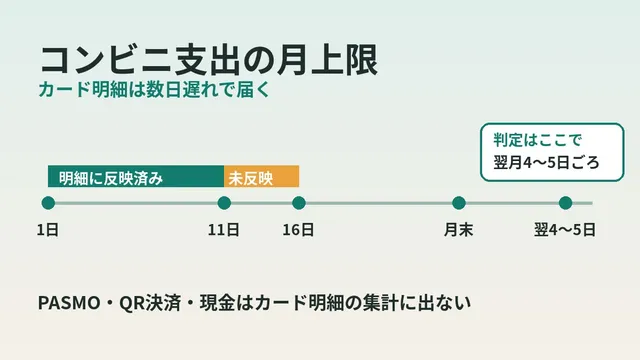
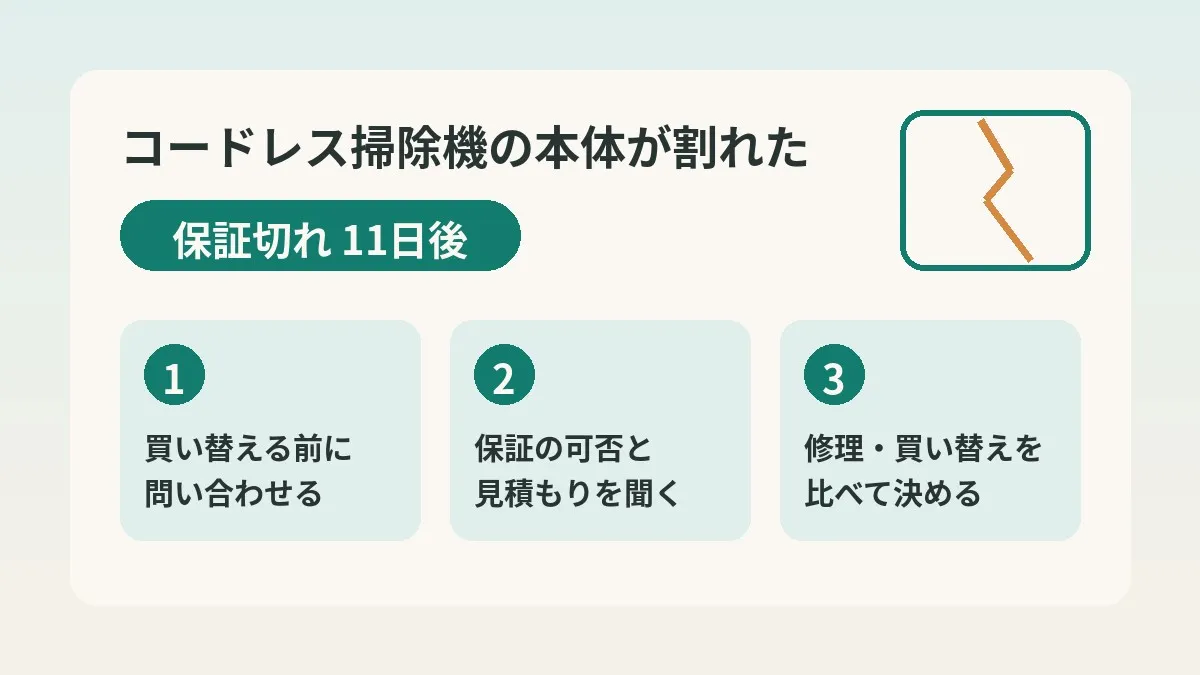
- The manufacturer warranty runs for 2 years from the purchase date. I noticed the crack 11 days after mine ended
- The day after I emailed, I was told it would be replaced free of charge, treated as a warranty case this one time only
- Out-of-warranty repairs are paid. The price is not on the official pages, so ask for a quote
- Dispose of the old body under your municipality’s rules, and remove the battery and hand it in for collection separately
The crack was at the base of the handle
The machine I use is a Dyson Micro (SV33).
The crack runs from the base of the handle into the body cover. That is the spot that takes the load every time you grip it.
When I checked the day I noticed it against the purchase date, the warranty had expired 11 days earlier. As timing goes, that was a very near miss.
The four options I first considered
When I noticed the crack, I figured I had four options.
- Have it handled under the manufacturer warranty
- Send it in for a paid repair
- Buy a new vacuum cleaner
- Print a part on a 3D printer and reinforce it
The warranty had expired, so I assumed the first one was out. In practice, then, I was choosing between repair and replacement.
But without knowing what a repair would cost, there was nothing to compare. To get the numbers I needed, I decided to ask first.
I asked just two things by email
On October 3, I wrote to the support email desk. I asked these two things.
- Whether they could handle it in a way equivalent to the warranty
- If not, a quote for a paid repair
The first was a nothing-to-lose question. With the second, even a refusal would let me move on to comparing against a replacement. Asking in a way where either answer decides the next step may have been the key point.
The next day, a reply offering a free replacement
The reply arrived the next day, October 4. The gist was as follows.
- Because the warranty had only just ended, it would be treated as a manufacturer warranty case this one time only
- The body and the cyclone would be replaced free of charge
- From the next time on, it would be paid
I replied with the delivery address on October 5, and the parts shipped on October 6. That was three days after my inquiry. I have already received them and done the swap.
- The free replacement was an individual decision, explicitly described as “this one time only”
- This does not mean repairs are free even after the warranty period
- The response depends on when you bought it, the condition of the product, and the manufacturer’s judgment
- You may not get the same result, so it is safer to ask for a paid repair quote at the same time
The timeline by date
Here is the sequence as a table.
| Date | What happened | What I did |
|---|---|---|
| 11 days after the warranty ended | Noticed the crack in the body | Thought through four options |
| October 3 | Contacted the email desk | Asked about warranty-equivalent handling and a quote |
| October 4 | Reply: treated as a warranty case this one time only | Checked the details |
| October 5 | Delivery address needed | Sent a reply email |
| October 6 | Replacement parts shipped | Received them later and swapped them in |
I have one thing to own up to. The note in my own task list was still stuck on the day I sent the inquiry. For a pending matter that moves by email, checking for a reply email first would have been faster.
The Dyson manufacturer warranty is 2 years from the purchase date
From here on I am organizing the official information. The SV33 user manual states that the manufacturer warranty is 2 years from the purchase date.
It covers free replacement or repair where a manufacturing defect is found. Parts and diagnosis are included, as is round-trip shipping to the repair center.
The warranty generally starts on the purchase date. If you bought from an online store or had it delivered, it starts the day after shipment.
The manual also lists what is not covered. The main items are these.
- Faults caused by use that does not follow the manual, or by lack of maintenance
- Use other than household use
- Use of non-genuine parts, or repair or modification by anyone other than the manufacturer
- Wear from normal use of items such as filters and brushes
- Battery deterioration from normal use
Battery deterioration is not covered. That is consistent with my buying a replacement battery out of my own pocket.
Register the product and keep proof of purchase
The official product warranty registration page says that registering gives you the 2-year manufacturer warranty. You enter the serial number and the purchase date.
The repair service page says product registration is required to use it. If you have not registered, apparently it is done when the repair is accepted.
The manual also asks you to keep the receipt or invoice and the delivery slip. Without the purchase date, nobody can tell whether you are within warranty. Even just keeping a photo of the receipt should help later.
Four ways to get in touch
These are the four contact channels I could confirm on the official contact page.
| Channel | Details | Good for |
|---|---|---|
| Phone | Toll-free. 9:00 a.m. to 5:30 p.m. (excluding the year-end and New Year period and similar). The number is on the official page | Deciding on the spot by talking it through |
| Chat | Use the icon at the bottom right of the screen | Exchanging text when you are in a hurry |
| LINE | Add as a friend to use | Handling everything on your phone |
| Sent from a dedicated form. Replies may take time | Calmly explaining photos and the background |
The page says emails are answered in order, so it may take time. It also suggests chat during business hours if you are in a hurry.
In my case the reply came the next day, but that may have been luck. For people who cannot make a call during weekday daytime, I find email an easy channel to use.
Information to gather before you ask
The official page asks you to have the serial number ready when you get in touch. Here is what speeds things up if you have it on hand.
| What to gather | Where to find it | Notes |
|---|---|---|
| Serial number | The sticker on the underside of the battery, etc. | On some models, behind the clear bin |
| Purchase date | Receipt, invoice, or delivery slip | The basis for whether you are within warranty |
| Where you bought it | Order history or invoice | Also check here for any retailer extended warranty |
| Photos of the problem | Take them yourself | Showing where the crack is and how far it goes |
| What you want to ask | Write it out in a note | Whether the warranty applies, and a paid quote |
The official guidance page explains where the serial number is for each model. For cordless models, the quickest thing seems to be looking at the underside of the battery first.
Writing about fixed-cost reviews, I feel that communication costs have the same structure. Until you ask, you do not know the actual amount.
Clicking this opens the Rakuten login page. Once you log in, you’ll see the campaign details.
How to compare: in warranty, just out of warranty, and long out of warranty
I put the first move for each situation into a table. The in-warranty and out-of-warranty rows are based on the official guidance. The just-out-of-warranty row is a way of thinking based on my single example.
| Situation | First move | Likely cost | Things to note |
|---|---|---|---|
| Within the warranty period | Contact support and request repair or replacement | Free if covered | Paid if it falls under an exclusion |
| Just after the warranty ended | Ask about both warranty-equivalent handling and a quote | Paid in principle | It is a case-by-case decision, so do not expect too much |
| Some time after the warranty ended | Get a quote and compare with replacing | Paid | Products past end of support cannot be repaired |
It is clearly stated that repairs outside the warranty period are paid. But specific prices were not on the official pages. So asking for a quote is the first task.
The repair service fee is said to include labor, parts, and round-trip shipping. A courier collects from your home, so there is no need to carry it anywhere.
How the official repair service works
Here is the flow, organized from the repair service page.
- Apply for a repair by phone, chat, or LINE
- Pack the product in a box and hand it to the courier who comes to collect it
- The repair center inspects and repairs it
- After the repair it is sent back, and you are notified by email
The guideline for shipment is normally within 72 hours of arrival at the center. Depending on parts stock, it can apparently take a little longer.
For registered cordless vacuum cleaners, there was also something called Express Repair. The product is repaired the day it arrives and shipped in as little as one day. The page says there is no extra charge.
However, for products whose support has ended, both repairs and parts supply have ended too. With an older model, it seems better to ask first whether it is still eligible.
Decision table: repair, replace, or reinforce
This table compares the three options other than the warranty.
| Option | Upside | Concern | When it seems to fit |
|---|---|---|---|
| Paid repair | You keep a model you are used to | The price depends on the quote | Not long since purchase |
| Replacement | Comes with a new warranty | Tends to be the biggest outlay | The battery is fading too |
| Reinforcing it yourself | Only costs the parts | May fall outside the warranty | Neither warranty nor repair is likely |
The reinforcement idea was to 3D-print a backing plate. That said, the manual states that repair or modification by anyone other than the manufacturer is not covered. So it seems best to think about reinforcement only after seeing the result of the inquiry.
As an order, I think “inquiry → quote → compare with replacing → reinforce” is the safe one. The later the option, the harder it is to undo.
The way of comparing is the same as in calculating replacement blades versus a new electric shaver body. And if you do replace, deciding your buying price first and waiting for a sale may also be useful.
Why I bought an extra battery after the replacement
After the replacement, I decided to keep using the same model. On top of that, I ordered a genuine replacement battery separately from the official shop.
What was replaced this time was the body and the cyclone; the battery stayed as it was. A battery used for two years is a consumable, so this part is on me.
On the official parts page, the Dyson Micro battery was 9,900 yen including tax. Compatible models are listed as SV21, SV33, and HH17. At the time of writing it was shown as out of stock, so availability seems to vary.
You need a Phillips screwdriver to swap it. The official support page has a video of the steps. There was also a note that using non-genuine parts may mean the warranty no longer applies.
The plan for disposing of the old body and battery
The remaining job is disposing of the old body and cyclone. My plan is to use the new body a few times and dispose of the old one if there are no problems. I have not done it yet, so this is just the plan laid out.
- Use the new body a few times and check for faults
- Remove the battery from the old body with a Phillips screwdriver
- Cover the battery’s metal terminals with vinyl tape
- Look up your municipality’s sorting rules and put out the body and cyclone accordingly
- Take the battery to a shop with a collection box or to your municipal office
The manual says to remove the battery before disposal. The guidance is not to disassemble the battery and to dispose of it according to local rules.
As for the body, I will check with my municipality whether it counts under small home appliance recycling. According to the Government Public Relations Online explanation, both the items collected and the method are decided by each municipality. Methods include box collection and station collection, and a fee may apply.
There was also a warning not to hand items to unlicensed junk collectors. Door-to-door collection by small truck and collection advertised by flyer are said to violate the law in many cases.
Do not mix lithium-ion batteries into the trash
The battery needs more care than the body.
- The official FAQ says it can be collected at stores with a rechargeable battery recycling box
- Before you take it in, check whether the store is a participating one
- JBRC collection covers batteries from member companies’ products that are not damaged, swollen, or wet
- Insulate the terminals with vinyl tape. Cellophane tape cannot be used
NITE is warning about incidents where products with lithium-ion batteries catch fire at waste treatment facilities. When they are crushed during shredding, it can apparently lead to a fire.
Consumer Affairs Agency material also gave cordless vacuum cleaners as a familiar example. It says that throwing them away unsorted can cause fires in collection trucks and treatment facilities. It is also worth remembering to run the battery down as far as possible before disposal.
Common mistakes and pitfalls
From this experience and the official information, here are mistakes that are easy to make.
- Replacing before asking: if you decide without even getting a quote, you never have anything to compare.
- Acting as if it will be free: out of warranty, paid is the rule. Planning on hope alone may cause trouble later.
- Fixing it yourself first: modifications and non-genuine parts are not covered. You erase your own room to negotiate.
- Not knowing the purchase date: nobody can judge whether you are within warranty. Look for the receipt or order history first.
- Missing the reply email: for a matter that moves by email, check first whether a reply has come.
- Throwing away the battery with the body: there is a risk of fire. Remove it and hand it in separately.
Who this suits and who it does not
I think asking first and then deciding suits people like these.
- People whose warranty has only just ended, or who are not sure whether it has
- People who are happy with their current model and want to keep using it
- People who can get by without a vacuum cleaner for a few days
On the other hand, in cases like these it may be fine to think about replacement first.
- You are using an old model whose support has ended
- The battery and suction are both weak and you were already thinking of replacing it
- You cannot go even one day without a vacuum cleaner
Either way, asking costs nothing. If you are unsure, how about asking first and then deciding?
What to check before you start
- I have a receipt or order history that shows the purchase date
- I have checked where the serial number is
- I have taken photos of where it cracked
- My message asks about both warranty coverage and a paid repair quote
- I have checked whether I have an extended warranty from the retailer or my card
- I have looked up how my municipality collects small appliances and rechargeable batteries
Extended warranty terms differ by retailer and by card. I did not use one this time, so if you have one, take a look at the terms of your contract.
Frequently asked questions
Q. Once the Dyson warranty period has passed, is a repair always paid?
The official repair service page says repairs outside the warranty period are paid. Mine was treated as a warranty case this one time only, but that was an individual decision. You may not get the same response, so asking for a paid quote at the same time gives you peace of mind.
Q. How much does a repair cost after the warranty ends?
The official pages did not list specific amounts for standard repairs. The fee is said to include labor, parts, and round-trip shipping. I expect it varies by model and symptom, so ask support for a quote.
Q. Is a cracked body covered by the warranty?
The manual says the warranty covers cases where a manufacturing defect is found. Faults caused by how it was used, or by modification, are not covered. The decision will likely turn on what caused the crack, so I think it is best to ask with photos attached.
Q. Is phone or email better for getting in touch?
If you are in a hurry, phone or chat suits you better. The official page says email replies may take time. I used email.
Q. Where is the serial number written?
On cordless vacuum cleaners it seems to be on the sticker on the underside of the battery in most cases. If you cannot find it, check behind the clear bin after removing it. The official serial number guidance page shows the location for each model.
Q. Is a replacement battery free under the warranty?
Battery deterioration from normal use is stated as not covered. I also ordered my replacement battery from the official shop at my own expense. Compatible models are fixed, so it is safer to check your model number before buying.
Q. Can I put the old body out as non-burnable trash?
How to put it out differs by municipality. Some collect it as a small home appliance, and in others it falls into a different category. Always remove the battery and hand it in for collection separately from the body.
Q. Is it all right to glue or reinforce it myself?
The manual states that repair or modification by anyone other than the manufacturer is not covered. If you work on it before asking, it may become harder to raise the matter. I think reinforcement can wait until the other options are gone.
Official sources I referred to
- Dyson: Contact us
- Dyson: Repair service
- Dyson: Product warranty registration
- Dyson: How to find your serial number
- Dyson Micro cordless cleaner (SV33) support
- Dyson Micro battery (965363-01)
- Dyson: Replacement parts FAQ
- JBRC: How to dispose (what is and is not collected)
- JBRC: Search for participating stores and municipalities
- Government Public Relations Online: Recycling used small home appliances
- Ministry of the Environment: Overview of the Small Home Appliance Recycling Act and related laws
- NITE: Batteries, “Fires at waste treatment facilities”
- Consumer Affairs Agency: Beware of fires caused by products using lithium-ion batteries
Summary
The one lesson this time is “do not replace before you ask.” The free replacement was an individual decision, and I think luck played a part. Still, just asking for a quote gives you something to compare.
How to approach a household budget review as a whole is covered in how to start reviewing fixed costs. If something of yours breaks, please ask just once before you replace it.
Your monthly communication costs may also look different once you check the terms.
Clicking this opens the Rakuten login page. Once you log in, you’ll see the campaign details.
This article contains affiliate advertising. If you sign up for a product or service through a link on this site, we may receive compensation from the partner company. The site operator is also an employee of Rakuten Group and may receive compensation through an employee referral program. The content and opinions here are based on the operator’s own experience and research regardless of any advertising relationship, but please read with the above in mind. See the Disclaimer & Affiliate Disclosure for details. Disclaimer & Affiliate Disclosure
This article includes machine-translated content. Please check the official Rakuten Mobile multilingual page for exact terms.
If you have concerns about Rakuten Mobile coverage or signal quality, you can consult through the official signal improvement request form .