- 01Second on my fixed-cost list: Rakuten Mobile
- 02The 3 lines we use couldn’t go any lower
- 03Two places with room to save
- 04The family discount wasn’t applied to any of the 3 lines
- 05I cancelled 1 dormant line
- 06What I checked on the official site before cancelling
- 07The line in my parent’s name will wait until year-end
- 08Expected savings: about ¥1,400 a month
- 09What I haven’t confirmed yet
- 10Two things that tripped me up
- 11Common mistakes and pitfalls
- 12Check before you start
- 13FAQ
- 14Official sources I referred to
- 15Summary
Good morning, this is まさきん.
I’ve been working through our household’s fixed costs one at a time, in a set order. Second on the list was the Rakuten Mobile (楽天モバイル) plan our family uses. When I took stock of it, I found a line nobody was using and a family discount we’d never applied, so I’m writing it all down here.
This reflects information at the time of publishing. Please check the official site for the latest terms.
- The 3 lines we actually use are on tiered pricing, so I concluded they can’t go any lower
- The room to save came from two places: “a family discount we never applied” and “a dormant line”
- The family discount takes two steps: the representative sends an invite link, and each family member accepts it
- Together they should cut about ¥1,400 a month (roughly ¥1,411)
- For the line in my parent’s name, I’m not rushing. I’ll check with them in person when I visit over the year-end holidays
- I plan to confirm the changes on the October bill and haven’t verified them yet
Second on my fixed-cost list: Rakuten Mobile
I always decide the order before I start reviewing fixed costs. If I try to think about everything at once, I wear myself out just comparing options. I wrote about the overall approach in how to get started reviewing fixed costs.
Second in that order was Rakuten Mobile. The verdict was “lower it.” But how it got lower wasn’t quite what I expected.
At first I figured switching plans would do it. In the end, the plan stayed exactly the same. The savings came from a missed discount and a line we weren’t using.
The 3 lines we use couldn’t go any lower
Of the lines on our family account, 3 are actually in use. All of them showed real usage.
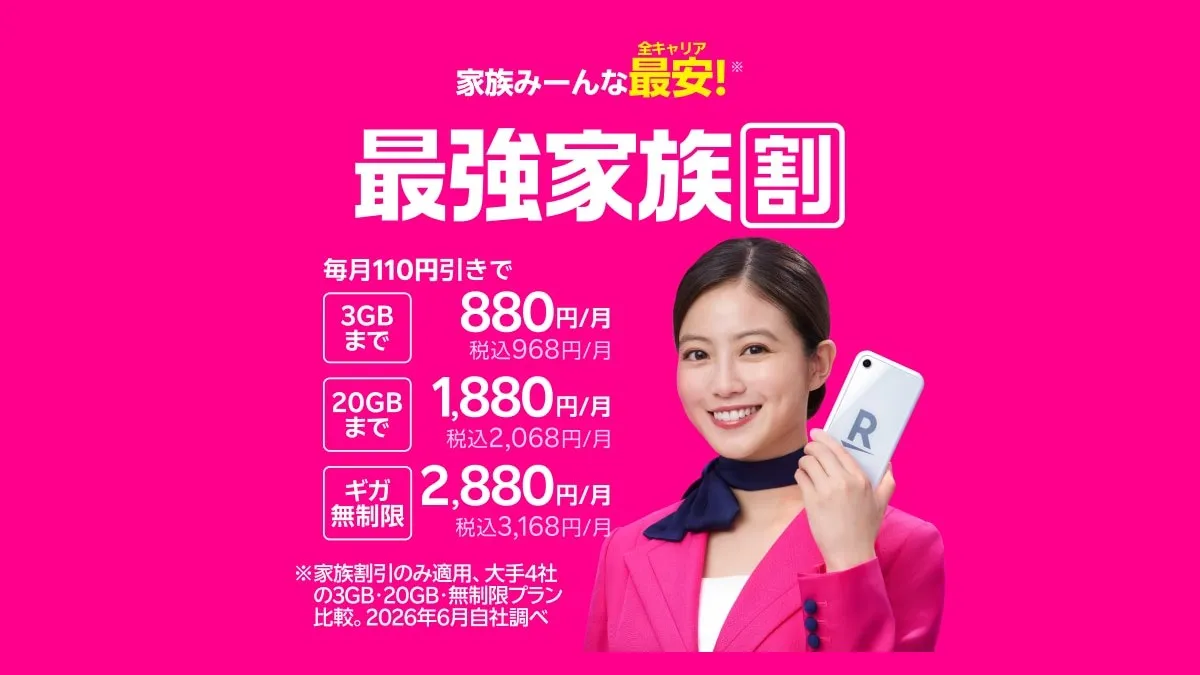
Rakuten Mobile’s Rakuten Saikyo Plan (Rakuten最強プラン) is tiered: your bill depends on how much data you use. Here’s the pricing I confirmed on the official page.
| Data usage | Monthly (tax incl.) |
|---|---|
| Up to 3GB | ¥1,078 |
| Over 3GB up to 20GB | ¥2,178 |
| Over 20GB (unlimited) | ¥3,278 |
With the Saikyo Family Discount (最強家族割), each tier drops by ¥110, to ¥968, ¥2,068, and ¥3,168.
Since you only pay for what you use, changing plans wouldn’t help. And forcing ourselves to use less data would affect daily life. So I concluded the lines we use can’t get any cheaper.
This is where I almost wrapped up with “our phone bill can’t go down any further.” But the things worth looking at were outside the pricing plan.
Two places with room to save
Going through the lines one by one, the room to save came down to two things.
- None of the 3 lines we use had the family discount applied
- There was 1 dormant line nobody was using
Neither has anything to do with what’s in the plan itself. They felt like leftovers sitting “around” the contract.
I’ve covered how to find dormant lines in how to find dormant family phone lines. In this post, I’ll focus on the missed discount and how much the bill actually went down.
The family discount wasn’t applied to any of the 3 lines
First, the family discount. Our family uses Rakuten Mobile, yet none of the 3 lines had the discount.
The family discount isn’t applied unless you sign up for it. Just having the lines doesn’t trigger it automatically. I’d gone along without ever checking.
Once I noticed, I signed up right away.
How the Saikyo Family Discount works
In my notes I’d written it down as the “Saikyo Family Program.” Checking the official page now, the name is “Saikyo Family Discount” (最強家族割). Here’s what I could confirm from official sources.
| Item | What I confirmed on the official page |
|---|---|
| Discount | ¥110 off per line per month (tax incl.) |
| Eligible plans | Rakuten Saikyo Plan, Rakuten Saikyo U-NEXT |
| Number of lines | Up to 20 lines per group |
| Who counts as family | Any degree of kinship. Relatives, common-law partners, and same-sex partners are also eligible |
| How to apply | The representative creates a group in my Rakuten Mobile and invites family members |
| When it starts | From usage in the month you join (billed the following month) |
| Caution | If the representative cancels, everyone loses the discount |
It’s also said to stack with age-based discounts (such as the Saikyo Kids Discount).
The store never explained the actual steps
I first heard about the family discount from staff at a store. But they didn’t walk me through the actual sign-up steps.
When you hear “just sign up and it applies,” it’s easy to assume the representative taps a button once and that’s it. That turned out not to be the case.
With the Saikyo Family Discount, the representative first issues an invite link. Only when the invited family member accepts it do they actually join the group. Both the representative and the family member have to take action, or the sign-up isn’t complete.
If you don’t know this, you might stop after doing only the representative’s part. Honestly, this is the single point I most want to get across in this post.
How to sign up (two steps: representative and family)
Here are the official steps, split by who does each one. Button names are shown in Japanese as they appear in the app.
| Step | Who | What to do |
|---|---|---|
| 1 | Representative | Open my Rakuten Mobile inside the Rakuten Link app |
| 2 | Representative | Under 「データ・料金」 (Data and fees), tap 「グループを作成する」 (Create group) |
| 3 | Representative | Choose your phone number and tap 「グループを作成する」 (Create group) |
| 4 | Representative | Send the invite link that appears to your family |
| 5 | Family member | Tap the invite link they received |
| 6 | Family member | Choose the number that will join and tap 「招待を受ける」 (Accept invitation) |
| 7 | Family member | Done when 「グループに参加しました」 (You joined the group) appears |
Steps 1 to 4 are the representative’s job, and steps 5 to 7 are the family member’s. Sending the link only gets you halfway.
The family member accepts by choosing the phone number that will join. If several family members are joining, it seems each line needs to go through this step.
Things to watch with the invite link
Here’s what could trip you up, based on what I could confirm on the official pages.
- I couldn’t find any rule on how to send it. Any method your family can open on their phone, like LINE or email, should work
- The official pages don’t state an expiration date for the link
- If the link shows as invalid, the representative reissues it from my Rakuten Mobile and sends it again
- You need the Rakuten Link app to create and manage the group
- The app supports Android 10 or later and iOS 16 or later
- A family member already in another group has to leave that group first
If someone in your family uses an older phone, it’s worth checking that the app runs first. For family who live far away, a quick call before sending the link might help too. People tend to hesitate before opening an unexpected link.
Once they’ve accepted, open the representative’s my Rakuten Mobile. It’s reassuring to check that everyone is in the group. The discount shows up on the bill starting from the usage in the month they joined.
According to the official FAQ, even if you join partway through the month, the ¥110 discount applies to that month’s usage. However, up to January 2025 usage, it was prorated by day. Older explainer articles may say something different, so please check the official FAQ.
I cancelled 1 dormant line
Second, the dormant line. When I lined up all the family’s lines, there was one nobody was using.
Even unused, the base fee keeps coming. Because of the tiered pricing it sits at the lowest tier. Still, a little over ¥1,000 a month was going out and producing nothing.
I cancelled it. We had no plans to use it, so there was hardly anything to think over.
By this point, I felt that reviewing your phone bill isn’t just about “picking a plan.” If your family still has lines with other carriers, it might be worth putting all the prices side by side once.
Clicking this opens the Rakuten login page. Once you log in, you’ll see the campaign details.
What I checked on the official site before cancelling
Cancelling can’t be undone. So before pressing the button, I checked a few things on the official pages.
| What I checked | What the official page says |
|---|---|
| Fee in the cancellation month | Not prorated. Settled based on data used up to cancellation |
| Billing for the cancellation month | Usage in the cancellation month is billed the following month |
| Phone number | The cancelled number stops working immediately |
| Undoing it | You can’t cancel the cancellation or reactivate the line |
| If you want to keep the number | That’s a separate process: MNP port-out to another carrier |
| Cancellation fee | Up to ¥1,078 (tax incl.) if cancelled within 1 year of starting service |
The phone number is the part to be especially careful with. Once you cancel, that number doesn’t come back. You’ll want to check first that nobody in the family has it saved as a contact.
Also, the cancellation month isn’t prorated. Whether it’s the start or end of the month, you pay that month’s tier. Which maybe means there’s no need to rush to cancel at the start of a month.
The line in my parent’s name will wait until year-end
There’s one more line I put on hold. It’s in the name of my parent, who lives far away.
Usage data alone didn’t make it clear whether they’re using it. I need to ask them directly.
A phone call would probably get me an answer right away. But pressing them over the phone with “Is it OK if I cancel this?” didn’t feel right. For them, it might be their lifeline in an emergency.
So I decided to ask face to face when I visit over the year-end holidays. If they aren’t using it, we’ll decide then whether to cancel.
I’ve decided to accept the few months of fees until then. It’s a little over ¥1,000 a month per line, so even several months comes to a few thousand yen. If that buys me an unhurried conversation with my parent, it feels like a cheap wait.
When the account holder lives far away, the paperwork also involves identity verification. I wrote about the conditions for handling things on someone’s behalf at a store in my post on trying to consolidate family lines at a shop.
Expected savings: about ¥1,400 a month
Here’s a summary of how much this review should save.
| Item | Expected monthly savings |
|---|---|
| Family discount (¥110 × 3 lines) | ¥330 |
| Cancelling the dormant line | About ¥1,080 |
| Total | About ¥1,411 |
Over a year, that’s about ¥16,900. Maybe not a huge amount. But all I did was sign up for a discount and cancel one line. Do it once and it keeps working every month, which is exactly how fixed-cost savings should look.
If we end up cancelling my parent’s line, a bit more will be added on top. But that’s a year-end matter, and it’s not included in these numbers.
What I haven’t confirmed yet
To be honest, this ¥1,400 or so is still just an “estimate.”
Will the family discount show up properly on the bill for all 3 lines? Will the charge for the cancelled line disappear? I plan to check both on the October bill. As of now, I haven’t verified either.
One more thing I’m watching is how the cancellation month is handled. According to the official guide, usage in the cancellation month is billed the following month. So if the cancelled line still appears on the October bill, I’ll check whether that’s the final charge. I may only be able to say it’s truly gone on the bill after that.
Two things that tripped me up
This time, I stumbled before even getting to the paperwork. There were two things.
The results never made it back to my list
I’d actually been sorting out the lines in notes kept somewhere else. The results never made it back to my fixed-cost list.
So looking at the list alone, Rakuten Mobile showed as “not started.” Something I’d already done looked like something I hadn’t. That’s how you end up researching the same thing twice.
I never wrote down whether the cancellation went through
The other was how I recorded the cancellation task. I’d marked the task “done.” But nowhere had I written “whether the cancellation actually went through.”
Looking back later, I couldn’t tell whether it had really stopped. In the end, I had to go check again.
Two rules I set from these stumbles
From these two, I set some rules for myself.
- Even when work happens elsewhere, always write the result back to the fixed-cost list
- A cancellation counts as “done” when the charge disappears from the bill, not on the day I file it
The first is about keeping records in one place. Working notes can live anywhere. But the results always go back to the list.
The second is the same conclusion I reached before in the post about a subscription cancellation that didn’t take. I think the same standard works for phone lines too.
Common mistakes and pitfalls
Based on this experience and the official information, here are the easy places to trip up.
- Your family uses the same carrier, but you never signed up for the family discount
- You sent the invite link, but your family member never tapped 「招待を受ける」 (Accept invitation)
- Stopping at “we’re on the cheapest plan, so it can’t go lower” without looking at discounts or the number of lines
- Keeping an unused line around because “we might use it someday”
- Cancelling a number without checking whether someone has it saved as a contact
- Marking it “done” on the day you cancel and never looking at the bill
- Not writing results from separate notes back to your list
- Cancelling the family discount representative’s line and knocking everyone off the discount
The last one might be easy to miss. The dormant line could happen to be the representative’s line. Before cancelling, it’s reassuring to check which line is the group’s representative.
Check before you start
- I listed the family lines by account holder, actual user, and usage
- I checked in my Rakuten Mobile whether we are in a Saikyo Family Discount group
- I checked that every invited family member finished accepting the invitation
- I confirmed the line I want to cancel is not the family discount representative
- I confirmed family or parents have not saved that number as a contact
- I know there is a cancellation fee within 1 year of starting service
- I noted the first billing date after cancellation as my check date
FAQ
Q. Is the family discount applied automatically?
It seems not. According to the official guide, the representative creates a group and invites family members. Even if your family all uses Rakuten Mobile, there’s no discount until you sign up.
Q. Once I send the invite link, am I done?
No. Your family member has to open the link and tap 「招待を受ける」 (Accept invitation). You are done when 「グループに参加しました」 (You joined the group) appears. If the link shows as invalid, the representative reissues it and sends it again.
Q. If I sign up partway through the month, is the discount prorated?
According to the official FAQ, even if you join mid-month, the ¥110 discount applies to that month’s usage. Up to January 2025 usage, it was prorated. It seems it’s no longer prorated.
Q. Can a parent who lives elsewhere join the family discount?
According to the official FAQ, relatives, common-law partners, and same-sex partners are also eligible. The pages I looked at didn’t say whether you need to live together. If you’re unsure, check the official terms page.
Q. If I cancel a dormant line, is that month’s fee prorated?
No. According to the official FAQ, it’s settled based on the data used up to cancellation. For an unused line, I believe that means the lowest tier.
Q. Can I undo a cancellation?
Reportedly not. They don’t accept cancelling a cancellation or reactivating a cancelled line. If you want to keep using it, you’ll need to sign up as new.
Q. Can I keep just the phone number?
Once you cancel, the number stops working right away. If you want to keep it, that’s a separate process: MNP port-out to another carrier. It’s a different flow from cancelling, so it’s good to decide beforehand.
Q. How long will I keep getting billed for a cancelled line?
According to the official guide, usage in the cancellation month is billed the following month. So getting one more bill the month after you cancel is normal. Checking that it’s gone on the bill after that is the sure way to confirm.
Official sources I referred to
- Rakuten最強プラン(料金プラン)|楽天モバイル
- 最強家族割|楽天モバイル
- 最強家族割のご利用方法|楽天モバイル
- 月の途中で最強家族割に参加/退会した場合、割引額はどうなりますか?|楽天モバイル
- 親戚や事実婚、同性パートナー等でも最強家族割が適用されますか?|楽天モバイル
- 解約について|楽天モバイル
- 解約後のご請求について|楽天モバイル
- Rakuten最強プランを解約した場合、解約月のプラン料金は日割りになりますか?|楽天モバイル
- 解約した場合、電話番号が使えなくなるのはいつですか?|楽天モバイル
- 回線の解約をキャンセルしたい/解約した回線を復活させたい場合|楽天モバイル
- いつでも解約できますか?最低利用期間・解約事務手数料はありますか?|楽天モバイル
- 他社への乗り換え(MNP転出)をしたいのですが、どうすればよいですか?|楽天モバイル
Summary
The lines we use couldn’t get any cheaper. Even so, between the missed discount and the dormant line, we should save about ¥1,400 a month. The room to save was sitting outside the plan itself.
That said, I haven’t confirmed it on a bill yet. This review isn’t finished until I check the October bill and write the results back to my list. As for my parent’s line, I’ll decide after we talk face to face at year-end.
If your family uses lines from the same carrier, why not take a quick look at the discounts section?
Clicking this opens the Rakuten login page. Once you log in, you’ll see the campaign details.
This article contains affiliate advertising. If you sign up for a product or service through a link on this site, we may receive compensation from the partner company. The site operator is also an employee of Rakuten Group and may receive compensation through an employee referral program. The content and opinions here are based on the operator’s own experience and research regardless of any advertising relationship, but please read with the above in mind. See the Disclaimer & Affiliate Disclosure for details. Disclaimer & Affiliate Disclosure
This article includes machine-translated content. Please check the official Rakuten Mobile multilingual page for exact terms.
If you have concerns about Rakuten Mobile coverage or signal quality, you can consult through the official signal improvement request form .