- 01Why fixed cost reviews do not last
- 02I switched to looking at just one contract a week
- 03How this divides the work with the inventory article
- 04The household survey has no category called “fixed costs”
- 05What to check when looking at one contract
- 06A decision table for “keep, downgrade, or cancel”
- 07How to run the 15 minutes once a week
- 08Official pages to check by type of contract
- 09How to check subscriptions on iPhone and Android
- 10An example order that completes one round in 12 weeks
- 11Follow a “cancel” through to the next billing date
- 12Pitfalls that make it stop
- 13Who this suits and who it does not
- 14What to check before you start
- 15Frequently asked questions
- 16Official sources I referred to
- 17Summary
Good morning, this is まさきん.
This one is about fixed cost reviews that never last. I kept deciding to “take inventory of every subscription” and then stalling halfway. Once I cut the method down to “look at just one contract a week,” it started to run, so I am writing down how I operate it.
Note: This information is current as of the time of publication. Please check the official sites for the latest conditions.
- A fixed cost review may fail to last because you try to take inventory of everything at once
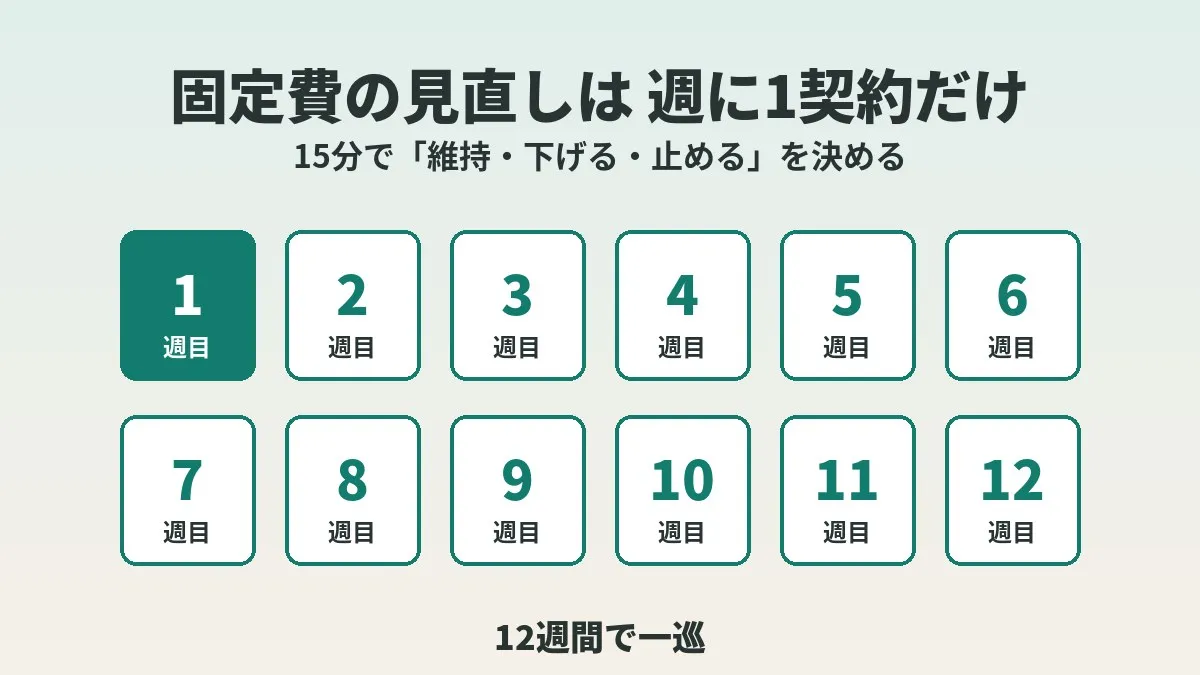
- Look at just one contract for 15 minutes once a week and decide on “keep, downgrade, or cancel”
- The five things to check are the monthly amount, the last date of use, the renewal date, the cancellation cutoff, and the alternatives
- An example order is subscriptions, then telecom, then electricity and gas, then insurance, completing one round in 12 weeks
- Mark a “cancel” as done only after seeing on your statement that the next charge did not come
Why fixed cost reviews do not last
With a fixed cost review, the first step tends to be heavy. If you start from “write everything out first,” the writing alone uses up your time.
That was me. I started out meaning to take inventory of every subscription and ended up stalled partway through. When the job is big, opening it up again becomes a chore.
I think the reason for stalling lies in the size of the job more than in motivation. A job with no end in sight is the first thing pushed back in a busy week. In our house, with two working parents and four kids, a solid block of time is almost impossible to find.
I switched to looking at just one contract a week
So I made the unit smaller. I look at only one contract a week. For that one contract, I decide on “keep, downgrade, or cancel.”
Once I have decided, that week is done. Even if other contracts are on my mind, they go to the following week.
After I changed to this format, the review started to run. The only thing I changed was the size of the job each time. With one contract a week , I think it stays within reach even in a busy week.
How this divides the work with the inventory article
I wrote about the overall approach in how to get started with a fixed cost review. It covers the flow from listing everything out to sorting, acting, and recording.
That article is a map of “what to do.” This time I am narrowing it down to “how to keep going.”
If you have already listed everything out, you can simply go down that list one item at a time. If you have not, I do not think you need to wait until the list is complete. It also works to start with whichever contract comes to mind and grow the list afterward.
The household survey has no category called “fixed costs”
A short detour. I checked where the term “fixed costs” stands in the official statistics.
The Family Income and Expenditure Survey by the Statistics Bureau of the Ministry of Internal Affairs and Communications is conducted every month on about 9,000 households nationwide. It looks at household income and expenditure as well as savings and liabilities.
Reading the glossary, expenditure was divided into “consumption expenditure” and “non-consumption expenditure.” Consumption expenditure is explained as what we would call living expenses. Non-consumption expenditure is said to be spending that is in principle outside the household’s control, such as taxes and social insurance premiums.
On the other hand, no category called “fixed costs” appears in this glossary. Fixed costs are not an official classification but a term used in managing household finances.
So I think you are free to decide for yourself how far the term stretches. In this article, the target is “anything with a contract that you pay automatically every month or every year.” Since the contract is the unit, it probably goes well with a method of looking at one contract at a time.
What to check when looking at one contract
For each contract, I look at the following five things. Add any more and it no longer fits in 15 minutes.
| Item | What to look at | Examples of where to check |
|---|---|---|
| Monthly amount | The amount actually being charged. Convert annual payments to a per-month figure | Card statement, contract details screen |
| Last date of use | When you last used it | App history, login history |
| Renewal date | The date of the next automatic renewal | Subscription management screen, contract documents |
| Cancellation cutoff | By when you need to act to stop the next charge | Official help pages, terms of service |
| Alternatives | Whether a free plan, a built-in feature, or another service you already have is enough | Other services you are subscribed to |
For the renewal date and the cancellation cutoff, checking the official screens is the sure way. Materials from the Consumer Affairs Agency lay out the items that must be shown on the final confirmation screen of an online order. They include the fact that it renews automatically, the method and conditions for cancelling, and the deadline for giving notice.
In other words, these should have been shown to you when you signed up. Whether you can recall them later is another matter. The National Consumer Affairs Center of Japan also recommends checking the contract terms carefully and keeping your registration details.
For the alternatives column, the perspective in my article on finding duplicate subscriptions can be used as is. It is a way of checking whether another service is sitting in the same box for the same purpose.
A decision table for “keep, downgrade, or cancel”
After looking at the five items, pick one of the three. I put some rules of thumb for when you are unsure into a table.
| Decision | Examples of situations that fit | What to do that week |
|---|---|---|
| Keep | You have used it recently. No alternative in sight | Record the renewal date and finish |
| Downgrade | You use it, but the plan or capacity is more than you need | Look into moving to a lower plan or a free plan and do the paperwork |
| Cancel | You have not used it for a while. There is an alternative | Go through the cancellation and note the next billing date |
The important point is that “keep” is a perfectly good conclusion. I do not think the purpose of a review is to cut. Is the purpose not to reach a state where you are paying with your eyes open?
Tools that help your productivity at work and services your family loves can stay. This is the same idea as “weigh the savings against the impact on daily life,” which I wrote about in the getting started article.
It seems better not to create a fourth option called “on hold.” When items on hold pile up, you are back in the same state as a stalled inventory. A contract you cannot decide on in 15 minutes goes down as “keep” for now and gets reviewed in the next round.
How to run the 15 minutes once a week
Here is the flow of one session as a numbered list. The time split is only a guide.
- Decide which one contract to look at this week (just look at the next row in your order table)
- Open the contract details screen or the statement and check the monthly amount and renewal date
- Check the last date you used it from the history or from memory
- Check the cutoff for cancelling or changing on the official help pages
- Think about whether there is an alternative
- Choose one of “keep, downgrade, or cancel”
- For anything that needs paperwork, do it on the spot or set a date to do it
- Record the result in a single line and finish
If you are not done in 15 minutes, I think it is fine to stop there. For a contract with a long procedure, I make the following week an “action only week.”
One line is plenty for the record. Something like the contract name, the decision, the renewal date, and when to look next. In the getting started article too, I wrote that one row in a spreadsheet is enough.
Official pages to check by type of contract
Step 2, “open the contract details screen,” is where people can get stuck. I summarized, in general terms, where to look for each type of contract.
| Type of contract | Where to look | What to check there |
|---|---|---|
| Subscriptions through an app store | The subscription list on your device or the subscriptions page | List of active subscriptions, renewal dates, whether there is a cancel button |
| Subscriptions signed up for on the web | The account screen of the service | Plan name, next billing date, cancellation steps |
| Mobile and internet lines | The member page of the provider | Plan, add-ons, usage |
| Electricity and gas | The member page of the provider, the meter reading slip | Rate plan, usage, contracted capacity |
| Insurance | The contract inquiry page, the insurance policy | Coverage, premium, renewal timing |
The names and locations of the screens differ by provider. So I kept the table to the general direction of what to check. For the actual steps, please check the official pages of each company.
For a telecom contract, just looking at the plan, the add-ons, and the usage is enough to fill one week. Whether any unused add-ons are still attached is often obvious as soon as you open the member page.
Telecom tends to be a large amount, so it may be worth giving it a whole week. Once you know your current plan and usage, how about lining it up against other options?
Clicking this opens the Rakuten login page. Once you log in, you’ll see the campaign details.
How to check subscriptions on iPhone and Android
Subscriptions that go through an app store can be viewed as a list on the device. These are the steps I was able to confirm in the official help pages.
On iPhone
The Apple support page gives the following flow.
- Open the Settings app and tap your name
- Tap “Subscriptions”
- Select the subscription you want to check
- To stop it, tap “Cancel Subscription”
The cancel button apparently may not appear unless you scroll down. When there is no button, or when an expiration notice is shown in red, the subscription is said to be already cancelled.
On Android
In Google Play Help, the flow is to check from the subscriptions page of Google Play. Select the subscription you want to cancel and tap “Cancel subscription.” Then follow the instructions on the screen.
Depending on the app, it seems you may also be able to pause a subscription. It might come in handy to remember this as an option between “downgrade” and “cancel.”
- Google Play Help says that uninstalling the app does not cancel your subscription
- The National Consumer Affairs Center of Japan also warns that deleting an app alone does not cancel the contract
- A contract that does not show up in the list may be paid through a different account or a different route
An example order that completes one round in 12 weeks
The order is another place where a fixed cost review tends to cause hesitation. I put an example of the order I would use into a 12-week table. It runs from the lightest effort to the heaviest.
| Week | Example contract to look at | Rough effort |
|---|---|---|
| 1 | A subscription for an app you have not opened in a while | Light |
| 2 | One video or music streaming service | Light |
| 3 | Cloud storage | Light (heavy if data has to be moved) |
| 4 | One thing you pay for through carrier billing | Light |
| 5 | Your mobile plan and add-ons | Medium |
| 6 | Family mobile lines | Medium |
| 7 | Home internet line | Medium |
| 8 | Electricity rate plan | Medium |
| 9 | Gas rate plan | Medium |
| 10 | One insurance policy (checking the contract details only) | Heavy |
| 11 | Services or cards with an annual fee | Light |
| 12 | Checking statements for contracts you marked “cancel” so far | Light |
This is only an example. The number and content of contracts differ by household, so please rearrange it for your own use.
I put the light ones in the first half for the same reason as the sorting in the getting started article. There I divided difficulty into A, B, and C and wrote that you start with A. Please think of this table as that order assigned to weeks.
Twelve weeks is almost three months. In the getting started article, I wrote that I set aside a time to look back once a quarter. Running one contract a week for 12 weeks means that quarterly look back becomes the start of the next round.
A big decision like insurance will not be settled in one week, I think. It may be fine to use week 10 just for checking the contract details and leave the decision for another occasion.
Follow a “cancel” through to the next billing date
For a contract you chose to “cancel,” it is safer not to call it finished on the day you did the paperwork.
I previously wrote about a subscription I had marked as cancelled that kept charging me. The rule I settled on in that article was to make the condition for completion “no charge arrives on the next billing date.”
Google Play Help says that even after cancelling, you can keep using the service for the period you have already paid for. While you can still use it, it is hard to see whether it has actually stopped.
So in the weekly record, I also write down the next scheduled billing date. In week 12, I match those dates against the statements. The National Consumer Affairs Center of Japan also recommends checking your card and carrier billing statements every month.
Pitfalls that make it stop
Even with the one contract a week format, there are things that can bring it to a halt. Here are the ones I can think of in general.
- Trying to look at two or three in one week and going over 15 minutes
- Piling up items “on hold” and moving on without deciding
- Trying to complete the list before starting
- Counting only the amount cut as the result and feeling empty in a “keep” week
- Skipping a week and then doing a batch to make up for the delay
- Not having decided which contract comes next and getting stuck thinking on the spot
The one I actually hit is close to the third. I thought I would start after taking inventory of everything, and stalled partway.
I do not think a skipped week needs to be made up. You just shift the order table by one week. Even if one round becomes 13 weeks, it hardly causes any trouble, does it?
Who this suits and who it does not
Whether this method fits seems to depend on your situation.
It suits people who find it hard to get a block of time. It may also fit people who once started an inventory and stalled.
On the other hand, I think it will feel slow to people who want to rebuild their household finances in a hurry. That is because one round takes about three months. In that case, setting aside a block of time and going through everything at once may be quicker.
People with only a handful of contracts also probably do not need to slice it into weeks. Looking at them all in one sitting takes care of it.
What to check before you start
- I set aside a 15-minute slot somewhere in the week
- I picked the first contract to look at
- I prepared a place (a table or a note) to write the result in one line
- I can open my card statement and the app store subscription list
- I decided to pick one of the three and not create an "on hold" option
Frequently asked questions
Q. In what order should I go through a fixed cost review?
I think starting from the lightest effort is best. I made a table with an example that begins with subscriptions you are not using. After that comes telecom, electricity and gas, and insurance. Please rearrange it to suit your household.
Q. What do I do if it does not finish in 15 minutes?
I think it is fine to stop for that week. You can use the following week to continue with the same contract. Forcing yourself to finish may make the next week feel heavier.
Q. What if I do not know how many contracts I have?
You can start without a list. Look at whichever contract comes to mind and add to the list little by little. How to list everything out is covered in the getting started article.
Q. Is there any point if it is “keep” week after week?
I think there is. Just knowing the renewal date and the cancellation cutoff gives you material for the next time you decide. If you have confirmed that you are paying with your eyes open, is that not a result in itself?
Q. Is a “cancel” complete once I delete the app?
It is not. Google Play Help states that uninstalling does not cancel a subscription. You need to go through the procedure set by the provider.
Q. When should I look at a contract that is in a free trial?
It is reassuring to check just the renewal date first, without waiting for its turn. The Apple support page has guidance for when you do not want it to renew. It said to cancel at least 24 hours before the trial ends.
Q. How do I handle contracts in a family member’s name?
Putting it into the order table as one item seems best. The Apple support page says to ask the family member who made the purchase to cancel it. I think checking together on that person’s own device is quickest.
Q. Where can I get advice if a cancellation turns into a dispute?
The National Consumer Affairs Center of Japan points to the Consumer Hotline at “188.” It is a nationwide number that connects you to your nearest consumer affairs center.
Official sources I referred to
- Family Income and Expenditure Survey (Statistics Bureau, Ministry of Internal Affairs and Communications)
- Family Income and Expenditure Survey glossary (Statistics Bureau, Ministry of Internal Affairs and Communications)
- Notice for businesses on the amended Act on Specified Commercial Transactions and the final confirmation screen (Consumer Affairs Agency)
- Watch out for unexpected subscription billing trouble (National Consumer Affairs Center of Japan)
- Subscriptions: deleting the app alone does not cancel (National Consumer Affairs Center of Japan)
- Cancel a subscription from Apple (Apple Support)
- Cancel, pause, or change a subscription on Google Play (Google Play Help)
Summary
When a fixed cost review does not last, making the unit smaller may be what works. Instead of taking inventory of everything at once, look at just one contract a week. What you decide is one of “keep, downgrade, or cancel.”
In my case, it finally started to run once I took this form. The only thing I changed was the size of the job.
How about opening just one contract in this week’s 15 minutes? Your phone bill, which you pay without fail every month, makes an easy first item, I think.
Clicking this opens the Rakuten login page. Once you log in, you’ll see the campaign details.
This article contains affiliate advertising. If you sign up for a product or service through a link on this site, we may receive compensation from the partner company. The site operator is also an employee of Rakuten Group and may receive compensation through an employee referral program. The content and opinions here are based on the operator’s own experience and research regardless of any advertising relationship, but please read with the above in mind. See the Disclaimer & Affiliate Disclosure for details. Disclaimer & Affiliate Disclosure
This article includes machine-translated content. Please check the official Rakuten Mobile multilingual page for exact terms.
If you have concerns about Rakuten Mobile coverage or signal quality, you can consult through the official signal improvement request form .