- 01Annual or monthly: which is the better deal?
- 02Working out the break-even from official prices
- 03Some subscriptions have no annual option
- 04What happens the moment you switch
- 05There are three types of billing timing
- 06Subscriptions through app stores
- 07Card closing dates and debit months
- 08Steps before switching
- 09Check refunds for mid-term cancellation
- 10Cases where annual is better avoided
- 11The same thinking applies to when you cancel
- 12Common mistakes and pitfalls
- 13Frequently asked questions
- 14Official sources I referred to
- 15Summary
Good morning, this is まさきん.
Is it better to pay for a subscription annually or monthly? Do the math and annual billing is cheaper for many services. While reviewing our household budget, though, I noticed something. The “day” you switch matters more. This time I am sorting out when to switch to annual billing, working back from the month your card is debited.
Note: this reflects the information available at the time of publication. Please check the official sites for the latest conditions.
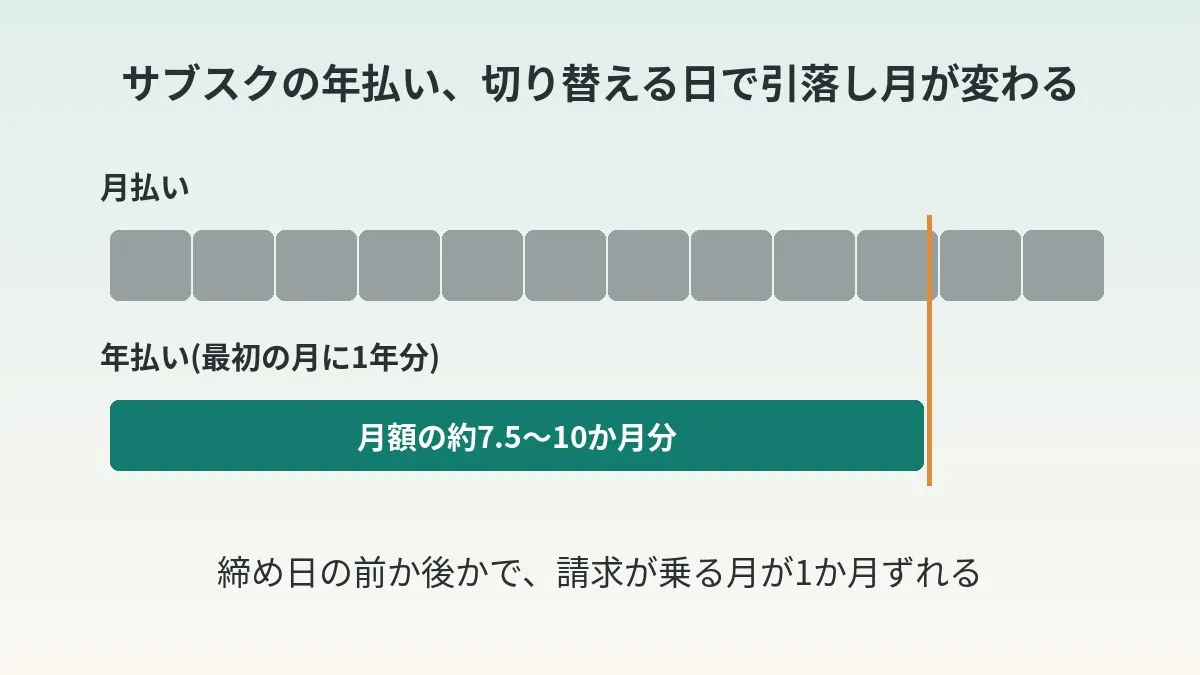
- Looking at official price lists, annual subscription plans are often priced so that about 7.5 to 10 months of fees buys a full year
- However, when you switch to annual, a full year is billed at once. The saving is about the total over 12 months
- Which month’s debit the charge lands on is determined by your card’s closing date. Shifting by a single day can move the debit by a month
- Before switching, check the billing timing and the refund policy in the official help
- For a subscription you are unsure about keeping, staying off the annual plan may be safer
Annual or monthly: which is the better deal?
Comparing on price alone, annual billing comes out ahead for many services. That is because the annual price is set lower than 12 months of the monthly price.
One way of looking at it is enough. Just divide the annual price by the monthly price. The number you get is “how many months of use it takes to break even.”
For example, if the annual price is 10 times the monthly price, you break even in 10 months. Months 11 and 12 are effectively free. Conversely, if you quit at 9 months, monthly billing would have cost less.
That is about the total over 12 months, though. The payment is concentrated in the very first charge. Overlook this, and a switch that should save money may end up squeezing the household budget.
Working out the break-even from official prices
Here are the services for which I could confirm both monthly and annual prices on official pages as of October 2026. I did the calculations myself.
There are three formulas.
- Break-even months = annual price ÷ monthly price
- Difference over one year = monthly price × 12 − annual price
- Discount rate = difference ÷ (monthly price × 12)
| Service | Monthly | Annual | Break-even | Difference over one year | Discount rate |
|---|---|---|---|---|---|
| Amazon Prime | 600 yen | 5,900 yen | About 9.8 months | 1,300 yen | About 18.1% |
| Microsoft 365 Personal | 2,130 yen | 21,300 yen | 10.0 months | 4,260 yen | About 16.7% |
| Microsoft 365 Family | 2,740 yen | 27,400 yen | 10.0 months | 5,480 yen | About 16.7% |
| Nintendo Switch Online individual plan | 400 yen (30 days) | 3,000 yen (365 days) | 7.5 months | 1,800 yen | About 37.5% |
| Claude Pro | 20 dollars | 200 dollars | 10.0 months | 40 dollars | About 16.7% |
For Amazon Prime, 5,900 ÷ 600 = 9.83. The difference is 600 × 12 − 5,900 = 1,300 yen. The discount rate is 1,300 ÷ 7,200, or about 18.1%.
For Microsoft 365 Personal, the annual price was exactly 10 times the monthly price. The official page also says “save 4,260 yen with the annual plan.” That matched my calculation.
Nintendo Switch Online is divided by days. One month is 30 days and 12 months is 365 days. So please treat the month-based comparison as a rough guide.
Claude Pro is priced in dollars. The official pricing page said the annual option is billed as a lump sum of 200 dollars. The amount charged in yen moves with the exchange rate.
Some subscriptions have no annual option
When I looked into it, there were also services where you cannot choose annual billing.
For iCloud+, Apple’s support page says it is billed as a monthly fee. The price list for Japan was monthly only as well. 50GB is 180 yen and 200GB is 540 yen. 2TB was 1,800 yen.
For Apple Music too, what I could confirm on the official page was monthly pricing. The Individual plan is 1,180 yen per month and the Family plan is 1,980 yen per month. I could not find any mention of annual pricing on that page.
YouTube Premium does have an annual plan. It works a little differently, though. I touch on that in the next section. I think checking the amount on the sign-up screen is the surest way.
So the first thing to do is check “is there an annual option?” Where there is none, there is nothing to agonize over in the first place.
What happens the moment you switch
What happens when you switch to annual? In most cases, a charge for one year is raised.
For a service at 600 yen a month, the usual charge is 600 yen. Only in the month you switch to annual does it become 5,900 yen. The difference is 5,300 yen. It looks small, but stack three or four and you are into the tens of thousands of yen.
In our household, I noticed this during the budget review. Switching to annual is a saving over the long run. But what happens if that charge lands on the card debit right in front of you? It worsens cash flow for that month.
Since then, I have come to think “switch only after looking at the debit month.” Calculating whether it is a saving, and confirming whether it is a month you can pay. These are two separate tasks.
There are three types of billing timing
When are you charged after switching? Reading the official help pages, there were broadly three patterns.
| Type | How you are charged | Example confirmed in official help |
|---|---|---|
| Immediate, full amount | You prepay one year at the time of sign-up | YouTube Premium annual plan |
| Immediate, difference (prorated) | The amount minus the remaining period is charged right away | Notion upgrades, Nintendo Switch Online plan transfers |
| From the next renewal date | The new terms start after the current period ends | Some Microsoft 365 switches |
The YouTube Premium annual plan is a prepayment that does not auto-renew. YouTube Help explains that you prepay the full amount. If you are already on a monthly membership, the procedure was to cancel your current membership and then sign up.
Notion charges immediately when you move up a plan. The amount charged is said to be reduced according to the remaining period. Conversely, if you move down a plan, the change takes effect on the last day of the billing cycle.
Nintendo Switch Online uses a mechanism called a plan transfer. The purchase price is discounted according to your remaining period. The discount is reportedly calculated by the day. However, even if the discount exceeds the purchase price, the difference is not refunded.
Microsoft 365 lets you change the renewal cycle from the account management screen. Changing from monthly to annual is also done there. On the other hand, the behavior seems to differ depending on what you are switching. It was stated that in some cases neither the change nor the charge takes place until the plan renews.
Even for the same “go annual” move, the billing date differs from service to service. This is not something to proceed with on assumptions.
Subscriptions through app stores
For subscriptions you signed up for through an iPhone or Android app, the store is the biller. The place to switch is also the store’s management screen.
Apple’s support page says you can switch between monthly and annual billing. You open “Subscriptions” from “Settings” and choose “See All Plans.” Then you proceed to purchase.
However, I could not find an explanation of when you are charged on that page. So I think the surest way is to look at the amount and date on the purchase confirmation screen.
Google Play Help says a bit more. If the developer allows it, you can switch the billing period from monthly to yearly. In doing so, you may need to pay the full amount of the new plan or the difference. The guidance was to check the details with the app’s developer.
In other words, even through a store, “full amount or difference” depends on the app. Look at the amount on the confirmation screen before you tap. I would say this is the safest approach.
When you review subscription fixed costs, you notice telecom costs have the same structure. The amount you pay every month without much thought may be the largest of all.
Clicking this opens the Rakuten login page. Once you log in, you’ll see the campaign details.
Card closing dates and debit months
Which month’s debit does the annual charge land on? That is determined by the card’s closing date.
I checked the closing dates and payment dates on the card companies’ official pages.
| Card | Closing date | Payment date |
|---|---|---|
| Rakuten Card | End of each month (the 25th for Rakuten Ichiba, Rakuten Pay and Rakuten Travel) | 27th of the following month |
| JCB Card | 15th of each month | 10th of the following month |
| Sumitomo Mitsui Card (payment on the 10th) | 15th of each month | 10th of the following month |
| Sumitomo Mitsui Card (payment on the 26th) | Last day of each month | 26th of the following month |
For every card, if the payment date falls on a non-business day it moves to the next business day. With the Sumitomo Mitsui Card, the closing date changes depending on the payment date. You can check which applies to your card on the member site.
The key point is that crossing the closing date pushes the debit a month later. A difference of just one day changes the month you pay.
The day you switch changes the debit month
Let us look at concrete dates. This is the case of switching to annual between October and November 2026. I have listed them on the assumption that the charge is raised on the day you switch.
| Card closing date | Day you switch | Debit date |
|---|---|---|
| End-of-month closing, payment on the 27th of the following month | October 31 | November 27 |
| End-of-month closing, payment on the 27th of the following month | November 1 | December 28 (because the 27th is a Sunday) |
| Closing on the 15th, payment on the 10th of the following month | October 15 | November 10 |
| Closing on the 15th, payment on the 10th of the following month | October 16 | December 10 |
With a card that closes at month-end, the debit shifts by a month between October 31 and November 1. With a 15th closing, the 15th and 16th are the boundary.
Suppose, for example, your November debit is already heavy. In that case all you need to do is wait until the day after the closing date. The annual charge moves to the December debit.
Conversely, I imagine there are households for whom December is tight before the bonus arrives. In that case, switch by the closing date and bring it into November. Which is right should depend on the ebb and flow of your own budget.
- The table assumes “the charge is raised on the day you switch.” For services where the billing date is the next renewal date, think in terms of that date
- The Sumitomo Mitsui Card guidance says payment may slip to the following month depending on when data arrives from the merchant
- Switching right at the closing date makes it hard to tell which month it will land on. Allowing a margin of 2 to 3 days is reassuring
How to learn your expected debit early is summarized in the steps to find out your Rakuten Card usage before the statement is finalized.
Steps before switching
If it were me, I would check in the following order.
- Confirm on the official page whether an annual plan exists
- Work out the break-even months with annual price ÷ monthly price
- Consider whether you will use the subscription longer than the break-even months
- Look up the billing timing when switching, in the official help or on the confirmation screen
- Look up the refund policy if you cancel partway through
- Confirm the closing date and payment date of the card you pay with
- Count on the calendar which month’s debit the charge will land on
- Add the annual price to that month’s expected debit and see whether your account balance can cover it
- If it is a tight month, move the switch date to the day after the closing date or later
- Once switched, put the next renewal date in your calendar
I think steps 4 and 5 are best not skipped, even if they are a nuisance. Tap without checking these and an unexpected amount can come up.
Step 10 is quietly important too. An annual plan is only billed once a year. That makes it easy to forget it exists. Put an entry in a little before the renewal date and you can calmly decide whether to continue.
If you want to move several subscriptions to annual, not stacking them in the same month is another option. Switching one at a time in different months lowers the peak of the debit.
Check refunds for mid-term cancellation
The scariest thing about annual plans is wanting to quit partway through. Refund policies differed considerably from service to service.
| Service | Refund policy in official help |
|---|---|
| YouTube Premium annual plan | No refunds and no pausing |
| Amazon Prime | If you have not used the benefits, the fee for the current membership period is refunded in full |
| Notion | For annual billing, a full refund if you downgrade within 30 days of signing up |
| Microsoft 365 | Not all cancellations result in a refund |
| Google Play subscriptions | You can keep using it for the period already paid after cancelling. Refunds depend on the case |
| Nintendo Switch Online | No refund of the difference even if the transfer discount exceeds the purchase price |
Reading through them, I did not find any wording for Japan along the lines of “we will refund the remaining months.” With annual billing, once you pay, it basically does not come back. It may be safer to think of it that way.
The Microsoft page also has a list of countries where prorated refunds are available. Japan was not on it, however.
Cases where annual is better avoided
Even when annual is cheaper, I think there are situations where it is better not to switch.
You have not decided whether to keep using it. If the break-even is 10 months, quitting at 9 months is a loss. For a subscription you are wavering on cancelling, it seems best to judge it while still on monthly first. I wrote about a way to judge by usage count in the trial period and count rule for subscriptions.
The plan or price looks likely to change. What a service offers can change over the course of a year. On annual billing, it becomes harder to move to a different plan midway. There were also examples, like Nintendo Switch Online, where the transfer difference is not returned.
There is no refund for mid-term cancellation. As in the table above. If there is no refund, you need to be prepared to pay for the full year.
That month’s debit is already heavy. This can be handled by “shifting” rather than “not doing.” You just move the switch date to after the closing date.
The number of family members or how you use it is about to change. This is the case where you might move from an individual plan to a family plan. The YouTube Premium annual plan is individual only, and it is stated that you cannot move up to multi-user until it expires.
The same thinking applies to when you cancel
Cancelling also has a “when.” Most services let you keep using them until the end of the period after you cancel.
I experienced this myself when I cancelled a certain membership service. There was a “membership end date” about three weeks after the day I completed the procedure, and I could use it until then.
Google Play Help also says you can use the service during the period already paid for. Spotify likewise stated that it remains available until the next billing date. Notion is the same: you can use the paid features until the end of the billing cycle.
In such cases, there is less reason to wait until just before the renewal date to cancel. The risk of forgetting is greater. That said, not every service works this way. Please check the end date on the cancellation screen before proceeding.
The story of charges continuing after I thought I had cancelled is covered in detail in my record of a subscription that kept billing after I supposedly cancelled. I will leave cancellation matters to that article.
Common mistakes and pitfalls
Tapping after looking only at the discount rate. A label saying roughly 17% off is appealing. But one year is billed that day. Count the debit month first and you will not be caught off guard.
Switching several subscriptions to annual on the same day. Doing them all at once feels tidy. On the other hand, the charges are bundled too. Spreading them across months keeps the household budget smoother.
Getting the closing date wrong. The Rakuten Card closes at month-end, but usage at Rakuten Ichiba and the like closes on the 25th. It is reassuring to look up your own card’s closing date on the official page once.
Forgetting the renewal date. With annual billing, the same amount is charged again a year later. Being renewed for something you are not using is a situation to avoid.
Looking on the official site when it went through an app store. If the store is the biller, switching is done on the store’s screen too. Confirm the route you signed up through first and you will not get lost.
Paying twice for the rest of the month. If you switch to annual right after a monthly renewal, the question is how the monthly fee you just paid is treated. Whether it is adjusted by the difference or charged in full depends on the service.
- Have you confirmed on the official page that an annual plan exists?
- Have you worked out the break-even months with annual price ÷ monthly price?
- Do you expect to keep using it longer than that number of months?
- Have you checked whether the charge on switching is immediate or from the next renewal date?
- Have you read the refund policy for mid-term cancellation in the official help?
- Have you confirmed your card closing date and payment date?
- Have you looked at the expected debit and account balance for the month the charge lands on?
- Are you ready to put the next renewal date in your calendar?
How to approach fixed costs as a whole is summarized in how to get started with a fixed-cost review.
Frequently asked questions
Q. Is it better to pay for subscriptions annually or monthly?
If you keep using it for a year, annual is cheaper for many services. Calculated from official prices, the annual price was about 7.5 to 10 months of the monthly price. If there is a chance you will quit partway, though, I think monthly is the safer choice.
Q. When is the best time to switch to annual?
Deciding by your card’s closing date seems best. If you want to avoid a month with a heavy debit, switch on the day after the closing date or later. The charge then moves to the following month’s debit.
Q. Am I charged right away when I switch to annual?
It depends on the service. The YouTube Premium annual plan is a prepayment of the full amount. Notion charges the amount minus the remaining period right away. There is also a type that switches from the next renewal date, so please check the date on the confirmation screen.
Q. Will I get a refund if I cancel partway through an annual plan?
It is safer to assume no refund. The YouTube Premium annual plan is stated to be non-refundable. Notion, on the other hand, stated that annual billing is refunded in full if you downgrade within 30 days.
Q. Is it a loss to switch right after a monthly renewal date?
It depends on the service. If the remaining period is adjusted by the difference, the loss is small. If there is no adjustment, I think switching just before the monthly renewal date wastes less.
Q. Can subscriptions signed up for in an iPhone app also go annual?
If the app offers an annual plan, you can switch. Open “See All Plans” from “Subscriptions” in “Settings.” It is reassuring to look at the amount and billing date on the purchase confirmation screen.
Q. Why not pay the annual price in installments?
With installment or revolving payments that carry fees, the annual discount may disappear. If it were me, I would choose to shift the month of the switch. If it is still tight after that, staying on monthly is probably fine.
Q. When is the best time to cancel?
For a service you can keep using until the end of the period after cancelling, I think you can go ahead as soon as you have decided. The longer you wait, the easier it is to forget. Please check the end date on the cancellation screen.
Official sources I referred to
- Amazon Prime membership fee (Amazon Help)
- Cancel your Amazon Prime membership and get a refund (Amazon Help)
- Microsoft 365 plans and pricing (Microsoft)
- Change the payment method and options for a Microsoft subscription (Microsoft Support)
- How to get a refund for a Microsoft subscription (Microsoft Support)
- Nintendo Switch Online pricing and how to join (Nintendo)
- Plan transfers (Nintendo Support)
- Sign up for a YouTube Premium or YouTube Music Premium annual plan (YouTube Help)
- iCloud+ plans and pricing (Apple Support)
- Apple Music (Apple)
- Switch to a different subscription plan (Apple Support)
- Cancel, pause or change a subscription on Google Play (Google Play Help)
- Notion pricing plans (Notion)
- Claude pricing (Anthropic)
- Spotify Premium (Spotify)
- I want to know the monthly closing date and payment date for card usage (Rakuten Card)
- Can I change the payment date of the 10th or the closing date of the 15th? (JCB)
- Please tell me the credit card payment date and closing date. (Sumitomo Mitsui Card)
Summary
Annual billing is often a saving if you use the service for a year. But whether it saves money and whether you can pay for it turned out to be separate questions. Before switching, look at the billing timing and the refund policy. Then count the debit month from your card’s closing date. I think that alone reduces the scramble in the month you switch.
As you tidy up subscriptions one by one, the shape of your monthly fixed costs comes into view. The big amount in there may well be telecom costs after all. While you are thinking about switching to annual, take a peek at your phone bill too.
Clicking this opens the Rakuten login page. Once you log in, you’ll see the campaign details.
This article contains affiliate advertising. If you sign up for a product or service through a link on this site, we may receive compensation from the partner company. The site operator is also an employee of Rakuten Group and may receive compensation through an employee referral program. The content and opinions here are based on the operator’s own experience and research regardless of any advertising relationship, but please read with the above in mind. See the Disclaimer & Affiliate Disclosure for details. Disclaimer & Affiliate Disclosure
This article includes machine-translated content. Please check the official Rakuten Mobile multilingual page for exact terms.
If you have concerns about Rakuten Mobile coverage or signal quality, you can consult through the official signal improvement request form .