- 01This was third on my review list
- 02What is Premium Connectivity?
- 03Standard vs. Premium
- 04I’d really only lose two things
- 05What the official pages couldn’t answer
- 06What about Grok in the car?
- 07Setting Wi-Fi to stay connected while driving
- 08What happened when I drove
- 09Cancelling vs. keeping it
- 10I decided to cancel the last one too
- 11Who this suits and who it doesn’t
- 12Check before you cancel
- 13FAQ
- 14Official sources I referred to
- 15Summary
Good morning, this is まさきん.
I’ve been working through our household’s fixed costs one at a time, in a set order. Third on the list was Tesla’s Premium Connectivity. This post is about how I decided to cancel it after actually driving around with a mobile router.
This reflects information at the time of publishing. Please check the official site for the latest terms.
- The official page lists Premium Connectivity at ¥1,990 a month
- Connect to Wi-Fi and many features still work after you cancel
- What you lose is mainly the satellite-view map and the live traffic visualization
- When I drove with a router connected, music streaming didn’t cut out
- I’ve decided to cancel the last remaining subscription too, and I’ll confirm on the next month’s statement that the charges have stopped
This was third on my review list
If you try to review all your fixed costs at once, you won’t keep it up. So in our household, we decide the review order first, then work through the list from the top, one item at a time.
Third on that list was Tesla’s Premium Connectivity, a paid subscription that upgrades your car’s connectivity.
Our household actually had two of these subscriptions. I’d already cancelled one. This time, the question was what to do with the other.
What is Premium Connectivity?
Tesla’s in-car connectivity has two tiers: the free “Standard” and the paid “Premium.”
According to the official page, Standard comes at no extra cost for 8 years from delivery or similar. It includes maps and navigation and music playback over Bluetooth. While connected to Wi-Fi, you can also use many connected features.
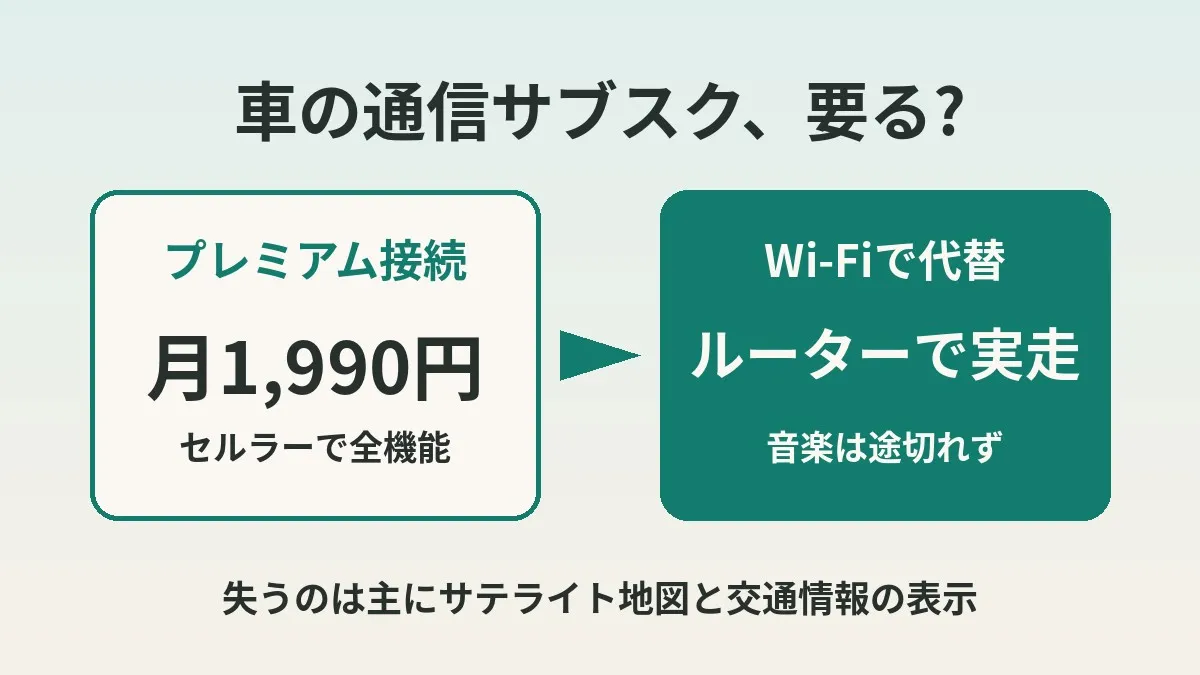
Premium lets you use all features over cellular as well as Wi-Fi. It covers data-hungry features like music and media streaming. The official page listed the price at ¥1,990 a month. I couldn’t find a yearly price on the Japanese page.
Standard vs. Premium
Here’s a table of the differences, as far as I could confirm on the official pages.
| Feature | Standard (free) | Premium (¥1,990/month) |
|---|---|---|
| Maps and navigation | Available | Available |
| Traffic-based routing | Available | Available |
| Satellite-view maps | Not included | Available |
| Live traffic visualization | Not included | Available |
| Music and media streaming | On Wi-Fi | Also over cellular |
| Video streaming and browser | On Wi-Fi | Also over cellular |
| Over-the-air software updates | Available | Available |
The English official page says traffic-based routing is available on Standard too. The same goes for Trip Planner and Supercharger availability.
On the other hand, satellite-view maps and live traffic visualization are described as “features added with Premium.” It’s safest to assume these don’t come back even on Wi-Fi.
I’d really only lose two things
The conclusion of my research was simpler than I expected. If I connect to Wi-Fi through a mobile router, I mainly lose two things.
The first is the satellite-view map, the aerial-photo style map display. The second is live traffic visualization, which overlays color-coded congestion on the map.
Put the other way, music streaming works over Wi-Fi. Video and the browser also seem to work in some cases via a hotspot, according to the English official page. Karaoke is in the English feature list, but I couldn’t find it on the Japanese page.
The official page says all vehicles can receive software updates wirelessly. Important safety-related updates are said to arrive over cellular too. So I don’t think there’s much risk of updates stopping if you cancel.
What the official pages couldn’t answer
One thing I was concerned about was remote control from the phone app, like turning on the climate control ahead of time or checking that the car is locked. I suspect a lot of people would be in trouble if that stopped working.
But the official connectivity page didn’t say anything explicit about it. I couldn’t confirm whether the app keeps working after you cancel. Honestly, the official information alone couldn’t answer it.
So I read owner blogs and owners’ club explainers. There were first-hand accounts saying remote control through the app still worked after the trial ended. In an owners’ club comparison, app remote control was also listed on the Standard side.
Still, that’s not stated officially. So I’m treating it as “owners report that it works.” After cancelling, I plan to check for myself.
What about Grok in the car?
The other thing on my mind was Grok, the in-car AI assistant. In my earlier post about starting to use Grok in my Tesla, I wrote that Premium Connectivity was required.
Looking into it again, Tesla’s English support page listed slightly different conditions: “Premium Connectivity or a Wi-Fi connection.” However, I couldn’t find the same wording on the Japan page.
So I think there’s a chance Grok stops working if you cancel on a car in Japan. It might work while connected to Wi-Fi, but I haven’t tried it yet. If you use Grok regularly, it’s worth checking before you cancel.
Setting Wi-Fi to stay connected while driving
Deciding based on research alone felt a bit risky. So I decided to test it by actually driving.
The key is the car’s Wi-Fi setting. The owner’s manual says to select “Stay connected while driving” after connecting to a hotspot. With this on, Wi-Fi seems less likely to drop once you start moving.
Here are the steps I tried.
- Turn on the mobile router and leave it in the car
- Open the Wi-Fi list on the car’s touchscreen
- Select the router’s network and connect
- Turn on “Stay connected while driving”
- Start driving with music streaming playing
The manual also says captive Wi-Fi isn’t supported. That means public Wi-Fi with a login screen won’t work. With a mobile router, I don’t think you need to worry about this.
What happened when I drove
What I checked was whether music streaming kept going without interruption while driving. The result: no problems.
Cancelling won’t get in the way of my everyday music. Finding that out was the biggest takeaway this time.
The router I used was one I already had. I didn’t buy a new one.
Will router costs cancel out the savings?
This part needs a little care. The router I had doesn’t cost anything extra. So the savings from cancelling stayed intact.
But if your router is pay-as-you-go, it’s a different story. Your data costs would go up by however much you use in the car, and the savings might just shift over to your data bill. The owner’s manual also notes that hotspots are subject to carrier fees and restrictions.
The same goes if you use phone tethering instead. On a plan with a data cap, even just music could add up. If you’re cancelling your car’s connectivity, I think it’s important to look at your phone and router costs side by side too.
Clicking this opens the Rakuten login page. Once you log in, you’ll see the campaign details.
Cancelling vs. keeping it
To help decide, I lined up the two options.
| Aspect | Cancel and use Wi-Fi | Keep Premium |
|---|---|---|
| Monthly cost | Possibly nothing extra, depending on router | ¥1,990/month |
| Music streaming | Works while connected to router | Works anywhere |
| Satellite-view maps | Not available | Available |
| Live traffic visualization | Not available | Available |
| App remote control | Works, according to owners | Available |
| Effort | Turning on and connecting the router | None |
For how our household uses the car, the two things we’d lose weren’t things we’d miss. Routing that avoids traffic is said to remain on Standard. If it’s just that the congestion isn’t color-coded on screen, I figured I could live with it.
I decided to cancel the last one too
In the end, I decided to cancel the remaining subscription too. That frees up ¥1,990 a month, or ¥23,880 a year.
I plan to cancel from the Tesla app before the end of the month. Here’s the flow described on the official page.
- Open the Tesla app
- Select “Upgrades”
- Under “Manage,” select “Premium Connectivity”
- Select “Cancel Subscription”
The official page says monthly fees aren’t prorated. It seems you can keep using it until the end of the current billing period even after cancelling. So you probably won’t lose out even if you don’t cancel right at the end of the month.
I’ll confirm on next month’s statement
Even after filing the cancellation, I don’t plan to mark it “done” right away.
I previously wrote about a subscription I thought I’d cancelled that kept charging me. Since then, I count something as done “on the day the charge didn’t come.” This time too, I’ll check next month’s card statement to see whether the charge is gone.
Once confirmed, I’ll change its status on my review sheet to “stop confirmed.” I’ve written about how I decide the review order in how to get started reviewing fixed costs.
Who this suits and who it doesn’t
I don’t think cancelling and relying on Wi-Fi is for everyone.
- Suits: people who rarely look at the satellite map or traffic display
- Suits: people who already have a router or Wi-Fi that costs nothing extra
- Doesn’t suit: people who often use Grok or the browser in the car
- Doesn’t suit: people who find it a hassle to power on and connect a router every time
- Doesn’t suit: people who only have a pay-as-you-go router
In particular, how much that extra step every time you get in the car bothers you varies from person to person. If you think of the monthly fee as paying to skip that hassle, keeping it is a perfectly reasonable choice.
Check before you cancel
- I can live without the satellite-view map and live traffic visualization
- My router or tethering is not pay-as-you-go
- I know where the Stay connected while driving setting is
- I decided whether I will use Grok in the car
- I checked whether I am on a free trial or a paid subscription
- I scheduled a check of my card statement on the first billing date after cancelling
FAQ
Q. How much does Premium Connectivity cost?
Tesla’s Japanese support page lists it at ¥1,990 a month. I couldn’t find a yearly plan. Prices can change, so please check the official page.
Q. Will I stop getting software updates if I cancel?
The official page says all vehicles can receive over-the-air software updates. Important safety-related updates seem to arrive over cellular too. However, a Wi-Fi connection is recommended for getting updates quickly and reliably.
Q. Can I still use the phone app for remote control after cancelling?
I couldn’t find anything explicit on the official connectivity page. Owners report that it still works after cancelling. If you’re concerned, the surest thing is to try it once after you cancel.
Q. Can I see the satellite map if I connect to Wi-Fi?
The official page describes satellite-view maps as a feature added with Premium. From my research, my understanding is that it doesn’t come back on Wi-Fi. Live traffic visualization seems to be treated the same way.
Q. Can I still use Grok in the car after cancelling?
The English official page lists Premium Connectivity or a Wi-Fi connection as the requirement. However, I couldn’t confirm this in official information for Japan. There’s a chance it stops working if you cancel, so if you use it, check beforehand to be safe.
Q. Can phone tethering work as a substitute?
The owner’s manual says mobile hotspots can be used, with a note that carrier fees and restrictions apply. Watch out for data caps and your phone’s battery drain.
Q. Do I lose out if I cancel mid-month?
The official page says monthly fees aren’t prorated. On the other hand, you can apparently keep using it until the end of the current billing period after cancelling. So you may not need to worry much about exactly when you cancel.
Official sources I referred to
- コネクティビティ(テスラ サポート 日本語)
- Connectivity(Tesla Support 英語版)
- Grok(Tesla Support 英語版)
- Wi-Fi(Model 3 オーナーズマニュアル 日本語)
Summary
Premium Connectivity turned out to be a subscription I could cancel with less inconvenience than I expected. On Wi-Fi, what you lose is mainly two things: the satellite map and the traffic display. Driving with a router, I also confirmed that music doesn’t cut out.
That said, if your router is pay-as-you-go, the savings might just move over to your data bill. And some things, like Grok and remote control, I couldn’t fully confirm from official sources. I’ve covered overall EV running costs in my post comparing EV and gas car running costs.
If you’re curious, why not try a drive with the router you already have?
Clicking this opens the Rakuten login page. Once you log in, you’ll see the campaign details.
This article contains affiliate advertising. If you sign up for a product or service through a link on this site, we may receive compensation from the partner company. The site operator is also an employee of Rakuten Group and may receive compensation through an employee referral program. The content and opinions here are based on the operator’s own experience and research regardless of any advertising relationship, but please read with the above in mind. See the Disclaimer & Affiliate Disclosure for details. Disclaimer & Affiliate Disclosure
This article includes machine-translated content. Please check the official Rakuten Mobile multilingual page for exact terms.
If you have concerns about Rakuten Mobile coverage or signal quality, you can consult through the official signal improvement request form .