- 01A correction to my previous post
- 02Why I assumed it was done
- 03What a memo, the holdings list, and the order history can tell you
- 04When is a switch reflected?
- 05Three moments to check after ordering
- 06The steps for checking
- 07What I did after noticing
- 08Until when can you cancel?
- 09I left the other funds alone this time
- 10I changed how I keep records
- 11Common mistakes and pitfalls
- 12What to check before you start
- 13Frequently asked questions
- 14Official sources I referred to
- 15Summary
Good morning, this is まさきん.
I found one thing I had failed to check in my iDeCo switching. In my previous post, I wrote that “I have already cleared out two funds, gold and domestic REITs.” But when I actually looked at the screen, the gold fund was still sitting there. This post is both a correction and a memo on how to check after you place a switching order.
Note: the information here is as of the time of publication. Please check the official sites for the latest terms.
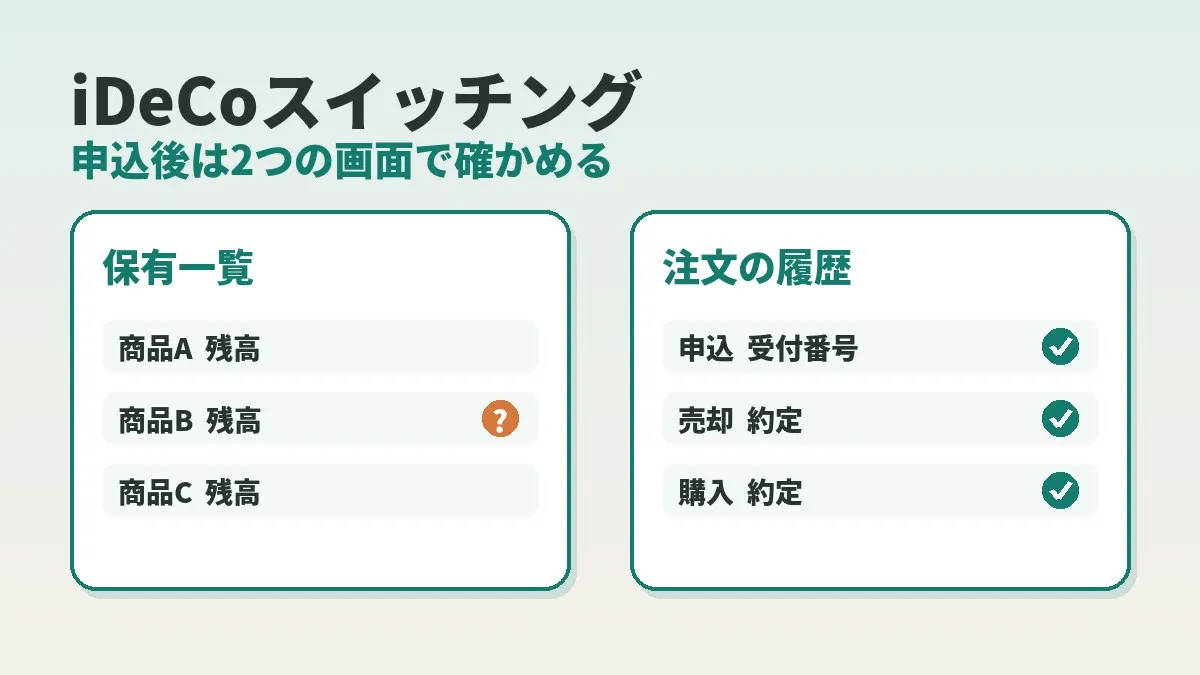
- To confirm an iDeCo switch, look at both your holdings list and your order history
- “Done” in a memo or report is not proof that you actually placed the order
- Nothing is reflected right away; the sale and the purchase execute on different days, and only then does your balance change
- The cancellation cutoff is 10:00 a.m. on a business day, and whether that means the same day or the next business day depends on when you placed the order
- Splitting your checks into three moments (right after ordering, the next business day, and after execution) makes it harder to miss something
A correction to my previous post
The correction first. In my October 4 post, I wrote that gold and domestic REITs had already been cleared out. For the gold fund, that was not correct.
The fund in question is the gold (currency-hedged) fund I hold in my Rakuten Securities iDeCo account. My own notes said “cleared out in September, zero holdings.” I wrote that into the post as it was.
When I opened the actual screen, the story was different. There was no September switching order in the history. The gold balance was still there, untouched.
In other words, I had stopped at “I thought I ordered it.” I gave inaccurate information to everyone who read that post. I am sorry.
Why I assumed it was done
The cause was simple. I judged it as done by looking only at the numbers in my summary notes. I never checked on the real screen.
A memo is something I wrote myself after the fact. Did I write down a plan, or a result? As time passes, even I can no longer tell the difference.
In work terms, it is like looking only at the dashboard numbers and never at the source data. Summaries are convenient, but they are not the original record. This time I skipped that step.
What a memo, the holdings list, and the order history can tell you
There are three things you can use to check. Each one tells you something different.
| What you look at | What it tells you | What it does not tell you |
|---|---|---|
| Your own memo or summary report | What you were thinking at the time | Whether the order was actually accepted |
| Holdings list (asset balance) | What you hold right now and how much | Whether an order is pending, or when things moved |
| The order inquiry / transaction history screen | Whether an order exists, its date, and whether it has executed | The full picture of your current balance |
My mistake was judging from the first row alone. The second and third rows are both real records. Still, there are situations where one of them is not enough.
Take the moment right after you order. Even if you look at the holdings list, the balance has not moved yet. Looking only there, you could easily think “the order did not go through.” On the other hand, the history alone does not tell you whether the balance has gone to zero.
So I look at both. Use the history to confirm “the order exists.” Use the holdings list to confirm “the balance has moved.” Those are the two steps.
Note that I could not confirm the official names of these screens on the public pages. In this post I call them the “holdings list” and “the order history screen.” Please check the actual labels on the screen after you log in.
When is a switch reflected?
“When is it reflected?” was something I wondered about too. The short answer is that it is not reflected on the day you order.
The sale and the purchase happen on different days. The Rakuten Securities procedures page says that because the sale date and the purchase date differ, it takes a set number of days for the switch to complete.
The official page did not say exactly how many business days. According to the JIS&T FAQ, you can check the execution date on screen when you place the order. It is shown on the screen where you select the fund to buy in the switch.
Laid out in order, the flow looks like this.
| Stage | What happens | How it looks in the holdings list |
|---|---|---|
| Order | You order the sale and the purchase as a set | The balance has not changed yet |
| Acceptance cutoff (10:00 a.m. on a business day) | That day’s accepted orders are finalized | The balance has not changed yet |
| Sale executes | The fund you are selling is sold | The balance of the sold fund goes down |
| Purchase executes | The new fund is bought with the sale proceeds | The balance of the new fund goes up |
I deliberately left out a column for the number of days. It varies with the combination of funds. The dates shown on screen are also for reference only, and apparently they can shift depending on market conditions.
Check the scheduled date on your own order screen. I think that is the most reliable way.
Three moments to check after ordering
Learning from this, I settled on three moments to check.
| Timing | Where to look | What to confirm |
|---|---|---|
| Right after ordering | The order completion screen | Whether a receipt number appeared, and when execution is scheduled |
| The next business day | The order history screen | Whether the order remains on record |
| After the scheduled execution date | Both the holdings list and the history | Whether the sold fund went to zero and the bought fund increased |
The first one is done on the spot. The second and third are easy to forget. So I decided to put them in my calendar.
Back in September, I did none of these three. If I had looked even once, I would have noticed.
The steps for checking
Here are the steps for actually checking, in numbered order.
- Log in to Rakuten Securities and open the defined contribution pension page
- In the holdings list, look at the balance of the fund you believe you cleared out
- If a balance remains, open the order history screen
- Look for a switching order in the relevant period
- If there is an order, check the scheduled execution date and its status
- If there is no order, conclude that you have not done the procedure yet
- Fix what your memo or report says so it matches the screen
I think doing both step 2 and step 4 is what matters. In my case, step 2 showed the balance was still there. Step 4 showed there was no September order, and the cause became clear.
Step 7 quietly helps too. If you do not fix the memo, you will make the same assumption the next time you look at it.
What I did after noticing
After I noticed, I went through the screens myself and placed the order again. That was in early October.
The order is a switch moving the full amount of the gold (currency-hedged) fund. The destination is the Rakuten Plus All Country Equity Index Fund (楽天・プラス・オールカントリー株式インデックス・ファンド).
This time I confirmed all the way to the receipt number appearing on the order completion screen. I wrote the number down too. That is the difference from September.
Execution is scheduled for a few business days after the order. As I write this, it has not executed yet. After execution, I plan to check once more whether the holding has gone to zero.
This is a move from gold to equities
One note to add. Gold and global equities are completely different things. I did not consolidate into a fund that plays the same role.
The comparison of management costs (including trust fees) is in the table in my previous post. There is a difference in cost. But the way the price moves changes as well. This is my own asset allocation decision, not a recommendation of any particular fund. Trust fees can change, so please check the latest figures on the fund pages.
Until when can you cancel?
I imagine there are times when you realize “that was wrong after all” once you have ordered. I rechecked the cancellation rules in the JIS&T FAQ. It says that a switch can be cancelled as long as it is before the cutoff time.
| Time of order | Cancellation deadline |
|---|---|
| Up to 10:00 a.m. on a business day | Until 10:00 a.m. that same day |
| From 10:00 a.m. onward on a business day | Until 10:00 a.m. the next business day |
Once the cutoff passes, you cannot cancel.
So the check right after ordering is something you want to do before the cancellation cutoff. If you are going to catch a mistake in the order, that window is your last chance.
If you order at night, the cutoff is 10:00 a.m. the next business day. Will you have time in the morning to look it over again? Thinking about that before you order may save you from scrambling.
I left the other funds alone this time
The gold fund is the only one I moved this time. I left US equities, global equities, and foreign REITs as they are.
Whether to move those is a decision for another day. The thinking is as I wrote in the previous post: decide the asset allocation first, then choose the funds.
Part of the reason I am not rushing is this very lesson. First see one case through to the end. I intend to watch it through execution and the balance before moving on to the next.
In the sense of leaving something alone on an assumption, fixed costs are similar. A phone bill you think you “already reviewed” can turn out to be on the same old plan once you open the statement.
Clicking this opens the Rakuten login page. Once you log in, you’ll see the campaign details.
I changed how I keep records
To keep this from happening again, I decided to change how I write my notes. Three things change.
- Use different words for “planned,” “ordered,” and “executed”
- Write “ordered” only when I have noted the receipt number
- Put the scheduled execution date in my calendar
Until now it was just the one phrase, “cleared out.” That phrase can be read as any of those stages. Simply splitting it into three stages should remove a lot of the ambiguity.
What I took away is that it helps to decide in advance what it takes to write “done.” A receipt number means ordered. Seeing zero in the holdings list means executed. When the conditions are tied to a screen, assumptions have a harder time creeping in.
I will not write the receipt number itself here. I keep it in notes that nobody else sees.
Common mistakes and pitfalls
Here are the points from this incident, plus things I noticed while looking into it.
- Trusting “done” in a memo and never opening the screen
- Getting as far as the confirmation screen and closing it without pressing the final button
- Seeing no change in the balance right after ordering and assuming it failed
- Looking only at the holdings list and not checking for pending orders
- Not noting the scheduled execution date, and losing track of when to check
- Finishing the switch but forgetting to change the contribution allocation
- Ordering without knowing the cancellation cutoff, assuming you can fix it later
The first one is my mistake. As for the second, I have not been able to tell whether that was what happened to me in September. But it does seem to happen, because the confirmation screen and the completion screen can look alike.
I wrote about the sixth one in the previous post as well. A switch does not change which funds your monthly contributions buy. Even if the balance goes to zero, your contributions may keep buying that fund.
What to check before you start
- I looked at the balance of the fund I believe I cleared out, in the holdings list
- I checked on the order history screen whether an order exists and on what date
- I worked out whether the word done in my memo means planned or actually ordered
- I noted the receipt number on the order completion screen
- I confirmed the scheduled execution date on the order screen and put it in my calendar
- I understand the cancellation cutoff of 10:00 a.m. on a business day
- I picked a day to look at the holdings list again after execution
- I checked that the sold fund is not still in my contribution allocation
Frequently asked questions
Q. How do I confirm that my iDeCo switch went through?
Look at both the holdings list and the order history screen. Use the history to confirm the order exists, and the holdings list to confirm the balance has moved. With only one of them, it is hard to tell a pending order from no order at all.
Q. When is a switch reflected?
Not on the day you order. The sale and the purchase execute on different days, and the balance changes after that. The exact number of days varies by fund, so check the scheduled execution date shown on the order screen.
Q. My balance has not changed right after ordering. Did it fail?
You cannot tell from that alone, because the balance stays as it was until the sale executes. I think the first thing to do is check on the order history screen whether the order was recorded.
Q. What should I do if the switch did not go through?
If there is no order in the history, the procedure most likely was never done. In that case you place the order again. That is what I did this time.
Q. Can a switch be cancelled?
Yes, up to the cutoff time. For orders placed up to 10:00 a.m. on a business day, it is until 10:00 a.m. that day. For orders placed from 10:00 a.m. onward, it is until 10:00 a.m. the next business day.
Q. What should I note down when ordering?
I now note the receipt number and the scheduled execution date. I also write down the names of the fund sold and the fund bought. They come in handy later when matching against the history.
Q. Where do I open the iDeCo screens at Rakuten Securities?
Log in to Rakuten Securities and open the defined contribution pension section. To order a switch, you go from the order menu to the option for replacing held funds. Partway through, you are taken to the JIS&T screens. If you do not have a securities account there, the guidance is to log in to the JIS&T site directly.
Q. Is there a fee if I redo it?
The JIS&T FAQ says there is no fee for the procedure itself, and that you can do it as many times as you like. However, depending on the fund, costs such as a redemption charge retained in the trust may apply.
Official sources I referred to
- Rakuten Securities iDeCo | Change procedures (switching and allocation settings)
- JIS&T | Frequently asked questions (switching)
- JIS&T | When are the sale and purchase executed in a switch?
Summary
An iDeCo switch can end at “I thought I ordered it.” That is what happened to me. “Cleared out” in my memo was not proof of an order.
There are two places to check: the holdings list and the order history screen. Note the receipt number right after ordering, and put the scheduled execution date in your calendar. That alone should be enough to avoid the same mistake.
My gold holding is now waiting for execution. After it executes, I will look once more to see whether it has gone to zero. I wrote about the lessons from my corporate DC days in my post looking back on switching in a corporate DC plan.
What I have written here is a record of my own checking. It is not a recommendation of any particular fund. Why not start by opening your holdings list once?
Checking “it should be done” against the actual screen works for communication costs too. Take a look at your current phone plan on the statement as well.
Clicking this opens the Rakuten login page. Once you log in, you’ll see the campaign details.
This article contains affiliate advertising. If you sign up for a product or service through a link on this site, we may receive compensation from the partner company. The site operator is also an employee of Rakuten Group and may receive compensation through an employee referral program. The content and opinions here are based on the operator’s own experience and research regardless of any advertising relationship, but please read with the above in mind. See the Disclaimer & Affiliate Disclosure for details. Disclaimer & Affiliate Disclosure
This article includes machine-translated content. Please check the official Rakuten Mobile multilingual page for exact terms.
If you have concerns about Rakuten Mobile coverage or signal quality, you can consult through the official signal improvement request form .